Hi @gamingwithchris
It's looking like a problem with the OLED/LCD display in the camera.
Here's the ifixit Vervanging van de OLED/LCD-module van de Sony Cyber-shot DSC-TX100V guide that shows how to replace it.
There are a few suppliers found online when searching for Sony Cyber-shot DSC-TX100V LCD replacement part
There's no part number shown for it in the service manual parts list
Perhaps there's a part number on the back of the screen that you can use to search for more suppliers.
@gamingwithchris
Yeah, I found that website also and searched through all the parts but none of the descriptions seemed applicable to the screen.
Wasn't really surprised as it's not listed in the service manual parts list either.
The only reference to it is that it is designated as component EL901 and is comprised of an LCD screen, a touchscreen and a backlight circuit.
As I suggested, check if there's a part number on the back of the display or on the flex cable coming out of the display and search online for Sony (insert part number) and hope that there's more suppliers than just the two that I found (AliExpress,and Ebay)
Here's an image from the manual showing the relevant part of the schematic with the display module.
(click on image)


 1
1 

 423
423  1,6k
1,6k 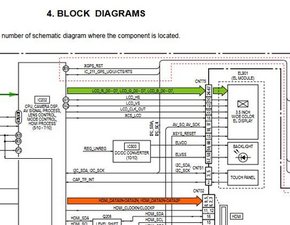

4 opmerkingen
Hi @gamingwithchris
Is the line showing up in pictures taken by the camera and then they're downloaded and viewed on a TV. monitor etc?
door jayeff
Hi! It’s a line around the middle of the screen. It’s not in the pictures I would say, it’s on the whole screen no matter what mode I put it in. I haven’t tried to download it onto another device but as of right now it goes from the top of the display to the bottom. And when I try to change the brightness of the screen, it doesn’t affect the white line, it stays very bright while the screen does not
door Gaming With Chris
@gamingwithchris
You need to verify and not guess whether it is just seen in the camera screen or if there's also a line seen in pictures taken by the camera, downloaded and viewed on a different screen
If it is in the LCD screen in the camera only then most likely it is the screen that it the problem and it can be replaced.
if it is in pictures also then it may be a motherboard problem, a lens problem or both.
Post an image showing the line in the screen here's how on ifixit Voeg afbeeldingen toe aan een bestaande vraag
door jayeff
@jayeff I have added the image, and I also verified that is just on the camera screen, I viewed the pictures on my computer and they are perfectly fine.
door Gaming With Chris