Deze vertaling is door een computer gegenereerd en is nog niet door iemand nagekeken. Spreek je deze taal? Bekijk het hier.
Inleiding
Verwijder het achterpaneel voor toegang tot de onderdelen in je iPhone 4.
Wat je nodig hebt
Video overzicht
-
-
-
Schakel je iPhone uit voordat je begint met het demonteren.
-
Het achterpaneel van je iPhone 4 kan vastzitten met twee #000 kruiskopschroeven of Apple's 5-puntige "Pentalobe"-schroeven (tweede afbeelding). Controleer welke schroeven je hebt en zorg dat je ook de juiste schroevendraaier hebt om ze te verwijderen.
-
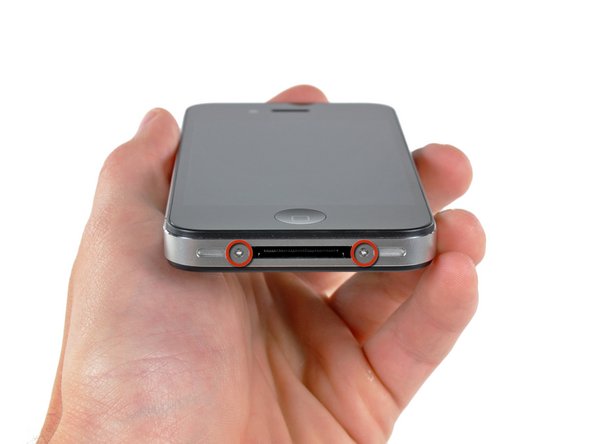
Verwijder de twee 3,6 mm Pentalobe- of kruiskopschroeven naast de dock connector.
 Vraag FixBot
-
-
-
-
Knijp met je vingers in het achterpaneel en til het van de iPhone af. Gebruik eventueel een kleine zuignap.
-
-


Volg deze instructies in omgekeerde volgorde om je apparaat weer in elkaar te zetten.
Annuleren: ik heb deze handleiding niet afgemaakt.
812 andere personen hebben deze handleiding voltooid.
Bijgevoegde documenten

9Gids Commentaar
The replacement part for the iPhone 4 rear panel has two thin, clear overlays on the inside surface--a larger one that runs the full length, and a small one that only covers the lens. These should be removed prior to installation. Also, the first rear panel replacement I got from iFixit was not an exact fit and would not easily "click" into place. They replaced it for free and the second one clicked right in.
On step 3 when replacing the back panel with a new one, they aren't kidding about removing ALL the protective slips. There's THREE of them.
1), the obvious back slip that protects the new back.
2). the one inside the back protecting the side with the camera lens
3). the little square one OVER the lens itself.
First time I tried to reinstall my back, that tiny little square over the lens prohibited my ability to actually get the back on completely. My husband jammed it for me, but the screws still wouldn't take. It's amazing that these things are so precise that the tiny little film on the lens would make it that much tighter.
Anyways, hope that helps somebody. :)
Easiest repair I've ever done. Thanks y'all!
