Ga door naar hoofdinhoud
Word lid van de reparatiegemeenschap - Account aanmaken

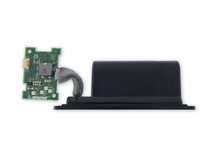
Bose SoundLink Mini II Audio Port/USB Replacement

Wat je nodig hebt

    1. Bose SoundLink Mini II Audio Port/USB Replacement, Battery: stap 1, afbeelding 1 van 2 Bose SoundLink Mini II Audio Port/USB Replacement, Battery: stap 1, afbeelding 2 van 2
      • Flip the speaker over onto its back.

      Vraag FixBot
      Voeg opmerking toe

    2. Bose SoundLink Mini II Audio Port/USB Replacement, Remove the rubber base: stap 2, afbeelding 1 van 2 Bose SoundLink Mini II Audio Port/USB Replacement, Remove the rubber base: stap 2, afbeelding 2 van 2
      • Gently remove the rubber base from speaker by pulling around the edges.

      Vraag FixBot
      Voeg opmerking toe

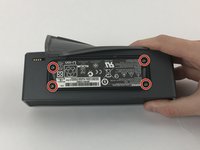
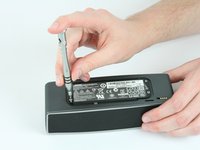
    3. Bose SoundLink Mini II Audio Port/USB Replacement: stap 3, afbeelding 1 van 2 Bose SoundLink Mini II Audio Port/USB Replacement: stap 3, afbeelding 2 van 2
      • Remove the four 6mm T9 Torx bit screws from the corners of the battery.

      Vraag FixBot

      Voeg opmerking toe

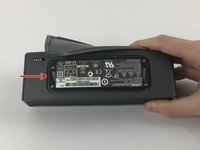
    4. Bose SoundLink Mini II Audio Port/USB Replacement: stap 4, afbeelding 1 van 3 Bose SoundLink Mini II Audio Port/USB Replacement: stap 4, afbeelding 2 van 3 Bose SoundLink Mini II Audio Port/USB Replacement: stap 4, afbeelding 3 van 3
      • Carefully lift the battery from the side nearest the four gold contact pins, but don't try to fully remove it yet.

      • At this point, the battery remains connected via four wires to the power supply board.

      • Carefully desolder the four wires from the power supply board in order to completely detach the battery. There is very little room for the soldering iron without damaging the case or the board; you may want to remove the board first.

      • For help with soldering, see the soldering guide.

      • Alternatively, you may remove the battery and power supply board together, without any soldering, but access requires some additional disassembly while carefully leaving the battery connected via the wires the entire time.

      Vraag FixBot

      Voeg opmerking toe

    5. Bose SoundLink Mini II Audio Port/USB Replacement, Bose Technicians' Instruction Manual: stap 5, afbeelding 1 van 1
      Vraag FixBot

      Voeg opmerking toe

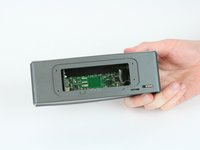
    1. Bose SoundLink Mini II Audio Port/USB Replacement, Audio Port/USB Circuit Board: stap 6, afbeelding 1 van 1
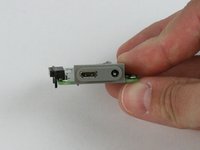
      • With the battery removed the button board will now be visible.

      Vraag FixBot

      Voeg opmerking toe

    2. Bose SoundLink Mini II Audio Port/USB Replacement: stap 7, afbeelding 1 van 3 Bose SoundLink Mini II Audio Port/USB Replacement: stap 7, afbeelding 2 van 3 Bose SoundLink Mini II Audio Port/USB Replacement: stap 7, afbeelding 3 van 3
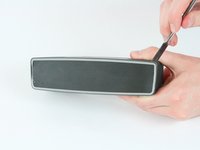
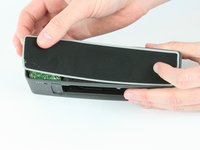
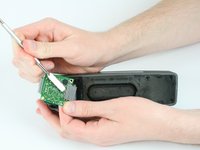
      • Remove the rear grille using the metal spudger.

      • The grille bends and deforms easily.

      Vraag FixBot

      Voeg opmerking toe

    3. Bose SoundLink Mini II Audio Port/USB Replacement: stap 8, afbeelding 1 van 3 Bose SoundLink Mini II Audio Port/USB Replacement: stap 8, afbeelding 2 van 3 Bose SoundLink Mini II Audio Port/USB Replacement: stap 8, afbeelding 3 van 3
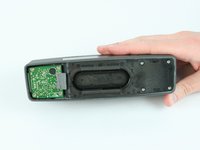
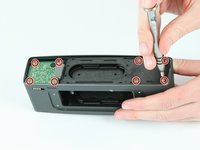
      • Remove the eight 9mm T9 Torx screws from the circuit board and back panel.

      • Use a metal spudger to release the ribbon cable connector and remove cable from the audio/USB board.

      Vraag FixBot

      Voeg opmerking toe

Conclusie

To reassemble your device, follow these instructions in reverse order.

Annuleren: ik heb deze handleiding niet afgemaakt.

14 andere personen hebben deze handleiding voltooid.

Devon

Lid sinds: 02/15/17

545 Reputatie

2 handleidingen geschreven

Team

USF Tampa, Team 5-2, Passmore Spring 2017 Lid van USF Tampa, Team 5-2, Passmore Spring 2017

USFT-PASSMORE-S17S5G2

4 Leden

23 handleidingen geschreven

1Gids Commentaar

Where did you get the replacement part?

Viesturs Rauza - Antwoord Deel

Voeg opmerking toe

Weergavestatistieken:

Afgelopen 24 uren: 4

Afgelopen 7 dagen: 36

Afgelopen 30 dagen: 172

Altijd: 23,885