Ga door naar hoofdinhoud
Word lid van de reparatiegemeenschap - Account aanmaken

Asus ROG G20CB CPU Replacement

Wat je nodig hebt

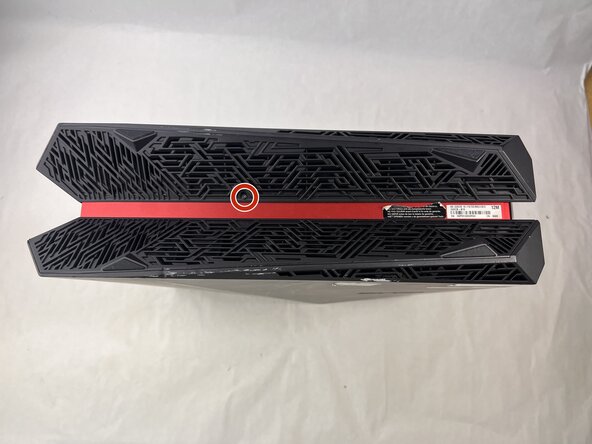
  1. Asus ROG G20CB CPU Replacement, Fan: stap 1, afbeelding 1 van 2 Asus ROG G20CB CPU Replacement, Fan: stap 1, afbeelding 2 van 2
    • Remove each of the two 4.6 mm Phillips screws on the top and bottom of the tower.

    Vraag FixBot

    Voeg opmerking toe

  2. Asus ROG G20CB CPU Replacement: stap 2, afbeelding 1 van 1
    • Slide the front panel to the left and lift gently.

    • There is a cable connecting the panel to the computer. Handle it gently and avoid straining the connected panel.

    Vraag FixBot

    Voeg opmerking toe

  3. Asus ROG G20CB CPU Replacement: stap 3, afbeelding 1 van 1
    • Disconnect the cable carefully by pulling gently on both sides of the connector.

    Vraag FixBot

    Voeg opmerking toe

  4. Asus ROG G20CB CPU Replacement: stap 4, afbeelding 1 van 1
    • Remove the five 4.6 mm Phillips screws holding down the fan tray and then pull the fan tray out of the system.

    • The fans are connected by a thin cable, be gentle when removing tray.

    Vraag FixBot

    Voeg opmerking toe

  5. Asus ROG G20CB CPU Replacement: stap 5, afbeelding 1 van 1
    • Carefully unplug the two fan cables from the motherboard by pulling straight up from the base of the connector.

    Vraag FixBot

    Voeg opmerking toe

  6. Asus ROG G20CB CPU Replacement: stap 6, afbeelding 1 van 1
    • Remove the six 4.6 mm Phillips screws connecting the fans to the fan tray.

    Vraag FixBot

    Voeg opmerking toe

  7. Asus ROG G20CB CPU Replacement, CPU Cooler: stap 7, afbeelding 1 van 1
    • Remove the 4.6 mm Phillips screw that secures the optical drive.

    Vraag FixBot

    Voeg opmerking toe

  8. Asus ROG G20CB CPU Replacement: stap 8, afbeelding 1 van 1
    • Push the optical drive out of the chassis.

    Vraag FixBot

    Voeg opmerking toe

  9. Asus ROG G20CB CPU Replacement: stap 9, afbeelding 1 van 1
    • Pull back the tape on the heat sink and use a long-neck Phillips screwdriver to remove the four screws securing the heat sink.

    • There is a number next to each screw, when taking the cooler off, loosen in descending order (4-3-2-1). When installing a cooler, tighten in ascending order.

    Vraag FixBot

    Voeg opmerking toe

  10. Asus ROG G20CB CPU Replacement: stap 10, afbeelding 1 van 1
    • Remove the 4.6 mm Phillips screw from the heatsink at the top of the case.

    • Lift the CPU cooler out of the system.

    • Be sure to apply fresh thermal paste before reinstalling a cooler.

    Vraag FixBot

    Voeg opmerking toe

  11. Asus ROG G20CB CPU Replacement, CPU: stap 11, afbeelding 1 van 1
    • Locate the CPU socket retention arm next to the processor.

    • Push the arm down and out, then lift it upward to release the CPU cover.

    Vraag FixBot

    Voeg opmerking toe

  12. Asus ROG G20CB CPU Replacement: stap 12, afbeelding 1 van 1
    • Gently lift the CPU straight out of the socket.

    • Handle the CPU by its edges. Do not touch the bottom pins or contacts to avoid damage.

    Vraag FixBot

    Voeg opmerking toe

  13. Asus ROG G20CB CPU Replacement: stap 13, afbeelding 1 van 1
    • Reassembly tip: When installing a new CPU make sure to align the gold triangle with the white circle on the motherboard.

    Vraag FixBot

    Voeg opmerking toe

Conclusie

To reassemble your device, follow the above steps in reverse order.
Take your e-waste to an R2 or e-Stewards certified recycler.
Repair didn’t go as planned? Try some basic troubleshooting or ask our Answers community for help.

Annuleren: ik heb deze handleiding niet afgemaakt.

Één andere persoon heeft deze handleiding voltooid.

Kimber-Starr

Lid sinds: 03/21/25

361 Reputatie

3 handleidingen geschreven

Team

UMass Dartmouth, Team 3-3, Botvin Spring 2025 Lid van UMass Dartmouth, Team 3-3, Botvin Spring 2025

UMASSD-BOTVIN-S25S3G3

3 Leden

5 handleidingen geschreven

0Gids Commentaar

Voeg opmerking toe

Weergavestatistieken:

Afgelopen 24 uren: 2

Afgelopen 7 dagen: 9

Afgelopen 30 dagen: 38

Altijd: 472