
Ga door naar hoofdinhoud
Word lid van de reparatiegemeenschap - Account aanmaken

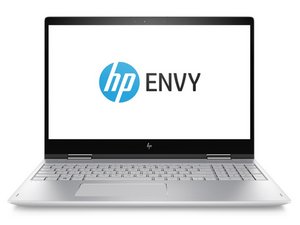
De HP Envy x360 is een serie laptops die sinds 2014 door het bedrijf wordt geproduceerd. Ze zijn voorzien van een aanraakscherm en een volledig draaibaar scherm.

Replace the CMOS battery

The laptop isn't charging. I've been told the CMOS battery may need to be replaced but I can't find it on the mother board. Is this one of the cases where the CMOS is replaced by the main battery?

Beantwoord deze vraag Dit probleem heb ik ook

Is dit een goede vraag?

Score 0
Voeg een opmerking toe

3 Antwoorden

Hi.

Regarding the cmos battery, according to this HP Support post this laptop does indeed not have a cmos battery.

Regarding that the laptop is not charging. This can be caused by multiple failures. Have you ever gotten the laptop wet, or spilled liquid on it?

If the laptop is not charging above e.g. 80%, then it may be a software issue. A lot of laptops has battery settings that prevents the laptop from charging to 100% in order to preserve battery health. If this is the case, please check you HP software for battery settings.

If you cannot charge the laptop at all, please check that:

  1. The charger is working with another device. This is to determine whether the charger or the laptop is faulty.
    • Do also check that the charging port / connector is clean and free from debris. And that there is no visual faults, like burns or corrosion.
    • Do note, that if a battery is very ''''discharged you may need to leave the unit charging for a long time.
  2. Perform a hard reset on your laptop. This involves turning it off, disconnecting the charger, and holding the power button for 15-20 seconds.
  3. If you have access to the BIOS (and have any battery power left). Then restore BIOS to default settings. See these instructions from the laptop manual on how to factory restore BIOS settings.
  4. By this point it is most likely to be a hardware failure. Open up your laptop (follow these instructions to remove the bottom cover). Remove power cable before opening the computer (and all other attached cables too for that matter)!
    1. You can visually scan if you see any burned, scorched or corroded components or if the battery looks swollen. Then those components may be at fault and likely needs replacing.
    2. If all looks good, you may use a multi-meter to check the battery voltage and amperage (voltage and amperage is stated on the battery) by the internal battery connector.
      • Note that the voltage and amperage may be low if the battery is discharged.
      • If these voltage or amperage values seem off, then it is likely that the battery has gone bad. (If values looks good, then it does not rule out a bad battery!)
    3. If no faults are found, then I cannot determine what the cause is. It is not unlikely that the battery is faulty, but I cannot guarantee that either.
    4. If the battery is faulty you have to replace the battery, see battery replacement instructions here.

Was dit antwoord nuttig?

Score 0

1 Opmerking:

Here is also a general HP Laptop Not Charging guide

door

Voeg een opmerking toe

Ça ne charge plus et s’allume plus maintenant

Was dit antwoord nuttig?

Score 0
Voeg een opmerking toe

I am having a CMOS error message at startup, which I assume means that I need to replace the CMOS battery. When trying to research this online, I saw that some laptops use the main battery as a CMOS battery so I wonder if mine has one or not. And have been unable to find information in the manual about it. Can anyone tell me if it does have it and how to get at it

Was dit antwoord nuttig?

Score 0
Voeg een opmerking toe

Voeg je antwoord toe

Red zal eeuwig dankbaar zijn.
Weergavestatistieken:

Afgelopen 24 uren: 7

Afgelopen 7 dagen: 42

Afgelopen 30 dagen: 154

Altijd: 1,076