
Ga door naar hoofdinhoud
Word lid van de reparatiegemeenschap - Account aanmaken

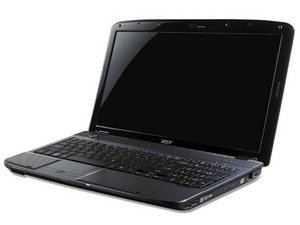
Laptop not turning on

The orange charging indicator appears when I plug it in, when I hold power a blue light appears near orange light but doesnt turn on display.

Update (12/12/25)

Acer Aspire 1 A111-31-C56Q

I have unplugged battery and plugged back in, tried for ages to restart it by holding power button. Also forgot to mention it only lights up while charging, as soon as I unplug charger, zero lights show up. But when the battery is unplugged the charging indicator goes away so at least its able to detect the battery

Beantwoord deze vraag Dit probleem heb ik ook

Is dit een goede vraag?

Score 0
1 Opmerking

@mrbaileyspalmer we will need to know the exact model number for your computer. What have you already checked to fix this?

door

Voeg een opmerking toe

1 Antwoord

Het nuttigste antwoord

If the battery is internal, the BIOS relies on it to function correctly during the startup process. If the battery is faulty or dead, the BIOS may fail to initialize, which results in the screen not turning on.

you should also check the RAM. A faulty or poorly seated RAM stick will also prevent the display from working. I recommend the following steps:

  1. Reseat the RAM: Remove the RAM stick, clean the gold contacts with a soft eraser or isopropyl alcohol, and plug it back.
  2. Test the RAM: If you have two slots, try testing one RAM stick at a time.

​Only after confirming that the battery and RAM are in good working condition should you move on to troubleshooting the Display/LCD panel itself."

According to the current symptoms, it is highly recommand that your battery is dead. Repair your battery first.

Was dit antwoord nuttig?

Score 1

2 opmerkingen:

Does the Cmos battery affect anything

door

The CMOS battery does not affect everything.Its primary role is to provide power so that the BIOS setup/settings can be stored and retrieved.

​If the CMOS battery is missing or weak, the BIOS will be unable to read or save your custom configuration.

A weak CMOS battery can cause a Checksum Error. When the BIOS detects that the CMOS data is corrupted or missing, it may halt the startup process as a safety measure. This prevents the computer from completing the POST process, leaving you with a blue power light but no display initialization.

door

Voeg een opmerking toe

Voeg je antwoord toe

MR BAILEY S PALMER zal eeuwig dankbaar zijn.
Weergavestatistieken:

Afgelopen 24 uren: 0

Afgelopen 7 dagen: 2

Afgelopen 30 dagen: 12

Altijd: 68