Ga door naar hoofdinhoud
Word lid van de reparatiegemeenschap - Account aanmaken

Ethernet doesn´t work

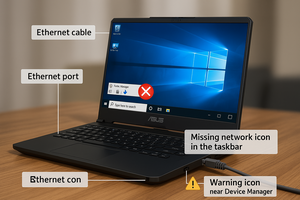
I Plug my ethernet cable to laptop and it doesnt show the ethernet icon, so it doesnt work

Beantwoord deze vraag Dit probleem heb ik ook

Is dit een goede vraag?

Score 1

1 Opmerking:

Hi! What does device manager tells you on the laptop? Any question or exclamation marks? Is the ethernet driver up to date? Did you tried a new re-install?

door

Voeg een opmerking toe

1 Antwoord

=== ***Quick Troubleshooting Steps

Afbeelding
  • ===
  • Check Ethernet Cable & Port:
    • Test the cable on another device.
    • Inspect laptop port for dust or bent pins.
  • Update/Reinstall Network Drivers:
    • Go to Device Manager → Network Adapters.
    • If you see Realtek Ethernet Controller, right-click → Update Driver.
    • If missing, go to Asus support site and install latest LAN driver for your model.
  • Enable Ethernet Adapter:
    • Control Panel → Network & Sharing → Change Adapter Settings.
    • Right-click Ethernet → Enable (if disabled).
  • Check BIOS Settings:
    • Restart and enter BIOS (usually F2 or DEL).
    • Ensure LAN Controller is enabled.
  • Try Different Port or Router:
    • Rule out router issues by connecting to another port or router.
  • Hardware Fault (if all fails):
    • If Ethernet still doesn’t work, the port might be physically damaged—consider using a USB to Ethernet adapter as a workaround.

Was dit antwoord nuttig?

Score 0
Voeg een opmerking toe

Voeg je antwoord toe

Gaming Brothers zal eeuwig dankbaar zijn.
Weergavestatistieken:

Afgelopen 24 uren: 2

Afgelopen 7 dagen: 12

Afgelopen 30 dagen: 46

Altijd: 406