Ga door naar hoofdinhoud
Word lid van de reparatiegemeenschap - Account aanmaken

How to bypass error code?

Block Image
Block Image

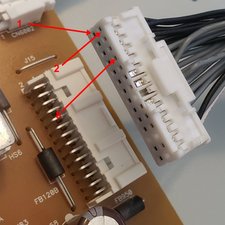
Which pin do I disconnect and ground to bypass six red blinking lights? Board number APDP-209A1 (Brown board). On the board there is the word "Secondary" with an arrow pointing; (CN6401-8) BL_ERR.

I assume this is the pin I want to disconnect and ground. Do I count from the top? Does secondary mean it's on the bottom and not the top of the plug since there are two wires for each position?

I removed the eighth pin counting from the top down on the upper row and it prevented my TV from powering on.

Beantwoord! Bekijk het antwoord Dit probleem heb ik ook

Is dit een goede vraag?

Score 2
1 Opmerking

KX-557000E pin 8 all worked well no dark spots but now have the two main boards as spares !!!!!!

door

Voeg een opmerking toe

2 Antwoorden

Gekozen oplossing

@erlonbailey remember that disabling the error code signal is not a repair. It may, or may not turn on and it may, or may not fail completely.

Block Image

Was dit antwoord nuttig?

Score 2

20 opmerkingen:

Thanks! I figured it out by continuing to test each possible connection. You are exactly right, it was the fourth black wire down from the top on the upper side of the connector. The TV is working great now and has not shut off yet. Fingers crossed! One thing I noticed after getting the TV to work is very small area in the lower right portion of the screen that is slightly darker. Further, I was able to get into settings menu now and turn down the brightness level in hopes of preserving the TV as long as possible.

door

@erlonbailey AWESOME! I bet this"very small area in the lower right portion" is a bad LED :-) Crazy right? One itty, bitty LED and BOOM, disabled. I wonder how many people, that do not come here for help, end up buying new. What a waste of resources and hard earned money!

Welcome to iFixit!

REPAIR IS WAR ON ENTROPY!

door

The #8 wire plug is easily removed from the harness by carefully prying up its tiny anchor tab. It can then be re-inserted in hole #24 which is a ground. Works like a charm! I adjusted the brightness down to 50% as some others have suggested -- I also see a couple of dimmer spots along the bottom edge of the display. I have ordered LED backlight strips from ebay (supposed to be compatible) for under 30 bucks. This YT video shows how their replacement is done on the XBR-55X800E: https://www.youtube.com/watch?v=0RKf8Hio... I'll have to work up the courage to DIY.

Thank you for this Q and A -- I'm so glad I was able to find it!!

door

@mikeroesler hope it works out for you. Only word of caution is about the LED strips. I have not been impressed with the ones I got of eBay. They were inexpensive but have had a difference in brightness. It may just have been that particular seller but it got me to stay away from ebay. Hopfully yours is a good experience. Let us know how it all turns out.

door

I have same problem with my tv 55x800e. I removed error pin #8 from power supply jack. But my bad luck it won’t turns on. Can you please help me?

door

15 commentaren meer tonen

Voeg een opmerking toe
Block Image

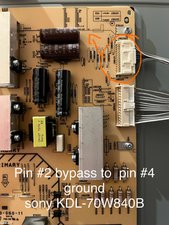
Pin #2 pulled out and moved to slot #4 ground. The YT video provides the explanation. This was our setup not exactly as the video.

From this YT solution as a reference https://youtu.be/T3VRvQUB_DQ?si=jXIjIRpj...

we temporarily fix the 4 flashing red light for sony KDL-70W840B. We'll just wait until the TV gives out. For now it works.

followed the BL_ERR as per yt video, our tv is a different model.

Thought to share this temporary fix for this particular sony model. Hope this helps.

Was dit antwoord nuttig?

Score 1

1 Opmerking:

Used the same theory on my set(65XE7002 UKA).

Took the BL_ERR pin from 8 to 24 earth pin and all now good.

Put back together and powered on and there are no dark spots anywhere.

Thanks so much for the advice.

door

Voeg een opmerking toe

Voeg je antwoord toe

Erlon Bailey zal eeuwig dankbaar zijn.
Weergavestatistieken:

Afgelopen 24 uren: 6

Afgelopen 7 dagen: 73

Afgelopen 30 dagen: 441

Altijd: 3,819