Ga door naar hoofdinhoud

Repair and disassembly information for Google's Pixel 8 smartphone, released in October 2023. Identified by model numbers G9BQD, GA04851-US, GKWS6, GPJ41, and GZPFO.

Proximity sensor not working after replacing screen

After I bought a genuine screen replacement from here ,I installed just as described by the video,after doing so I realized my proximity sensor wasn't working and my adaptive brightness was no longer adapting

Beantwoord! Bekijk het antwoord Dit probleem heb ik ook

Is dit een goede vraag?

Score 6
1 Opmerking

Could it be that I was supposed to remove one of those black stickers at the back of the genuine part?

door

Voeg een opmerking toe

2 Antwoorden

Gekozen oplossing

Hi Jayson,

I think you're right about removing that black sticker. Don't feel bad, I doubt I'd have thought to remove it myself since it doesn't at first glance look like just a protective sheet. Here's my reasoning for agreeing with you.

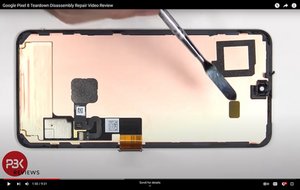
First of all, I had to do some digging to figure out just exactly where the proximity sensor is on your phone. I found a teardown video that shows the guy pointing to exactly where it peeks through the display. Here's a screenshot from the video here.

Google Pixel 8 Teardown Disassembly Repair Video Review - YouTube

Block Image

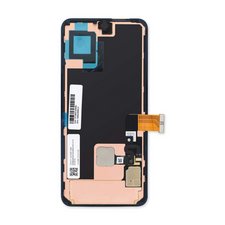
The pry tool is pointing to the viewport for the proximity sensor. Here's what the replacement screen looks like out of the box.

Block Image

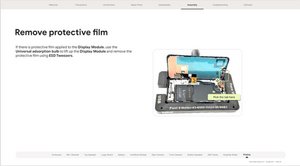
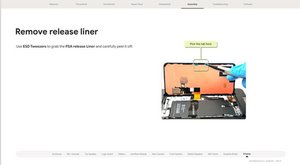
So yeah, it looks to me that the large black sticker is covering the proximity sensor viewport, rendering it unusable. Unfortunately it looks like you're going to have to open it back up again to take that stupid sticker off. Here's the part of their guide showing when you assemble the display to the phone.

Block Image
Block Image

Sorry you had to learn that the hard way, dang it. I'd suggest preordering some more display adhesive before you open it back up.

Hopefully that's all it'll take to get you going again! Let us know how it turns out.

Was dit antwoord nuttig?

Score 2

6 opmerkingen:

Don't know if its my luck, in an attempt to remove the screen to get rid of the black sticker, I ended up frying the screen, now I'm doomed, and don't know how to get a new screen, ifixit should have really added that part to their repair video

door

@jaysonparker Well, the iFixit screens do have a lifetime warranty. I don't know exactly how they would handle your situation but at this point it can't hurt to contact them and explain the situation. I can't speak for them but in my experience they have worked hard to make sure their customers are happy, so maybe there's something they can do to help. Best way would be to email them at support@ifixit.com; you can always point them to this post to explain the situation.

door

Okay thank you

door

Do i need to buy a now adhesive for the screen if I reopen the phone and remove what needs to be?

I guess this is also what affects the front camera (black screen)

door

@jh9wlvzrtj0fs3z Yes, that could indeed affect the front camera just like the proximity sensor. If you want to be absolutely safe, then yes, you should replace the adhesive every time you open the phone. However, that being said, I have done this very thing where I found out I had to reopen a phone I had just sealed. The screen came off fairly easily and the adhesive seemed to be intact, so in that case I did not replace it and it seems to have worked out fine. It really depends on how well it comes off; if it looks like it's still in good shape I'd be tempted to leave well enough alone, but if it gets tangled and/or torn then you should replace it.

door

1 commentaar meer tonen

Voeg een opmerking toe

same problem with the pixel 7a screen

this step is not explicitly shown...

Was dit antwoord nuttig?

Score 1

1 Opmerking:

Had the exact same issue. Just ordered my new adhesive so I can crack this puppy open again.

door

Voeg een opmerking toe

Voeg je antwoord toe

jayson parker zal eeuwig dankbaar zijn.
Weergavestatistieken:

Afgelopen 24 uren: 5

Afgelopen 7 dagen: 47

Afgelopen 30 dagen: 191

Altijd: 3,173