
Ga door naar hoofdinhoud
Sluit je aan bij de reparatiegemeenschap! Maak een account aan

De 15" MacBook Pro (model A1990) werd uitgebracht in juli 2018 en is voorzien van een 15,4-inch led-display met achtergrondverlichting en True Tone-technologie, TouchID en maximaal een 6-core i9-processor.

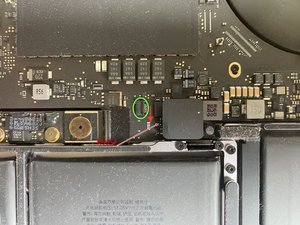
Ripped battery connector from logic board

Hey there,

Unfortunately, I ripped the tiny battery connector from the logic board, while trying to take out the battery (picture attached). Is there any way to repair that or do I need to replace the logic board?

Afbeelding

Update (06/19/23)

Here’s another picture attached. The object (plug?) in the green circle would needed to be placed where the red arrow is pointing to. While trying to take off the cable i ripped it of the logic board.

Afbeelding
Beantwoord! Bekijk het antwoord Dit probleem heb ik ook

Is dit een goede vraag?

Score 1
2 opmerkingen

Have you repaired this?

door Deel

@sivanatarajan - Depending on what happened!

Some people break the connector often snapping out the ZIF connectors compression latch so you either need to find it on one's desk or floor to put it back or you need to buy a replacement connector to snap it out and snap it into your boards connector.

Some destroy the connector in the process of getting the ribbon out not realizing this is a ZIF connector needing a full replacement of the connector.

Then some damage the cable over bending it or mangle the contact area so when the ribbon is inserted into the connector it doesn't offer a good contact when the compression latch presses it into the connectors contacts requiring a new cable.

Then the act of prying the connector damages the PCB by lifting the connector off the PCB you either have all the solder pads still present or one or two are ripped off and you need to patch the damaged line.

door Deel

Voeg een opmerking toe

4 Antwoorden

Filteren op:
Gekozen oplossing

Looks like one solder pad is already missing, thats means you must find in schematic where this line is going and can route a patch line to reconnect it.

When you share the exact motherboard number i can look to schematics.

And good repair shops? Yes, in Wien you can visit me 😄

Was dit antwoord nuttig?

Score 3

5 opmerkingen:

Or only model number A**** will be enought to find the line.

door Deel

@vojtech59738 maybe with a closer, clearer picture the trace for the pad may be visible.

door Deel

It's an A1990 model. I will add another picture

door Deel

@nigel yes when is on the 1st Layer, but this MacBook have 7layers PCB.

door Deel

@vojtech59738 on the second picture you can see the trace going to the ripped pad. Doesn’t look like a hard job to fit it. Looking at it you could probably expose part of the trace and run solder from the connector pin to the trace. I did it once with a vape circuit board. Trace was that close to the pin there was no point running a wire.

door Deel

Voeg een opmerking toe

it can be repaired but it would need someone with good soldering experience to repair it

Was dit antwoord nuttig?

Score 2

28 opmerkingen:

Hey @tech_ni & @strongbow,

could you recommend any Repair-Service in Europe/Germany? And, is there any tutorial for the soldering? We have some guys in the company who said they would dare to try by themselves ;)

door Deel

@fen18106 looking at the great bunch of people (excluding myself) that answered you question, I think you already have all the right experts to help you with that repair

door Deel

@fen18106 if your in germany ben or some of the techs at resq would be able to repair it. https://www.resq-repair.com/en. if any of them pads are damaged then you would need the boardview to see where they go and run jumper wires

door Deel

@tech_ni solder a jumper to R6952 :-) boardview verified :-))

door Deel

@oldturkey03 820-00850 board im guessing

door Deel

23 commentaren meer tonen

Voeg een opmerking toe

@fen18106 let us know what board number you have on there. I show a 820-01041. That particular pad is SMBUS_3V3_BATT_SCL and could connect directly to R6952.

@strongbow the trace is visible but a PITA top solder too, I'd solder a jumper to the component :-)

Afbeelding

I am really not sure if the pad is actually off or just needs to be cleaned. Must be my old eyes :-)

Was dit antwoord nuttig?

Score 2

3 opmerkingen:

Re-tinning the pads would be a good start then check the path using an Ohm meter or continuity tester between.

Just be careful as you could make things worse.

door Deel

The pad is definitely off - i had it right in my hands ;)

The board number is 820-01041 or 820-01326 - on the box of the MBP "Radeon Pro 560X" is written - and on logi.wiki there is "Radeon ... vega", so I am not 100% sure which one it is: https://logi.wiki/index.php/Board_Number...

door Deel

@fen18106 like I said, maybe my old eyes. Always good to verify. So, the instructions are right and it's the right component to run a jumper to.

door Deel

Voeg een opmerking toe

Did you resolve this issue? I have same exact problem ;o/

I soldered everything back on , and attached traces. But my macbook shows X over battery icon, even though it works on battery and charges properly

Was dit antwoord nuttig?

Score 0

1 Opmerking:

@brouty - Sounds like the repair wasn't complete or something went wrong or the connector it's self was now damaged and needs a replacement, or the MacBook Pro 15" Retina (Mid 2018-2019) Battery Daughter Board Cable is damaged.

door Deel

Voeg een opmerking toe

Voeg je antwoord toe

FeN. zal eeuwig dankbaar zijn.
Weergavestatistieken:

Afgelopen 24 uren: 4

Afgelopen 7 dagen: 11

Afgelopen 30 dagen: 55

Altijd: 1,601