Ga door naar hoofdinhoud
Word lid van de reparatiegemeenschap - Account aanmaken

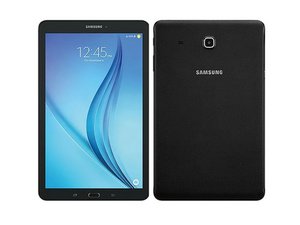
De Samsung Galaxy Tab E 8.0, een touch screen tablet geproduceerd door Samsung Electronics, werd uitgebracht in januari 2016. Deze pagina bevat reparatie-informatie voor modelnummer SM-T377V.

Tablet screen is very dim

Hello! I need a bit of help trying to fix my tablet. I dropped it on it's side earlier, and now the screen's brightness seems to be very low. The device is still working well, I can use it like I would everyday. But the screen is super dim, almost impossible to see in the light and dark rooms.

I assume this may be an issue with the backlight. Is there any way to fix this? :[

Beantwoord deze vraag Dit probleem heb ik ook

Is dit een goede vraag?

Score 1
Voeg een opmerking toe

2 Antwoorden

Het nuttigste antwoord

@kayjayy not really. Other than opening it and making sure that all the ribbon cables are still connected and no components have been dislodged. Looks like you might be due for a new display but check it first for the aforementioned. Samsung Galaxy Tab E 8.0 scherm vervangen

Was dit antwoord nuttig?

Score 1

2 opmerkingen:

thank you! I will try this when I get home! Is there a guide tp help with the first thing mentioned (making sure ribbons are still connected)?

door

@kayjayy first step same guide. Once the back panel is off, you should see all of the ribbon cables. Check those carefully for nicks, tears and improper seating.

door

Voeg een opmerking toe

Check the proximity sensorClick to Expand

Deactivate Adaptive brightnessClick to Expand

Increase the Screen timeoutClick to Expand

Keep the screen active while you are using itClick to Expand

Change the Secure lock settingsClick to Expand

Change the power saving mode

Regards,

Diana

Was dit antwoord nuttig?

Score 0
Voeg een opmerking toe

Voeg je antwoord toe

Kayla! zal eeuwig dankbaar zijn.
Weergavestatistieken:

Afgelopen 24 uren: 1

Afgelopen 7 dagen: 3

Afgelopen 30 dagen: 19

Altijd: 1,552

