Ga door naar hoofdinhoud
Sluit je aan bij de reparatiegemeenschap! Maak een account aan

Uitgebracht op 22 augustus 2013. Identificeerbaar aan het modelnummer NP940X3G.

How to upgrade SSD?

I've opened the back cover and removed the battery, but I see no mSATA. Where is it?

Update (09/25/2015)

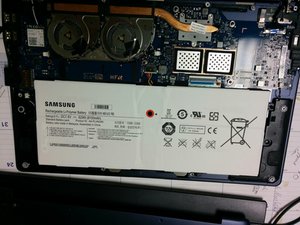
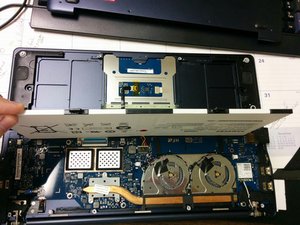
Please see the pictures I've posted of the inside of the Ativ book 9+. Is there an mSATA SSD in this laptop?

Update (09/25/2015)
Afbeelding
Afbeelding

Attached pictures.

Beantwoord deze vraag Dit probleem heb ik ook

Is dit een goede vraag?

Score 1
Voeg een opmerking toe

2 Antwoorden

Filteren op:
Het nuttigste antwoord

i cant see any mSATA on this board. There is a place where it says 2nd SSD but as far i can see there is no connector. I think it is not possible to build a SSd with mSATA in this Laptop.

Sorry to say that.

Was dit antwoord nuttig?

Score 1
Voeg een opmerking toe

Hy William

When you open the Notebokk, is there a orange cable on the left side of the Batterie?

if yes, under this cable, you will finde the mSATA connector.

Greetings

Daniel

Was dit antwoord nuttig?

Score 0

2 opmerkingen:

Unfortunately, no orange cable. There is a piece of plastic, looks like a spacer. There are two wires connected to this piece of plastic, very thin wires look like power, red and white.

If it is possible to post a picture here, I can share a picture of the inside of the laptop.

door Deel

You can ad a picture by making a new answer and click the picture button

door Deel

Voeg een opmerking toe

Voeg je antwoord toe

William Beldham zal eeuwig dankbaar zijn.
Weergavestatistieken:

Afgelopen 24 uren: 4

Afgelopen 7 dagen: 9

Afgelopen 30 dagen: 31

Altijd: 5,623