Ga door naar hoofdinhoud
Word lid van de reparatiegemeenschap - Account aanmaken

Ook bekend als de LG Splendor, een uitvoering van de LG Optimus L7, soms aangeduid als de LG Snapshot of Swift L7 met de modelnummers US730 en LG730, afhankelijk van de provider.

How Do I install a LG730 LCD Display Screen?

I just replaced my screen on my LG730, now I am waiting for my new LCD screen to arrive. I am wondering, how do I install it? I have a rough idea, but never had to do it before. I spent time on the internet and could not find much. Does anyone have advice?

Beantwoord! Bekijk het antwoord Dit probleem heb ik ook

Is dit een goede vraag?

Score -1
2 opmerkingen

Well I should have clarified. I Replaced the touch screen, which had a few spider web cracks in it. I also damaged the LCD screen, I do not know how to Take out, and put in the new LCD screen, at least with out damaging anything.

door

Oh nevermind, I did a little tinkering around, and got it all situated, thanks for the help though man, I'll accent your answer.

door

Voeg een opmerking toe

1 Antwoord

Gekozen oplossing

Zack Borgen, I am a bit confused. You said that you replaced the screen, but now you are wondering how to install it. Did you check my answer from here:"

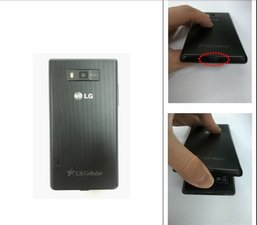
Take apart the battery cover using notch below

Afbeelding

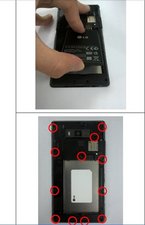
Take apart the battery and remove screw (12 point)

Afbeelding

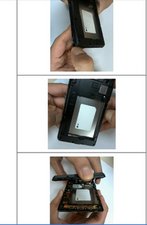
1. Unfastening the hook, make gap between Rear Cover and Front Cover

2. Widen the gap between Rear Cover and Front Cover and hook off starting from below side (back view)

Afbeelding

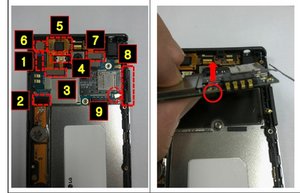
1. Take connectors & Side Key FPCB (1~9) out of the Main PCB

2. Widen the gap between Front cover and main PCB

Afbeelding

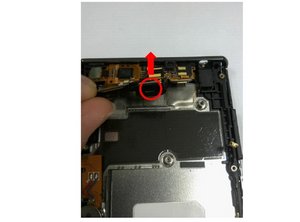
3. Remover the Bracket Camera to upper

Afbeelding

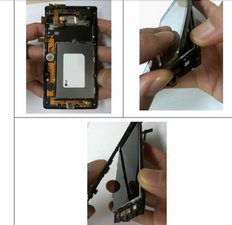
1. Unfastening the hook from below side, sh back side of LCD through a hole on back side of Front cover

2. Take apart Frame out of Front cover

Afbeelding

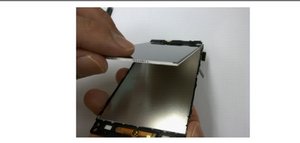
1. Lift LCD from the frame & Take off the LCD.

2. Be careful. Do not tear the LCD FPCB

Afbeelding

Was dit antwoord nuttig?

Score 1

2 opmerkingen:

I'll take another look at my LCD, but it does not just come off like the instructions show. So I'm sure I'm reading something wrong

door

Thank you for accepting my answer. If you need to take a look at the manual, let me know. My email address is in my profile.

door

Voeg een opmerking toe

Voeg je antwoord toe

Zack Borgen zal eeuwig dankbaar zijn.
Weergavestatistieken:

Afgelopen 24 uren: 1

Afgelopen 7 dagen: 4

Afgelopen 30 dagen: 60

Altijd: 1,839