Deze vertaling is door een computer gegenereerd en is nog niet door iemand nagekeken. Spreek je deze taal? Bekijk het hier.
Inleiding
Verwijder het glazen voorpaneel om bij de interne onderdelen van je Touch te komen.
Wat je nodig hebt
Video overzicht
-
-
-
De foto links (voorpaneel reeds verwijderd) toont de locaties van de metalen klemmen (in rood aangegeven) die op de kunststof omlijsting vastklikken. Probeer in de volgende paar stappen het voorpaneel omhoog te wrikken vanuit de openingen tussen deze klemmen.
 Vraag FixBot
-
-
-
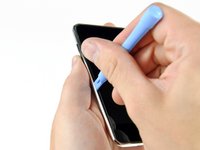
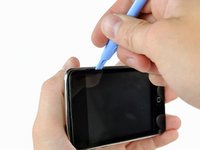
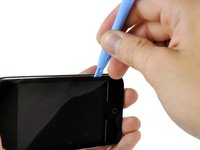
Steek voorzichtig een iPod-Openingsgereedschap tussen het glazen voorpaneel en de plastic behuizing in de buurt van de volumeknop.
-
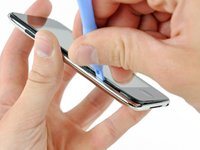
Draai het gereedschap weg van de Touch om het glazen paneel los te wrikken.
-
-
-
Steek het iPod-openingsgereedschap tussen het voorpaneel en de plastic behuizing en wrik op verschillende punten langs de linkerrand van de Touch omhoog.
-
-
-
-
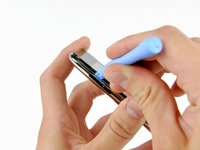
Ga door met het omhoog wrikken van de linkerzijkant totdat de boven- en onderkant uit de Touch beginnen te komen.
-
Zodra de boven- en onderkant iets uit de Touch zijn gekomen, gebruik je het Openingsgereedschap om ervoor te zorgen dat de plastic rand loskomt van de clips aan de binnenkant van de Touch.
-
-
-
Ga door met wrikken en richt je er nu op om de plastic rand los te maken van de interne metalen klemmen.
-
Wrik langs de bovenrand van de Touch om het voorpaneel verder van de rest van het apparaat te scheiden.
-
-
-
Wrik het voorpaneel langs de rechterrand omhoog volgens de methode die in de vorige stappen is beschreven.
-
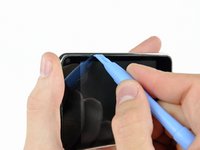
Werk uiteindelijk rond de gehele omtrek van het voorpaneel totdat het iets van het achterpaneel is opgetild.
-
-
-
Til het voorpaneel uit de achterbehuizing en let daarbij op de kabel waarmee het nog vastzit bij de linkerbovenhoek van de Touch.
-
-
-
Gebruik de platte kant van een spudger (of een openingsgereedschap) om de (kabel)aansluiting van de touch screen heel voorzichtig van het bovenste logic board los te wippen.
-
-









Volg deze instructies in omgekeerde volgorde om je apparaat weer in elkaar te zetten.
Annuleren: ik heb deze handleiding niet afgemaakt.
97 andere personen hebben deze handleiding voltooid.

6Gids Commentaar
When prying up - make sure that you lift the black plastic frame. I got trouble because on side I managed to lift the glass of the plastic frame on one side, and lifted the plastic frame out of the clips on the other sides, making it very hard to get the panel out. When I at last succeeded it was because the plastic frame broke in the lower right corner – when I had lifted the panel off the right side of the plastic frame was still attached (it needed to break at the top too before I could lift of the panel completely).
will i because to put the panel back on easily?
Patience and a can of compressed air are mandatory. The inside of my iPod Touch was pretty dusty after two years in my pocket. Before putting on the new digitizer, everything needs to be clean.
Also, I used my spudger to pry half the broken frame out of the left gutter (see Michael above). Doing that without damaging the screen was the hardest part.
I'm getting ready to do this and have the old screen partially off to let things dry out. I am, however, unclear on what to pry on to release the ribbon. From past experience with other iPod products, I'm thinking it is a small clamp that needs to be pried up. Is that the case and, if so, is it located where the picture indicates? I think the clamp is under the small grey plastic cover.
