Ga door naar hoofdinhoud
Word lid van de reparatiegemeenschap - Account aanmaken

Zoom H1 Handy Recorder Battery Terminal Replacement

Wat je nodig hebt

    1. Zoom H1 Handy Recorder Battery Terminal Replacement, Battery Terminal: stap 1, afbeelding 1 van 1
      • Place the device so the display is down.

      Vraag FixBot

      Voeg opmerking toe

    2. Zoom H1 Handy Recorder Battery Terminal Replacement: stap 2, afbeelding 1 van 1
      • Remove the battery cover, pressing down on the tabs and sliding.

      Vraag FixBot

      Voeg opmerking toe

    3. Zoom H1 Handy Recorder Battery Terminal Replacement: stap 3, afbeelding 1 van 1
      • Unscrew the two (2) #00, 10 mm screws located below the mic on the back cover

      Vraag FixBot

      Voeg opmerking toe

    4. Zoom H1 Handy Recorder Battery Terminal Replacement: stap 4, afbeelding 1 van 1
      • Carefully pry up the top end of the back cover using one finger

      Vraag FixBot

      Voeg opmerking toe

    5. Zoom H1 Handy Recorder Battery Terminal Replacement: stap 5, afbeelding 1 van 1
      • Remove the back plate by using a plastic removal tool to pry the back cover up around the edges.

      Vraag FixBot

      Voeg opmerking toe

    6. Zoom H1 Handy Recorder Battery Terminal Replacement: stap 6, afbeelding 1 van 1
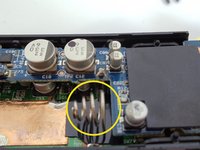
      • De-solder at terminal point one.

      Vraag FixBot

      Voeg opmerking toe

    7. Zoom H1 Handy Recorder Battery Terminal Replacement: stap 7, afbeelding 1 van 1
      • De-solder at the second terminal point.

      Vraag FixBot

      Voeg opmerking toe

    8. Zoom H1 Handy Recorder Battery Terminal Replacement: stap 8, afbeelding 1 van 2 Zoom H1 Handy Recorder Battery Terminal Replacement: stap 8, afbeelding 2 van 2
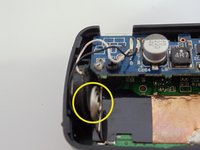
      • Remove the faulty terminals

      Vraag FixBot

      Voeg opmerking toe

    9. Zoom H1 Handy Recorder Battery Terminal Replacement: stap 9, afbeelding 1 van 1
      • Place new lead in at point one and re-solder at the point.

      Vraag FixBot

      Voeg opmerking toe

    10. Zoom H1 Handy Recorder Battery Terminal Replacement: stap 10, afbeelding 1 van 1
      • Place second lead at point 2 and re-solder.

      Vraag FixBot

      Voeg opmerking toe

Conclusie

To Re-construct device, perform these steps in reverse order.

Annuleren: ik heb deze handleiding niet afgemaakt.

Alex

Lid sinds: 10/28/13

809 Reputatie

5 handleidingen geschreven

7Gids Commentaar

Caution is needed with step 5. My backside broke off using a spudger to attempt to remove.

Joe Vaughan - Antwoord Deel

Mine has third screw under the serial-number sticker.

halluciana - Antwoord Deel

Can anyone advise where to find replacement terminals? My zoom h1 has bad corrosion of its battery terminals and I would like to follow this guide to fix them! Thanks!

Dylan St John - Antwoord Deel

My zoom h1 is just dead with no reason , can i fix my zoom h1 with this guide ??

Jas Jes! - Antwoord Deel

Same problem, without any reason it is dead

eevilcute - Antwoord Deel

Voeg opmerking toe

Weergavestatistieken:

Afgelopen 24 uren: 0

Afgelopen 7 dagen: 6

Afgelopen 30 dagen: 42

Altijd: 7,465