Inleiding
The remote control motherboard plays a major part in the connection between the remote control and the car. This guide steps you through replacing it.
Wat je nodig hebt
-
-
-
Turn off the remote control. Flip power switch to the off position.
-
Remove the battery from bottom of the remote control for further safety measures.
 Vraag FixBot
-
-
-
-
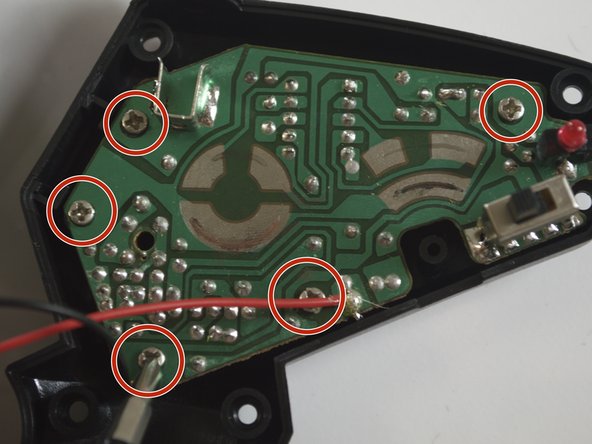
Remove five 3mm Phillips #2 screws that connect the motherboard to the back outer shell.
-
-
-
Detach the motherboard. Use soldering tools to desolder the red and black wires from the motherboard. To do this, refer to the how to solder/desolder page.
-
-




To reassemble your device, follow these instructions in reverse order.
Annuleren: ik heb deze handleiding niet afgemaakt.
Één andere persoon heeft deze handleiding voltooid.

Team

Cal Poly, Team 12-6, Lancaster Spring 2015 Lid van Cal Poly, Team 12-6, Lancaster Spring 2015
CPSU-LANCASTER-S15S12G6
4 Leden
12 handleidingen geschreven
