Inleiding
This guide will exhibit how to replace the microphone board. Soldering is required to detach and replace the board, so refer to the soldering replacement guide for more information.
Wat je nodig hebt
-
-
-
Gently remove the foam pad from the microphone by pulling it apart.
 Vraag FixBot
-
-
-
-
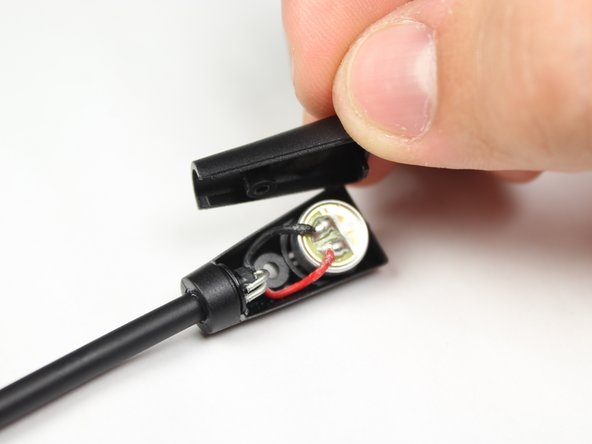
Remove the back casing from the microphone.
-
Desolder the two wires from the back of the microphone. For instructions on soldering, please see iFixit's soldering guide.
-
-


To reassemble your device, follow these instructions in reverse order.
Annuleren: ik heb deze handleiding niet afgemaakt.
7 andere personen hebben deze handleiding voltooid.

Team

Baylor, Team 10-14, Williams Fall 2015 Lid van Baylor, Team 10-14, Williams Fall 2015
BU-WILLIAMS-F15S10G14
3 Leden
16 handleidingen geschreven
1Gids Commentaar
I have a turtle beach recon 200 and there is no category here for it. I have gotten water into my microphone and I do not know how to fix it. My mic is attached to the headset. I have tried blowing into it and wiping it. None of that works. Please help.
