Ga door naar hoofdinhoud
Word lid van de reparatiegemeenschap - Account aanmaken

The Claw Circuit Board Replacement

Wat je nodig hebt

  1. The Claw Circuit Board Replacement, Bottom Cover: stap 1, afbeelding 1 van 1
    • Place The Claw in upright position with controls facing you.

    Vraag FixBot
  2. The Claw Circuit Board Replacement: stap 2, afbeelding 1 van 1
    • Gently flip The Claw machine upside down with the controls facing you.

    Vraag FixBot
  3. The Claw Circuit Board Replacement: stap 3, afbeelding 1 van 1
    • Remove all ten screws from the bottom cover using a Phillips #1 screwdriver.

    • You will need a screwdriver with a long thin neck to fit in the screw holes.

    Vraag FixBot
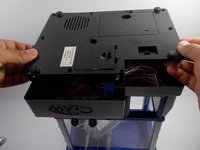
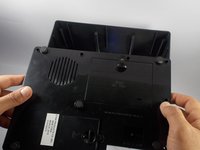
  4. The Claw Circuit Board Replacement: stap 4, afbeelding 1 van 2 The Claw Circuit Board Replacement: stap 4, afbeelding 2 van 2
    • Slide the bottom cover off to the side.

    • Do not completely remove bottom cover as it is still connected to wires.

    Vraag FixBot
  5. The Claw Circuit Board Replacement: stap 5, afbeelding 1 van 1
    • Complete removal of the bottom cover is not necessary, however if you feel you need to take the cover completely off the machine to complete your task it can be done by the following process.

    • You will need to cut the two green wires attached to the music player.

    • Then you will need to cut the white wire that leads to the battery compartment.

    • Finally you will need to cut the black wire leading to the battery compartment as well.

    • The complete removal of the bottom cover requires the cutting and soldering of wires. For help with soldering reference: Hoe moet je (de-)solderen?.

    Vraag FixBot
  6. The Claw Circuit Board Replacement, Circuit Board: stap 6, afbeelding 1 van 1
    • Once you have removed the bottom cover you should have clear access to the circuit board.

    • Locate the circuit board in the bottom of The Claw machine.

    Vraag FixBot
  7. The Claw Circuit Board Replacement: stap 7, afbeelding 1 van 1
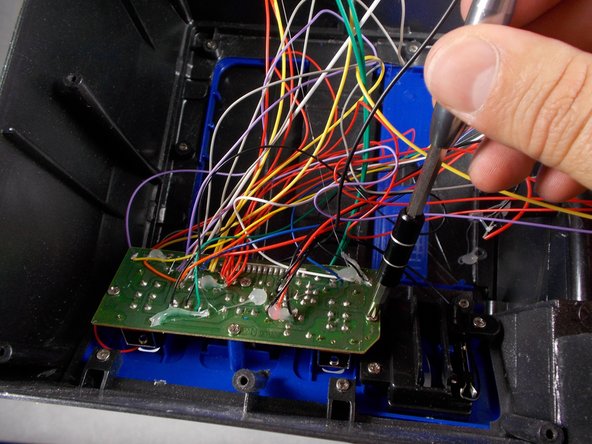
    • Locate the screws that hold the circuit board in place.

    Vraag FixBot
  8. The Claw Circuit Board Replacement: stap 8, afbeelding 1 van 1
    • Be sure to turn off the device and remove the batteries before reaching into the device with your hands or any metal tools.

    • Using a Phillips #1 screwdriver, remove the four 6mm that hold the circuit board in place.

    • You will also need to cut all of the wires leading to the circuit board to completely remove it.

    Vraag FixBot
  9. The Claw Circuit Board Replacement: stap 9, afbeelding 1 van 1
    • Remove the circuit board.

    • The removal of the circuit board requires the cutting of existing wires and soldering new wires to the new board. For help with soldering reference: Hoe moet je (de-)solderen?.

    Vraag FixBot
Conclusie

To reassemble your device, follow these instructions in reverse order.

2 andere personen hebben deze handleiding voltooid.

Alain Pierre

Lid sinds: 03/22/16

1.188 Reputatie

9 handleidingen geschreven

Team

UMass Dartmouth, Team 4-8, Catania Spring 2016 Lid van UMass Dartmouth, Team 4-8, Catania Spring 2016

UMASSD-CATANIA-S16S4G8

3 Leden

18 handleidingen geschreven

9Gids Commentaar

I accidentally cut the wires where the motors are and now can not figure out which go where, is there a diagram or drawling of where each wire goes?

Dyn4mic Universe - Antwoord Deel

Did you ever find a diagram for this? I would like to have one also….

Nathan Riffel - Antwoord Deel

Does anybody know where to get the replacement switches for these?

Bill B. - Antwoord Deel

Same. I am in need of the replacements as well.

Allison Rousseau - Antwoord Deel

Me too. L/R switch doesn't work need to replace it.

Johnny Annon - Antwoord Deel

Voeg opmerking toe

Weergavestatistieken:

Afgelopen 24 uren: 0

Afgelopen 7 dagen: 20

Afgelopen 30 dagen: 114

Altijd: 7,660