Ga door naar hoofdinhoud
Word lid van de reparatiegemeenschap - Account aanmaken
Sony WH-1000XM4 Ear Pads Replacement

Wat je nodig hebt

    1. Sony WH-1000XM4 Ear Pads Replacement, Place the headphones speakers-up: stap 1, afbeelding 1 van 1
      • Before beginning any repairs, press and hold the power button on the left ear cup for about 2 seconds until the blue light turns off.

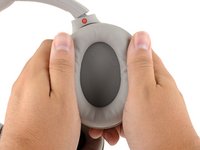
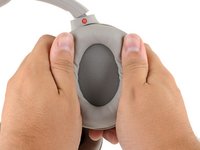
      • Place your headphones onto a work surface, ear pads facing up.

      Vraag FixBot

      Voeg opmerking toe

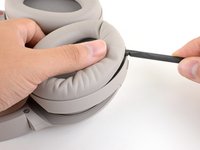
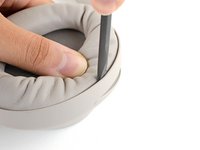
    1. Sony WH-1000XM4 Ear Pads Replacement, Create a gap: stap 2, afbeelding 1 van 2 Sony WH-1000XM4 Ear Pads Replacement, Create a gap: stap 2, afbeelding 2 van 2
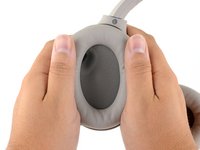
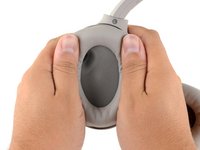
      • Use your thumb to depress the LEFT ear pad near the long outer edge, creating a gap between the cushion and the frame.

      Vraag FixBot

      Voeg opmerking toe

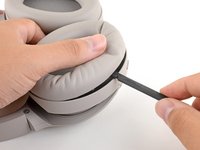
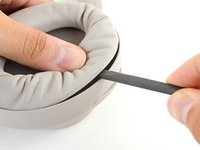
    2. Sony WH-1000XM4 Ear Pads Replacement, Unclip the ear cup: stap 3, afbeelding 1 van 2 Sony WH-1000XM4 Ear Pads Replacement, Unclip the ear cup: stap 3, afbeelding 2 van 2
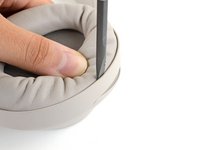
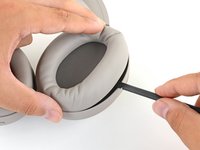
      • Insert the flat end of a spudger into the gap you've created, between the edge of the cushion and the frame.

      • Pivot the spudger down to unclip the long edge of the ear pad.

      • This may take a considerable amount of force. If the cushion won't click out of place, move your spudger to different points along the long edge.

      Vraag FixBot

      Voeg opmerking toe

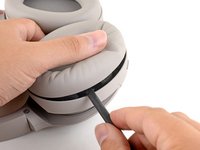
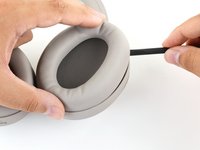
    3. Sony WH-1000XM4 Ear Pads Replacement: stap 4, afbeelding 1 van 3 Sony WH-1000XM4 Ear Pads Replacement: stap 4, afbeelding 2 van 3 Sony WH-1000XM4 Ear Pads Replacement: stap 4, afbeelding 3 van 3
      • Repeat the previous step around the perimeter of the ear cup to disconnect the remaining clips.

      Vraag FixBot

      Voeg opmerking toe

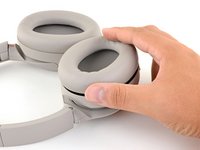
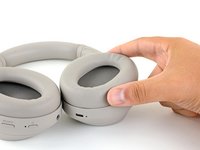
    4. Sony WH-1000XM4 Ear Pads Replacement, Remove the ear pad: stap 5, afbeelding 1 van 2 Sony WH-1000XM4 Ear Pads Replacement, Remove the ear pad: stap 5, afbeelding 2 van 2
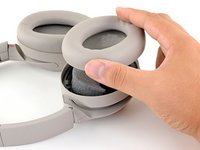
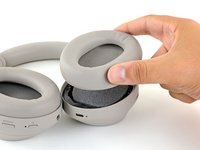
      • Remove the left ear pad.

      Vraag FixBot

      Voeg opmerking toe

    5. Sony WH-1000XM4 Ear Pads Replacement, Reassembly tip: stap 6, afbeelding 1 van 2 Sony WH-1000XM4 Ear Pads Replacement, Reassembly tip: stap 6, afbeelding 2 van 2
      • When installing a replacement left ear pad:

      • Align the cushion over the speaker and press them firmly together to snap it into place.

      • Press around the entire edge of the cushion, making sure all the clips have engaged.

      Vraag FixBot

      Voeg opmerking toe

    1. Sony WH-1000XM4 Ear Pads Replacement, Create a gap: stap 7, afbeelding 1 van 2 Sony WH-1000XM4 Ear Pads Replacement, Create a gap: stap 7, afbeelding 2 van 2
      • Use your thumb to depress the RIGHT ear pad near the long outer edge, creating a gap between the cushion and the frame.

      Vraag FixBot

      Voeg opmerking toe

    2. Sony WH-1000XM4 Ear Pads Replacement, Unclip the ear cup: stap 8, afbeelding 1 van 3 Sony WH-1000XM4 Ear Pads Replacement, Unclip the ear cup: stap 8, afbeelding 2 van 3 Sony WH-1000XM4 Ear Pads Replacement, Unclip the ear cup: stap 8, afbeelding 3 van 3
      • Insert the flat end of a spudger into the gap you've created, between the edge of the cushion and the frame.

      • Pivot the spudger down to unclip the long edge of the ear pad.

      • When the first clip disconnects, you'll hear an audible clicking sound.

      • This may take a considerable amount of force. If the cushion won't click out of place, move your spudger to different points along the long edge.

      Vraag FixBot

      Voeg opmerking toe

    3. Sony WH-1000XM4 Ear Pads Replacement: stap 9, afbeelding 1 van 3 Sony WH-1000XM4 Ear Pads Replacement: stap 9, afbeelding 2 van 3 Sony WH-1000XM4 Ear Pads Replacement: stap 9, afbeelding 3 van 3
      • Repeat the previous step around the perimeter of the ear cup to disconnect the remaining clips.

      Vraag FixBot

      Voeg opmerking toe

    4. Sony WH-1000XM4 Ear Pads Replacement, Remove the ear pad: stap 10, afbeelding 1 van 2 Sony WH-1000XM4 Ear Pads Replacement, Remove the ear pad: stap 10, afbeelding 2 van 2
      • Remove the right ear pad.

      Vraag FixBot

      Voeg opmerking toe

    5. Sony WH-1000XM4 Ear Pads Replacement, Reassembly tip: stap 11, afbeelding 1 van 2 Sony WH-1000XM4 Ear Pads Replacement, Reassembly tip: stap 11, afbeelding 2 van 2
      • When installing a replacement right ear pad:

      • Align the cushion over the speaker and press them firmly together to snap it into place.

      • Press around the entire edge of the cushion, making sure all the clips have engaged.

      Vraag FixBot

      Voeg opmerking toe

Conclusie

Compare your new replacement part to the original part—you may need to transfer remaining components or remove adhesive backings from the new part before installing.

To reassemble your device, follow the above steps in reverse order.

Repair didn’t go as planned? Try some basic troubleshooting or search our Answers community for help.

Annuleren: ik heb deze handleiding niet afgemaakt.

49 andere personen hebben deze handleiding voltooid.

Carsten Frauenheim

Lid sinds: 03/10/20

168.626 Reputatie

438 handleidingen geschreven

Team

iFixit Lid van iFixit

Staff

123 Leden

63.694 handleidingen geschreven

18Gids Commentaar

This is a great guide!

it is also the solution to the ticking problem on the left ear cup!

there is a small cable linking the microphone to the headset that is beneath the earcup. it has a small holder that should prevent it from moving.

if it’s not attached properly, the noise canceling will start ticking every few seconds in a very annoying way.

removing the earcup and cleaning there is the best solution I found!

Thanks a lot for the amazing guide!!

Sapir Havusha-Laufer - Antwoord Deel
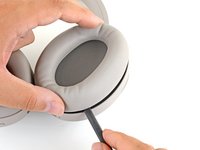
I was having a similar issue where the right ear cup was making an annoying scratching sound. Turned out to be a hair that was stuck in and brushing against the speaker. Fixed by opening and removing with tweezers!

spencer - Antwoord Deel

Very comprehensible instructions, thank you! I have rather the problem that the original ear pads are not available anywhere and are not shipped to Germany by Sony. Does anyone have a tip on how to get the replacement pads or any idea which third-party pads can be recommendet?

Larkus Manz - Antwoord Deel

Where can I buy official replacement earpads?

Arne Vandervorst - Antwoord Deel

i also need to know that, i found some OEM on amazon, but i don't trust any of them

Nicolas Silva A. - Antwoord Deel

Voeg opmerking toe

Weergavestatistieken:

Afgelopen 24 uren: 84

Afgelopen 7 dagen: 511

Afgelopen 30 dagen: 2,449

Altijd: 161,516