Inleiding
This guide will teach you step by step how to replace your LCD screen.
Wat je nodig hebt
-
-
-
Use a Phillips #00 screwdriver to remove the four (4) screws on the back of the device.
-
If the screws strips or is previously stripped, refer to the stripped screw repair guide.
 Vraag FixBot
-
-
-
Battery is the rectangular and silver object in the center of device.
-
Remove battery with finger by prying at the rear.
-
If unable to remove battery, pry out using spudger.
-
-
-
-
-
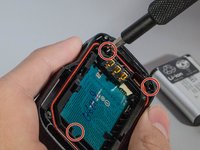
Unscrew the 3 (three) screws holding the bracket in place.
-
Then remove the bracket by prying one end up.
-
-
-
Gereedschap gebruikt in deze stap:Tweezers$4.99
-
With tweezers, unplug the ribbon cable from the white connector.
-
-
-
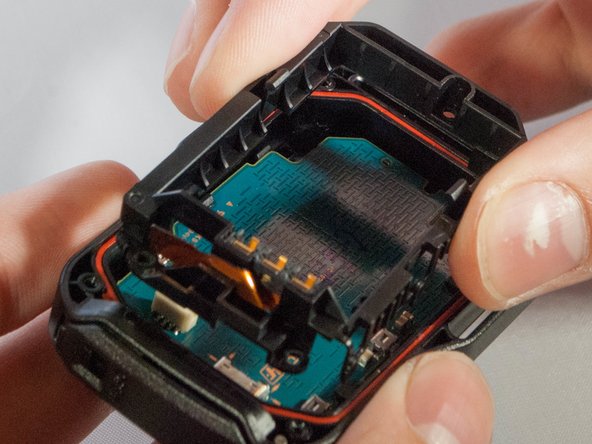
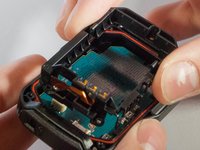
Remove motherboard from the device by pulling upward gently, with fingers or tweezers.
-
-
-
Gently push out on these two clips holding the LCD to the motherboard
-
Once you have the first two off, ever so carefully, push the LCD towards the remaining two clips.
-
-
-
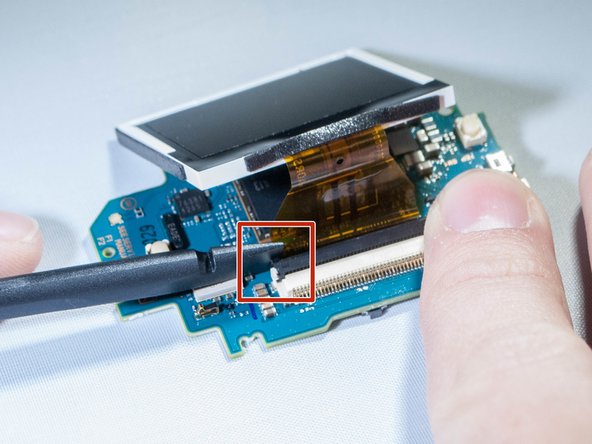
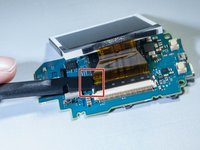
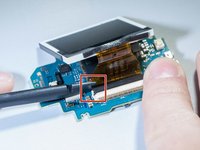
Undo the ribbon cable attached between the motherboard and screen by prying up black tab which holds the cable, using spudger. (See pictures)
-
-





To reassemble your device, follow these instructions in reverse order.
Annuleren: ik heb deze handleiding niet afgemaakt.
Één andere persoon heeft deze handleiding voltooid.

Team

Eastern Washington University, Team S2-G2, Crane Fall 2017 Lid van Eastern Washington University, Team S2-G2, Crane Fall 2017
EWU-CRANE-F17S2G2
3 Leden
6 handleidingen geschreven
4Gids Commentaar
Hi
I cant find an replacement lcd.
Could anybody help me where to get one?
Cheers
Sven
any link to the replacement LCD please?
