Ga door naar hoofdinhoud
Word lid van de reparatiegemeenschap - Account aanmaken

Sony DVP-SR200P DVD Reader Replacement

Wat je nodig hebt

    1. Sony DVP-SR200P DVD Reader Replacement, Top Cover: stap 1, afbeelding 1 van 2 Sony DVP-SR200P DVD Reader Replacement, Top Cover: stap 1, afbeelding 2 van 2
      • Remove the five #1 Phillips screws (black, 3/16") attaching the cover to the DVD player.

      • One 3/16" screw on the right side of the DVD player.

      • One 3/16" screw on the left side of the DVD player (directly opposite of other screw).

      • Three 3/16" screws on the back of the DVD player.

      Vraag FixBot

      Voeg opmerking toe

    2. Sony DVP-SR200P DVD Reader Replacement: stap 2, afbeelding 1 van 2 Sony DVP-SR200P DVD Reader Replacement: stap 2, afbeelding 2 van 2
      • Slide the cover away from the front of the DVD player until it is off.

      Vraag FixBot

      Voeg opmerking toe

    1. Sony DVP-SR200P DVD Reader Replacement, Processing Board: stap 3, afbeelding 1 van 1
      • Remove the blue tape from the processing board by gently pulling upward.

      Vraag FixBot

      Voeg opmerking toe

    2. Sony DVP-SR200P DVD Reader Replacement: stap 4, afbeelding 1 van 2 Sony DVP-SR200P DVD Reader Replacement: stap 4, afbeelding 2 van 2
      Gereedschap gebruikt in deze stap:
      Tweezers
      $4.99
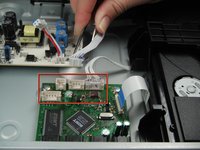
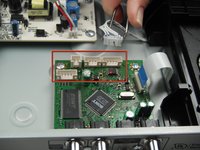
      • Use the tweezers to remove the four sets of wires connected to the processing board. Start with the cord located in front of the row of three cords.

      • The wires may be difficult to remove. Wiggling them while lifting them up may help remove them.

      Vraag FixBot

      Voeg opmerking toe

    3. Sony DVP-SR200P DVD Reader Replacement: stap 5, afbeelding 1 van 1
      • Handle the processing board with care. It is fragile.

      • Unscrew the two #1 Phillips screws (silver, 3/16") located on the two edge corners of the processing board.

      Vraag FixBot

      Voeg opmerking toe

    4. Sony DVP-SR200P DVD Reader Replacement: stap 6, afbeelding 1 van 1
      • Orient the DVD player so that you are facing the video and audio jacks.

      • Unscrew the two #1 Phillips screws (silver, 3/16") located on the outside of the DVD player

      • The processing board is now free to be removed and replaced.

      Vraag FixBot

      Voeg opmerking toe

    1. Sony DVP-SR200P DVD Reader Replacement, DVD Drive: stap 7, afbeelding 1 van 1
      • Orient the DVD player so the front of the DVD player is opposite of you.

      • Remove the two #1 Phillips screws (silver, 3/16") that attach the DVD drive to the bottom of the DVD player.

      Vraag FixBot

      Voeg opmerking toe

    2. Sony DVP-SR200P DVD Reader Replacement: stap 8, afbeelding 1 van 1
      • Remove the DVD drive by pulling it backward and upward while ensuring that it is free of any braces.

      Vraag FixBot

      Voeg opmerking toe

    1. Sony DVP-SR200P DVD Reader Replacement, DVD Reader: stap 9, afbeelding 1 van 3 Sony DVP-SR200P DVD Reader Replacement, DVD Reader: stap 9, afbeelding 2 van 3 Sony DVP-SR200P DVD Reader Replacement, DVD Reader: stap 9, afbeelding 3 van 3
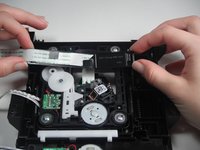
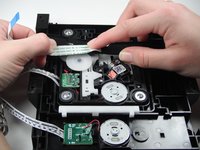
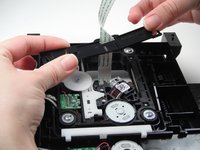
      • Flip the DVD drive upside down, to match the orientation of the first picture.

      • Carefully remove the white ribbon cable from the brace holding it in place by sliding it out towards you.

      • Next remove the brace from the DVD drive. Carefully wiggle and pull the brace upward as the white ribbon cable slides out through the brace.

      Vraag FixBot

      Voeg opmerking toe

    2. Sony DVP-SR200P DVD Reader Replacement: stap 10, afbeelding 1 van 1
      • Remove the four silver #1 Phillips 3/16''screws to free the DVD reader from the DVD drive.

      Vraag FixBot

      Voeg opmerking toe

    3. Sony DVP-SR200P DVD Reader Replacement: stap 11, afbeelding 1 van 1
      • Remove the DVD reader from the DVD drive by pulling it upwards off of the drive.

      • The DVD reader can now be replaced.

      Vraag FixBot

      Voeg opmerking toe

Conclusie

To reassemble your device, follow these instructions in reverse order.

Annuleren: ik heb deze handleiding niet afgemaakt.

3 andere personen hebben deze handleiding voltooid.

Jose Coronel

Lid sinds: 01/11/13

84 Reputatie

1 Handleiding geschreven

Team

Cal Poly, Team 5-17, Forte Winter 2013 Lid van Cal Poly, Team 5-17, Forte Winter 2013

CPSU-FORTE-W13S5G17

5 Leden

18 handleidingen geschreven

1Gids Commentaar

Which part help to play games in dvd player

WWE Final Fighters - Antwoord Deel

Voeg opmerking toe

Weergavestatistieken:

Afgelopen 24 uren: 5

Afgelopen 7 dagen: 14

Afgelopen 30 dagen: 57

Altijd: 5,588