Ga door naar hoofdinhoud
Word lid van de reparatiegemeenschap - Account aanmaken

Solio CLASSIC2 LED Light Replacement

Wat je nodig hebt

  1. Solio CLASSIC2 LED Light Replacement, Disconnecting the Battery: stap 1, afbeelding 1 van 1
    • Turn off the device by pressing on the clear power button behind the device.

    • To make sure that it is off, make sure the button is not flashing green.

    Vraag FixBot

    Voeg opmerking toe

  2. Solio CLASSIC2 LED Light Replacement: stap 2, afbeelding 1 van 1
    • Using the Phillips #1 screwdriver, remove the 2mm screw located on the bottom of the device, near the hinge.

    Vraag FixBot

    Voeg opmerking toe

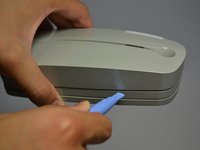
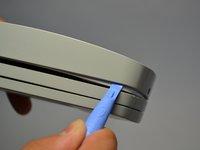
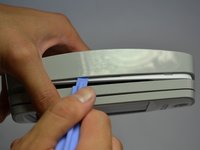
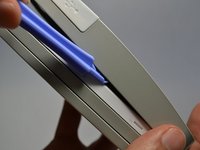
  3. Solio CLASSIC2 LED Light Replacement: stap 3, afbeelding 1 van 3 Solio CLASSIC2 LED Light Replacement: stap 3, afbeelding 2 van 3 Solio CLASSIC2 LED Light Replacement: stap 3, afbeelding 3 van 3
    • Using the plastic opening tools, gently pry open the side of the large panel.

    • Keeping the tool in, slowly slide the tool along the side of the panel.

    Vraag FixBot

    Voeg opmerking toe

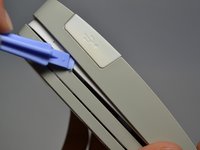
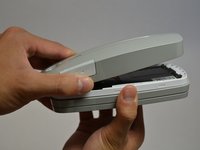
  4. Solio CLASSIC2 LED Light Replacement: stap 4, afbeelding 1 van 2 Solio CLASSIC2 LED Light Replacement: stap 4, afbeelding 2 van 2
    • Rotate the device 180 degrees.

    • Make sure the opening on other side of the device does not snap closed.

    • Gently slide the plastic opening tool along the side of the panel.

    Vraag FixBot

    Voeg opmerking toe

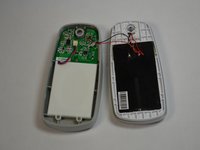
  5. Solio CLASSIC2 LED Light Replacement: stap 5, afbeelding 1 van 2 Solio CLASSIC2 LED Light Replacement: stap 5, afbeelding 2 van 2
    • Do not fully pull apart the back panel from the device. Doing so can rip the two red and blue wires attached to the panel.

    • Using both hands, slowly pull apart the back panel from the rest of the device.

    • Gently flip the back panel open so the circuit board faces up and the two panels are side by side.

    Vraag FixBot

    Voeg opmerking toe

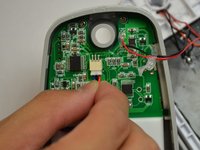
  6. Solio CLASSIC2 LED Light Replacement: stap 6, afbeelding 1 van 2 Solio CLASSIC2 LED Light Replacement: stap 6, afbeelding 2 van 2
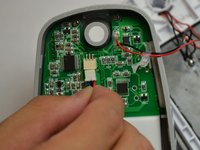
    • Softly pinch the red and blue wires close to the white connector.

    • To pull the wires out, wiggle them back and forth until the connector is fully out.

    Vraag FixBot

    Voeg opmerking toe

  7. Solio CLASSIC2 LED Light Replacement, Circuit Board: stap 7, afbeelding 1 van 1
    • Unscrew the three 2mm screws holding the circuit board down using a Phillips #1 screwdriver.

    Vraag FixBot

    Voeg opmerking toe

  8. Solio CLASSIC2 LED Light Replacement: stap 8, afbeelding 1 van 1
    Gereedschap gebruikt in deze stap:
    Tweezers
    $4.99
    • Make sure the white USB port cover on the side of the device is pulled out or you won't be able to lift the circuit board.

    • Gently lift the circuit board out of the device using tweezers.

    Vraag FixBot

    Voeg opmerking toe

  9. Solio CLASSIC2 LED Light Replacement, LED Light: stap 9, afbeelding 1 van 1
    • Soldering can melt key components and cause harm to both the user and the device. Read soldering guide before attemptingDesolder the LED lights.

    • Desolder the LED lights.

    Vraag FixBot

    Voeg opmerking toe

Conclusie

To reassemble your device, follow these instructions in reverse order.

Annuleren: ik heb deze handleiding niet afgemaakt.

Eric Padilla

Lid sinds: 10/21/13

201 Reputatie

2 handleidingen geschreven

Team

Cal Poly, Team 4-28, Amido Fall 2013 Lid van Cal Poly, Team 4-28, Amido Fall 2013

CPSU-AMIDO-F13S4G28

4 Leden

10 handleidingen geschreven

0Gids Commentaar

Voeg opmerking toe

Weergavestatistieken:

Afgelopen 24 uren: 0

Afgelopen 7 dagen: 10

Afgelopen 30 dagen: 44

Altijd: 565