Ga door naar hoofdinhoud
Word lid van de reparatiegemeenschap - Account aanmaken

Samsung WB35F Flash Capacitor Replacement

Wat je nodig hebt

  1. Samsung WB35F Flash Capacitor Replacement, Rear Case: stap 1, afbeelding 1 van 3 Samsung WB35F Flash Capacitor Replacement, Rear Case: stap 1, afbeelding 2 van 3 Samsung WB35F Flash Capacitor Replacement, Rear Case: stap 1, afbeelding 3 van 3
    • The first thing to do will be unscrew all the screws using Phillips #000 Screwdriver.

    • Keep all the screws in order. Black screws goes under the bottom of camera, and the silver screws goes on the sides and inside of the camera.

    Vraag FixBot

    Voeg opmerking toe

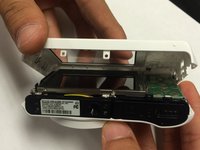
  2. Samsung WB35F Flash Capacitor Replacement: stap 2, afbeelding 1 van 2 Samsung WB35F Flash Capacitor Replacement: stap 2, afbeelding 2 van 2
    • Using the spudger, and plastic opening tool open the casing of camera.

    Vraag FixBot

    Voeg opmerking toe

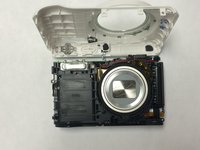
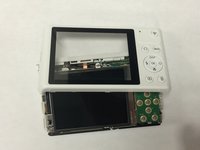
  3. Samsung WB35F Flash Capacitor Replacement: stap 3, afbeelding 1 van 3 Samsung WB35F Flash Capacitor Replacement: stap 3, afbeelding 2 van 3 Samsung WB35F Flash Capacitor Replacement: stap 3, afbeelding 3 van 3
    • Once you open the camera case, you will be able to work on any part of the camera.

    Vraag FixBot

    Voeg opmerking toe

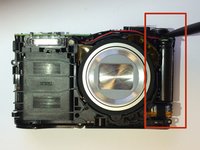
  4. Samsung WB35F Flash Capacitor Replacement, Flash Capacitor: stap 4, afbeelding 1 van 2 Samsung WB35F Flash Capacitor Replacement, Flash Capacitor: stap 4, afbeelding 2 van 2
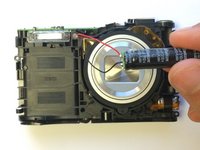
    • Caution: Touching the capacitor wires may cause serious injury. Use a capacitor discharge probe to safely rid the capacitors of dangerous charges.

    • Carefully take out the capacitor using the spudger.

    Vraag FixBot

    Voeg opmerking toe

  5. Samsung WB35F Flash Capacitor Replacement: stap 5, afbeelding 1 van 1
    • Disconnect the wire from battery and replace the old battery with new battery.

    • Connect the wires to new battery and put the battery back in terminal.

    • Connect the positive wire to the positive terminal of the battery and negative wire to the the negative terminal of the battery.

    Vraag FixBot

    Voeg opmerking toe

Conclusie

To reassemble your device, follow these instructions in reverse order.

Annuleren: ik heb deze handleiding niet afgemaakt.

Sarmad Khan

Lid sinds: 01/09/15

549 Reputatie

5 handleidingen geschreven

Team

USF Tampa, Team 1-6, Tanski Winter 2015 Lid van USF Tampa, Team 1-6, Tanski Winter 2015

USFT-TANSKI-W15S1G6

4 Leden

10 handleidingen geschreven

0Gids Commentaar

Voeg opmerking toe

Weergavestatistieken:

Afgelopen 24 uren: 2

Afgelopen 7 dagen: 13

Afgelopen 30 dagen: 65

Altijd: 2,718