Ga door naar hoofdinhoud
Word lid van de reparatiegemeenschap - Account aanmaken

Samsung WB1100F Motherboard Replacement

Wat je nodig hebt

    1. Samsung WB1100F Motherboard Replacement, LCD Screen Cover: stap 1, afbeelding 1 van 2 Samsung WB1100F Motherboard Replacement, LCD Screen Cover: stap 1, afbeelding 2 van 2
      • Remove six 1.2 mm Phillips #00 screws connected to the tripod dock and adjacent screws.

      • Remove six 1.2 mm Phillips #00 screws from the side of the camera.

      Vraag FixBot

      Voeg opmerking toe

    2. Samsung WB1100F Motherboard Replacement: stap 2, afbeelding 1 van 2 Samsung WB1100F Motherboard Replacement: stap 2, afbeelding 2 van 2
      • Use a plastic opening tool or spudger if available.

      • Using the flat end of a spudger, loosen the connection between the back panel and the device. Remove the back panel using your hands.

      Vraag FixBot

      Voeg opmerking toe

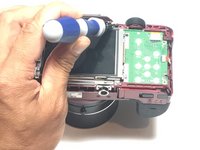
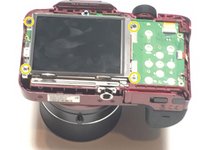
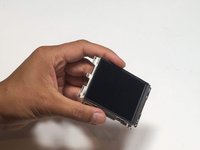
    1. Samsung WB1100F Motherboard Replacement, LCD Screen: stap 3, afbeelding 1 van 2 Samsung WB1100F Motherboard Replacement, LCD Screen: stap 3, afbeelding 2 van 2
      • Remove four 1.2 mm Phillips #1 screws connected to the LCD screen.

      Vraag FixBot

      Voeg opmerking toe

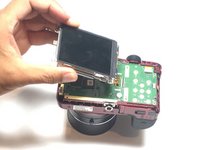
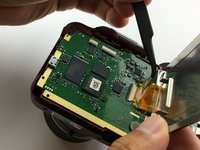
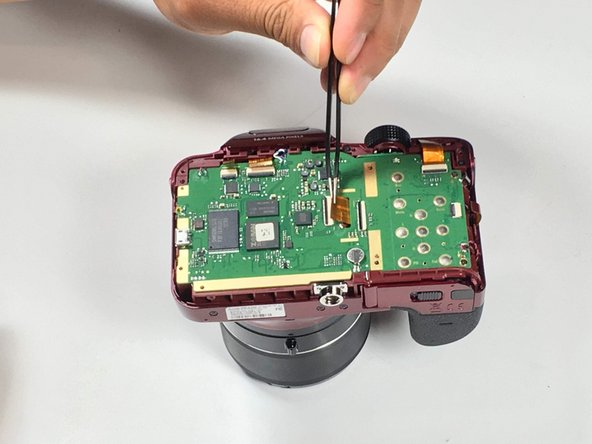
    2. Samsung WB1100F Motherboard Replacement: stap 4, afbeelding 1 van 3 Samsung WB1100F Motherboard Replacement: stap 4, afbeelding 2 van 3 Samsung WB1100F Motherboard Replacement: stap 4, afbeelding 3 van 3
      Gereedschap gebruikt in deze stap:
      Tweezers
      $4.99
      • Flip the LCD screen over to reveal the display cable.

      • Use the tip of a spudger or your fingernail to flip up the small retaining flap on the display cable ZIF connector.

      • Be sure you are prying up on the hinged retaining flap, not the connector itself.

      • Using a pair of tweezers, remove the ribbon cable from its socket on the motherboard.

      • The white line on this ribbon cable marks the edge of the connection area. To reinstall, insert the cable into the connector up to this line, and then close the retaining flap. If the cable doesn’t insert easily up to (or very near to) this line, it’s probably misaligned and needs to be gently removed and repositioned.

      Vraag FixBot

      Voeg opmerking toe

    1. Samsung WB1100F Motherboard Replacement, Motherboard: stap 5, afbeelding 1 van 1
      • Remove two 1.2 Phillips #00 screws connected to the motherboard.

      Vraag FixBot

      Voeg opmerking toe

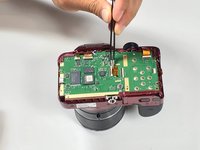
    2. Samsung WB1100F Motherboard Replacement: stap 6, afbeelding 1 van 1
      • Desolder five wires connected to the camera motherboard.

      Vraag FixBot

      Voeg opmerking toe

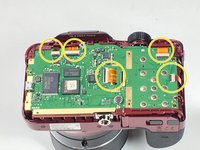
    3. Samsung WB1100F Motherboard Replacement: stap 7, afbeelding 1 van 2 Samsung WB1100F Motherboard Replacement: stap 7, afbeelding 2 van 2
      • Use the tip of a spudger or your fingernail to flip up the small retaining flaps on the five ZIF connectors on the motherboard.

      • Be sure you are prying up on the hinged retaining flap, not the connector itself.

      • Detach the five ribbon cables from the camera motherboard.

      • The white line on the ribbon cables mark the edge of the connection area. To reinstall, insert the cables into the connector up to this line, and then close the retaining flap. If a cable doesn’t insert easily up to (or very near to) this line, it’s probably misaligned and needs to be gently removed and repositioned.

      Vraag FixBot

      Voeg opmerking toe

    4. Samsung WB1100F Motherboard Replacement: stap 8, afbeelding 1 van 1
      • Gently remove the motherboard.

      Vraag FixBot

      Voeg opmerking toe

Conclusie

To reassemble your device, follow these instructions in reverse order.

Annuleren: ik heb deze handleiding niet afgemaakt.

2 andere personen hebben deze handleiding voltooid.

Jesse Lindsey

Lid sinds: 05/13/16

581 Reputatie

5 handleidingen geschreven

Team

Metro State, Team 1-1, Carpenter SU 2016 Lid van Metro State, Team 1-1, Carpenter SU 2016

MSU-CARPENTER-SU16S1G1

3 Leden

5 handleidingen geschreven

1Gids Commentaar

Great Jesse, I can say the same applies for the WB100, I get one and I already disassembly it to fix humidity condensation in the top buttons, unfortunately the flash stops working..

Congratulation for your post. Enrique

egyr - Antwoord Deel

Voeg opmerking toe

Weergavestatistieken:

Afgelopen 24 uren: 2

Afgelopen 7 dagen: 11

Afgelopen 30 dagen: 44

Altijd: 1,649