Deze vertaling is door een computer gegenereerd en is nog niet door iemand nagekeken. Spreek je deze taal? Bekijk het hier.
Inleiding
Als uw camera niet inschakelt en u hebt een reservebatterij geprobeerd, moet u mogelijk het moederbord vervangen. Deze handleiding laat zien hoe u dit vervangt.
Wat je nodig hebt
-
-
-
Zoek het batterijcompartiment aan de onderkant van de camera, direct onder de modusknop.
 Vraag FixBot
-
-
-
Zoek het gemarkeerde pijltje op het klepje van het batterijcompartiment en duw stevig in de richting van de pijl om de vergrendeling los te maken.
-
-
-
Maak de vergrendeling los en laat deze volledig openen.
-
Plaats de batterij volgens het diagram aan de binnenzijde van het klepje van het batterijcompartiment.
-
Sluit het klepje van het compartiment en druk stevig op de vergrendeling totdat u een klikgeluid hoort.
-
-
-
-
-
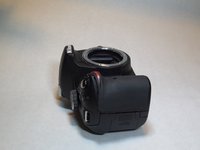
Draai de camera zodat de onderkant naar je toe wijst.
-
Zoek de 6 schroeven op en verwijder deze met de kruiskopschroevendraaier #00.
-
-
-
-
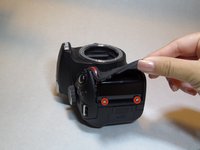
Zoek de rubberen grip direct onder de ontspanknop.
-
Til de rubberen grip op met een plastic openingsgereedschap om de twee schroeven eronder te vinden en te verwijderen.
-
-
-
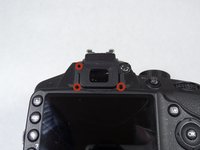
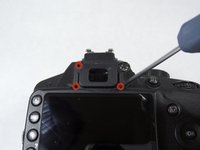
Zoek de 4 schroeven bij het oculair boven het LCD-scherm en verwijder ze. De 4e schroef zit verborgen achter het +/- label, dat voorzichtig met een naald kan worden verwijderd.
-
-
-
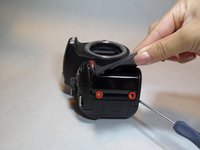
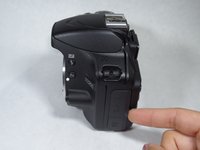
Zoek het (kabel)aansluitingklepje links van het LCD-scherm.
-
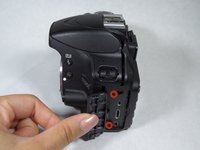
Maak het (kabel)aansluitingklepje los om twee schroeven bloot te leggen.
-
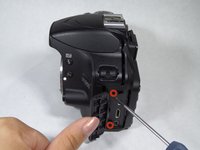
Zoek en verwijder de twee schroeven.
-
-
-
Trek voorzichtig aan het achterste gedeelte van de camera, beginnend aan de linkerkant van het LCD-scherm, en doe daarna hetzelfde aan de andere kant van de camera.
-
-
-
Wip voorzichtig de 5 bruine plastic (kabel)aansluitingen omhoog met het plastic Openingsgereedschap.
-
-
-
Zoek de 4 schroeven op het moederbord en verwijder ze.
-
Plaats een vinger onder het moederbord om het voorzichtig op te tillen.
-
Til het moederbord voorzichtig van de camera en u bent klaar!
-
-








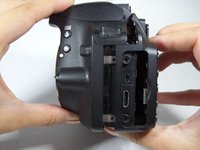
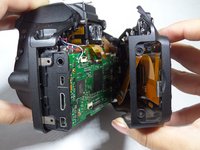
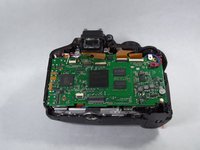


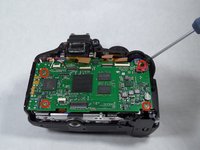
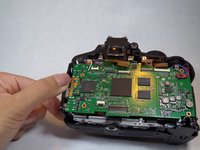
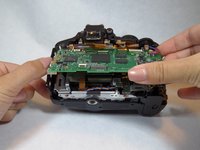
Volg deze instructies in omgekeerde volgorde om uw apparaat weer in elkaar te zetten. Let op: er zitten twee metalen interferentiebeveiligingen over het bord die losgesoldeerd moeten worden, evenals de 4 draden die linksboven op het bord worden getoond; deze moeten worden losgesoldeerd en op het nieuwe bord weer worden vastgesoldeerd.
Annuleren: ik heb deze handleiding niet afgemaakt.
27 andere personen hebben deze handleiding voltooid.

Team

CSU Fullerton, Team 1-3, Bruce Fall 2014 Lid van CSU Fullerton, Team 1-3, Bruce Fall 2014
CSUF-BRUCE-F14S1G3
6 Leden
48 handleidingen geschreven
19Gids Commentaar
Some D3200s must be built differently than others.
To get the back off of my D3200, there are two more screws that had to come out, not mentioned in this guide, and both well-hidden.
One is in the viewfinder focus adjustment knob,. The sticker has to be pried off of this knob, exposing that screw. The other is under the rubber trim piece between the “Command Dial” and the “Multi-Selector”.
The pictures here show the viewfinder focus adjustment knob still in place with the back removed. On mine, it's part of the back, and the back doesn't come off without that knob coming off with it.
This guide doesn't say what to do about the four wires coming off the motherboard, near the upper left corner. There's no connector, and if one were going to remove and replace the motherboard, I can see no option other than to desolder and resolder them, but that would involve equipment and skills that I don't think this guide intends to assume that the reader has.
Hi
Got the motherboard off and after lots of screws and a bit of a bend on the subframe changed filter on sensor to 720 IF.put it back together and it works!!!!
However the four wires i snipped intending to solder a small length on them to join but did not bother as was fairly sure they went to speaker and mic both are very poor quality and not needed for my intended use (IR).
after you snip the wires on the motherboard and turn it over there is a large ribbon connector to flip open then you can remove the board.
I know this is and old post, but would you possibly know if the D3300 worked the same? Would I be able to replace the motherboard on that one by using this guide? My SD card slot broke, and I needed to replace it.
Also, my D3200 has some metal shielding on and around the motherboard,not shown on this guide.
I think they are all much the same (3200) Same problem here plus I am not sure how you remove the the ribbon under the motherboard,you certainly cannot remove the ribbon without removing the four wires.
time for the soldering iron me thinks!!!!!
