Ga door naar hoofdinhoud
Word lid van de reparatiegemeenschap - Account aanmaken

NeuTab N7 Pro Battery Replacement

Wat je nodig hebt

  1. NeuTab N7 Pro Battery Replacement, Battery: stap 1, afbeelding 1 van 1
    • Power off your device before beginning disassembly.

    • Insert plastic opening tool and pry back case away from the device, slowly moving the plastic opening tool along the device.

    Vraag FixBot

    Voeg opmerking toe

  2. NeuTab N7 Pro Battery Replacement: stap 2, afbeelding 1 van 1
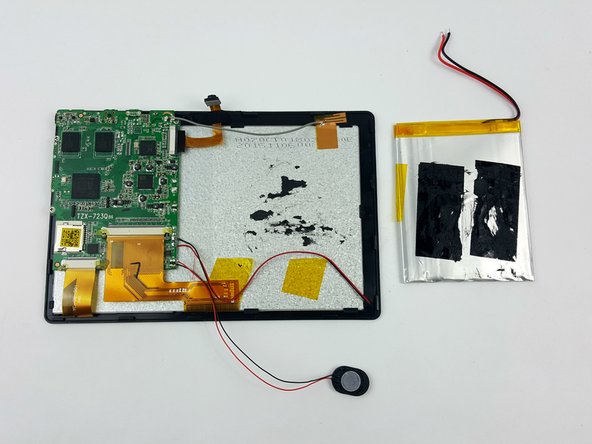
    • Follow the red and black wires from the battery to where they are soldered to the motherboard.

    • Warning: Use caution when handling a soldering iron to avoid injury or damage.

    • Use a soldering iron to separate the positive and negative wires from the motherboard.

    • For a complete guide on how to solder, click here.

    Vraag FixBot

    Voeg opmerking toe

  3. NeuTab N7 Pro Battery Replacement: stap 3, afbeelding 1 van 2 NeuTab N7 Pro Battery Replacement: stap 3, afbeelding 2 van 2
    • Insert plastic spudger under the battery and slide back and forth, separating the battery from the case.

    Vraag FixBot

    Voeg opmerking toe

Conclusie

To reassemble your device, follow these instructions in reverse order.

Annuleren: ik heb deze handleiding niet afgemaakt.

3 andere personen hebben deze handleiding voltooid.

Eric Fiske

Lid sinds: 02/09/16

430 Reputatie

2 handleidingen geschreven

Team

USF Tampa, Team 7-1, Cheng Spring 2016 Lid van USF Tampa, Team 7-1, Cheng Spring 2016

USFT-CHENG-S16S7G1

3 Leden

10 handleidingen geschreven

0Gids Commentaar

Voeg opmerking toe

Weergavestatistieken:

Afgelopen 24 uren: 1

Afgelopen 7 dagen: 7

Afgelopen 30 dagen: 26

Altijd: 2,278