Ga door naar hoofdinhoud
Word lid van de reparatiegemeenschap - Account aanmaken

Logitech Webcam Pro 9000 Motherboard Replacement

Wat je nodig hebt

  1. Logitech Webcam Pro 9000 Motherboard Replacement, Front and Back Cover: stap 1, afbeelding 1 van 2 Logitech Webcam Pro 9000 Motherboard Replacement, Front and Back Cover: stap 1, afbeelding 2 van 2
    • Remove the two 8 mm Phillips #0 screws on the back cover.

    • The motherboard connects the two covers together. DO NOT separate the two yet.

    • There is a button that loosens as the Phillips screws are removed. Don't be alarmed if it falls out.

    Vraag FixBot

    Voeg opmerking toe

  2. Logitech Webcam Pro 9000 Motherboard Replacement: stap 2, afbeelding 1 van 2 Logitech Webcam Pro 9000 Motherboard Replacement: stap 2, afbeelding 2 van 2
    • Remove the four 6mm Phillips #0 screws connecting the motherboard and front cover.

    • DO NOT detach the wire connecting the motherboard to the front cover.

    Vraag FixBot

    Voeg opmerking toe

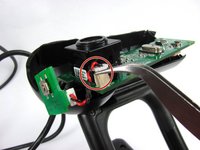
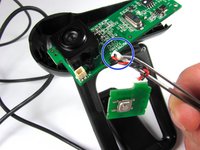
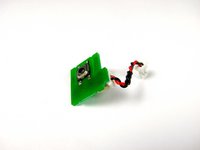
  3. Logitech Webcam Pro 9000 Motherboard Replacement, Snapshot button: stap 3, afbeelding 1 van 3 Logitech Webcam Pro 9000 Motherboard Replacement, Snapshot button: stap 3, afbeelding 2 van 3 Logitech Webcam Pro 9000 Motherboard Replacement, Snapshot button: stap 3, afbeelding 3 van 3
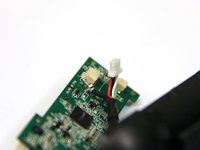
    • Grasp the white connector attaching the button chip wire to the motherboard.

    • Grab between the tabs and the socket.

    • Wiggle the connector back and forth to remove it from the connection box

    • Do not worry if you detach the red and black wire connection on the power button.

    Vraag FixBot

    Voeg opmerking toe

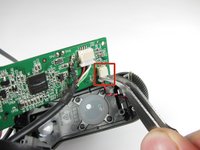
  4. Logitech Webcam Pro 9000 Motherboard Replacement, Microphone Connection: stap 4, afbeelding 1 van 2 Logitech Webcam Pro 9000 Motherboard Replacement, Microphone Connection: stap 4, afbeelding 2 van 2
    • Grasp the white wire connector between the tabs and the socket.

    • Wiggle the connector back and forth to remove the front cover from the motherboard.

    Vraag FixBot

    Voeg opmerking toe

  5. Logitech Webcam Pro 9000 Motherboard Replacement, USB Connection: stap 5, afbeelding 1 van 2 Logitech Webcam Pro 9000 Motherboard Replacement, USB Connection: stap 5, afbeelding 2 van 2
    Gereedschap gebruikt in deze stap:
    Tweezers
    $4.99
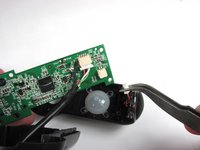
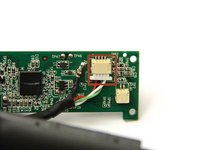
    • Use tweezers to grasp the white wire connector on the back of the motherboard.

    • Wiggle the connector back and forth to remove it from the socket.

    Vraag FixBot

    Voeg opmerking toe

  6. Logitech Webcam Pro 9000 Motherboard Replacement: stap 6, afbeelding 1 van 2 Logitech Webcam Pro 9000 Motherboard Replacement: stap 6, afbeelding 2 van 2
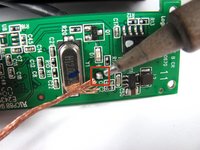
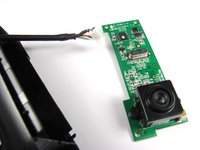
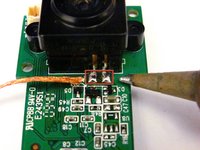
    • Desolder the joint on the front of the motherboard to completely detach the USB cable.

    • Follow this link to learn how to properly solder and desolder your parts.

    Vraag FixBot

    Voeg opmerking toe

  7. Logitech Webcam Pro 9000 Motherboard Replacement, Camera: stap 7, afbeelding 1 van 1
    • Remove the two 8mm Phillips#0 screws on the back of the motherboard.

    Vraag FixBot

    Voeg opmerking toe

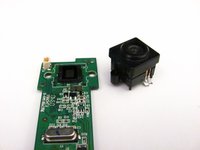
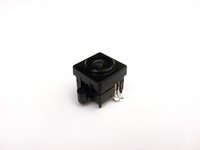
  8. Logitech Webcam Pro 9000 Motherboard Replacement: stap 8, afbeelding 1 van 3 Logitech Webcam Pro 9000 Motherboard Replacement: stap 8, afbeelding 2 van 3 Logitech Webcam Pro 9000 Motherboard Replacement: stap 8, afbeelding 3 van 3
    • Remove the camera from the motherboard by desoldering the two connections as shown.

    • Follow this link to learn how to properly solder and desolder your parts.

    Vraag FixBot

    Voeg opmerking toe

Conclusie

To reassemble your device, follow these instructions in reverse order.

Annuleren: ik heb deze handleiding niet afgemaakt.

Één andere persoon heeft deze handleiding voltooid.

Cory Davis

Lid sinds: 04/14/13

236 Reputatie

4 handleidingen geschreven

Team

Cal Poly, Team 12-34, Amido Spring 2013 Lid van Cal Poly, Team 12-34, Amido Spring 2013

CPSU-AMIDO-S13S12G34

4 Leden

16 handleidingen geschreven

0Gids Commentaar

Voeg opmerking toe

Weergavestatistieken:

Afgelopen 24 uren: 1

Afgelopen 7 dagen: 7

Afgelopen 30 dagen: 47

Altijd: 2,597