Ga door naar hoofdinhoud
Word lid van de reparatiegemeenschap - Account aanmaken

Logitech Harmony Smart Control Battery Contact Replacement

Wat je nodig hebt

    1. Logitech Harmony Smart Control Battery Contact  Replacement, Battery Contact: stap 1, afbeelding 1 van 2 Logitech Harmony Smart Control Battery Contact  Replacement, Battery Contact: stap 1, afbeelding 2 van 2
      • Use both thumbs to slide the grooved cover off of the remote

      • Once the cover is off, remove the battery.

      Vraag FixBot

      Voeg opmerking toe

    2. Logitech Harmony Smart Control Battery Contact  Replacement: stap 2, afbeelding 1 van 2 Logitech Harmony Smart Control Battery Contact  Replacement: stap 2, afbeelding 2 van 2
      • Locate both of the 4mm Phillips screws on the remote. Using the PH00 bit, remove the screws.

      Vraag FixBot

      Voeg opmerking toe

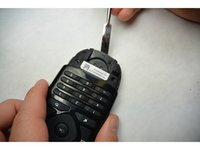
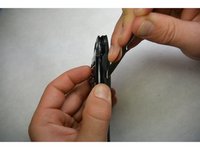
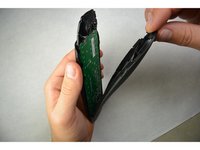
    3. Logitech Harmony Smart Control Battery Contact  Replacement: stap 3, afbeelding 1 van 3 Logitech Harmony Smart Control Battery Contact  Replacement: stap 3, afbeelding 2 van 3 Logitech Harmony Smart Control Battery Contact  Replacement: stap 3, afbeelding 3 van 3
      • Use a flat screwdriver or a prying tool to split the remote and separate the two pieces. Start from the bottom.

      Vraag FixBot

      Voeg opmerking toe

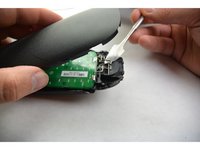
    4. Logitech Harmony Smart Control Battery Contact  Replacement: stap 4, afbeelding 1 van 2 Logitech Harmony Smart Control Battery Contact  Replacement: stap 4, afbeelding 2 van 2
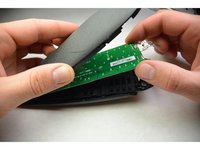
      • Using the metal piece from the housing, pry the circuit board upwards. Do not disconnect it from the board.

      • Slide the circuit board out from the housing .

      Vraag FixBot

      Voeg opmerking toe

    5. Logitech Harmony Smart Control Battery Contact  Replacement: stap 5, afbeelding 1 van 1
      • Locate the battery contacts on the circuit board.

      • Using a soldering iron, remove the old solder and the battery contacts. Install new battery contacts and solder them.

      Vraag FixBot

      Voeg opmerking toe

Conclusie

To reassemble your device, follow these instructions in reverse order.

Annuleren: ik heb deze handleiding niet afgemaakt.

Josh Hendricks

Lid sinds: 09/17/15

464 Reputatie

4 handleidingen geschreven

Team

IUPUI, Team 3-2, Harley Fall 2015 Lid van IUPUI, Team 3-2, Harley Fall 2015

IUPUI-HARLEY-F15S3G2

4 Leden

15 handleidingen geschreven

1Gids Commentaar

do you know where can i buy the springs?

IOANNIS KARAKOGLOU - Antwoord Deel

Voeg opmerking toe

Weergavestatistieken:

Afgelopen 24 uren: 0

Afgelopen 7 dagen: 4

Afgelopen 30 dagen: 24

Altijd: 5,350