Ga door naar hoofdinhoud
Word lid van de reparatiegemeenschap - Account aanmaken

HP Windows Mixed Reality Controllers TPC-Q044 Joystick Switch Replacement

Wat je nodig hebt

    1. HP Windows Mixed Reality Controllers TPC-Q044 Joystick Switch Replacement, Batteries: stap 1, afbeelding 1 van 3 HP Windows Mixed Reality Controllers TPC-Q044 Joystick Switch Replacement, Batteries: stap 1, afbeelding 2 van 3 HP Windows Mixed Reality Controllers TPC-Q044 Joystick Switch Replacement, Batteries: stap 1, afbeelding 3 van 3
      • Slide the rear compartment cover in the direction of the arrow.

      • If replacing batteries, ensure the (+) and (-) on the battery match the (+) and (-) labeled in the battery compartment.

      Vraag FixBot

      Voeg opmerking toe

    1. HP Windows Mixed Reality Controllers TPC-Q044 Joystick Switch Replacement, Shell: stap 2, afbeelding 1 van 2 HP Windows Mixed Reality Controllers TPC-Q044 Joystick Switch Replacement, Shell: stap 2, afbeelding 2 van 2
      • Remove the four 4mm screws using a Phillips #00 screwdriver.

      Vraag FixBot

      Voeg opmerking toe

    2. HP Windows Mixed Reality Controllers TPC-Q044 Joystick Switch Replacement: stap 3, afbeelding 1 van 3 HP Windows Mixed Reality Controllers TPC-Q044 Joystick Switch Replacement: stap 3, afbeelding 2 van 3 HP Windows Mixed Reality Controllers TPC-Q044 Joystick Switch Replacement: stap 3, afbeelding 3 van 3
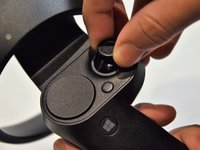
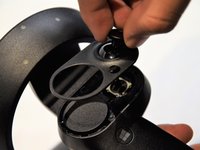
      • Grip the main body and pull the joystick outwards until the entire front panel pops off.

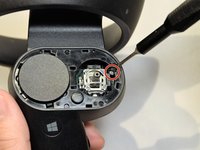
      • Remove the 6mm screw in the corner of the joystick well using a Phillips #00 screwdriver.

      Vraag FixBot

      Voeg opmerking toe

    3. HP Windows Mixed Reality Controllers TPC-Q044 Joystick Switch Replacement: stap 4, afbeelding 1 van 2 HP Windows Mixed Reality Controllers TPC-Q044 Joystick Switch Replacement: stap 4, afbeelding 2 van 2
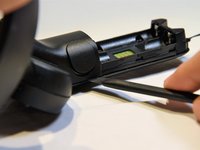
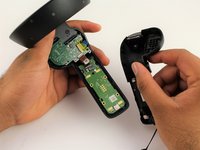
      • Use a spudger to pry apart the two halves of the assembly.

      • Work slowly, prying a small section at a time until the halves are completely separated.

      Vraag FixBot

      Voeg opmerking toe

    1. HP Windows Mixed Reality Controllers TPC-Q044 Joystick Switch Replacement, Small Circuit Board: stap 5, afbeelding 1 van 2 HP Windows Mixed Reality Controllers TPC-Q044 Joystick Switch Replacement, Small Circuit Board: stap 5, afbeelding 2 van 2
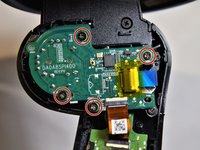
      • Using a Phillips #00 screwdriver, remove the four 4mm screws located on the joystick circuit board underneath the top half of the controller.

      Vraag FixBot

      Voeg opmerking toe

    2. HP Windows Mixed Reality Controllers TPC-Q044 Joystick Switch Replacement: stap 6, afbeelding 1 van 3 HP Windows Mixed Reality Controllers TPC-Q044 Joystick Switch Replacement: stap 6, afbeelding 2 van 3 HP Windows Mixed Reality Controllers TPC-Q044 Joystick Switch Replacement: stap 6, afbeelding 3 van 3
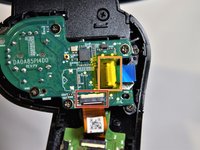
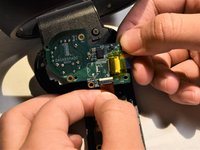
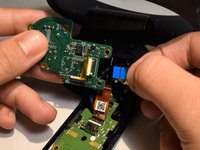
      • Remove the orange flat cable by pulling the orange tab parallel to the circuit board.

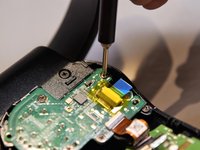
      • Release the blue flat cable by lifting up the white latch with a spudger.

      Vraag FixBot

      Voeg opmerking toe

    1. HP Windows Mixed Reality Controllers TPC-Q044 Joystick Switch Replacement, Joystick Switch: stap 7, afbeelding 1 van 2 HP Windows Mixed Reality Controllers TPC-Q044 Joystick Switch Replacement, Joystick Switch: stap 7, afbeelding 2 van 2
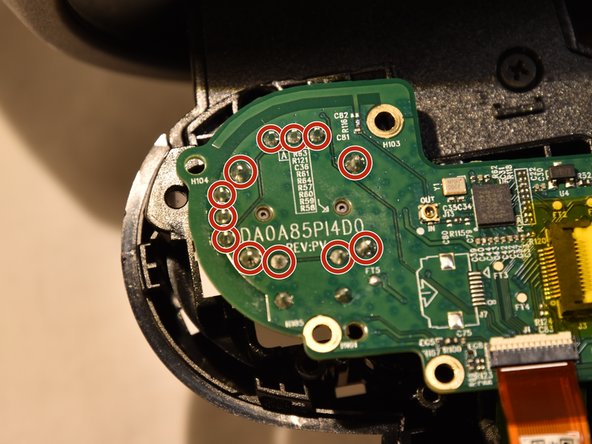
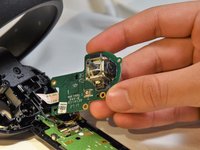
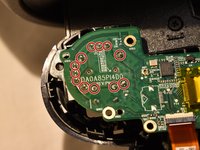
      • The joystick controller is soldered directly to the circuit board. You can find instructions for removing soldered components here.

      • The joystick controller is secured by 12 solder connections. Once these have been desoldered, the controller can be removed.

      Vraag FixBot

      Voeg opmerking toe

Conclusie

To reassemble your device, follow these instructions in reverse order.

Annuleren: ik heb deze handleiding niet afgemaakt.

3 andere personen hebben deze handleiding voltooid.

Clement Cheung

Lid sinds: 01/24/19

643 Reputatie

5 handleidingen geschreven

Team

Cal Poly, Team S18-G5, White Winter 2019 Lid van Cal Poly, Team S18-G5, White Winter 2019

CPSU-WHITE-W19S18G5

2 Leden

20 handleidingen geschreven

3Gids Commentaar

You can solder replacement Xbox One analog sticks right? I have some stick drift and can’t test this until my university reopens, but when it does I want to try fixing it.

Edit: I have the Dell controllers but they seem identical to the HP ones in this guide.

Vincent - Antwoord Deel

I think this might be the stick: https://www.mouser.com/ProductDetail/Alp...

Alps RKJXV 23 degree 10K ohm multi-directional switches

I haven’t soldered it yet so do not take my word as fact, it just looks right.

Vincent - Antwoord Deel

I have one issue post doing this. I reaoldered everything. The multimeter doesn't read OL anywhere BUT the controller will not power on when reassembled.

Layrinn - Antwoord Deel

Voeg opmerking toe

Weergavestatistieken:

Afgelopen 24 uren: 0

Afgelopen 7 dagen: 8

Afgelopen 30 dagen: 24

Altijd: 1,775