Inleiding
This guide is going to show you an easy way to replace the turning band in you Crosley CR42. So you can enjoy your LP sooner rather than later.
Wat je nodig hebt
-
-
-
Check troubleshooting wiki to make sure you aren't doing way more work than you have to!
-
If you believe the band may be broken or out of place, start by unplugging the record player.
 Vraag FixBot
-
-
-
Make sure the needle is in its resting position off to the side.
-
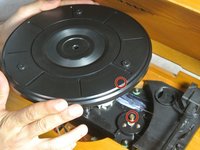
Gently remove the turntable from the device by lifting it directly upward.
-
-
-
Find the band, it may have fallen into the inside of the record player as you removed the turntable.
-
Inspect your band for any tears, rips, or obvious signs of stretching.
-
-
-
-
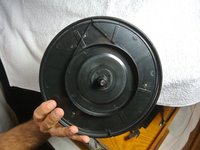
Flip the turntable over.
-
Locate the notch on the back side of the turntable.
-
The notch will be on the outside edge of the turntable.
-
-
-
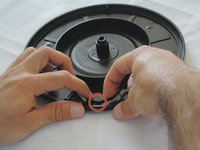
Wrap the band around the inner circle of the turntable and gently pull the band until you get to the notch.
-
Loop the band around the notch, the band should be taut.
-
-
-
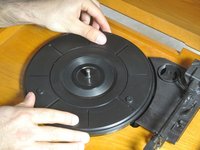
After the turntable is back on the device, gently turn it clockwise until you hear a 'click.'
-
Job well done!
-
-






Team

Cal Poly, Team 1-38, Maness Winter 2014 Lid van Cal Poly, Team 1-38, Maness Winter 2014
CPSU-MANESS-W14S1G38
4 Leden
15 handleidingen geschreven
