Deze vertaling is door een computer gegenereerd en is nog niet door iemand nagekeken. Spreek je deze taal? Bekijk het hier.
Inleiding
Deze handleiding laat zien hoe je een led op je CM Storm Quickfire Rapid-toetsenbord vervangt.
Wat je nodig hebt
-
-
-
Plaats de toetskapverwijderaar rond de toets met de defecte led en trek deze omhoog.
 Vraag FixBot
-
-
-
Gebruik een Philips #0-schroevendraaier om de schroef van 0,5 cm aan de achterkant van het toetsenbord te verwijderen.
-
-
-
-
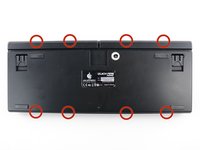
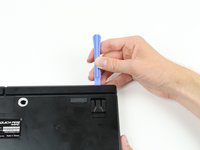
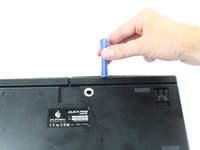
Wrik een plastic Openingsgereedschap tussen de achterplaat en de rand van het toetsenbord en schuif dit door de omcirkelde gebieden om de plastic haakjes los te maken waarmee de rand aan de achterplaat is bevestigd.
-
-
-
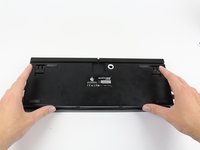
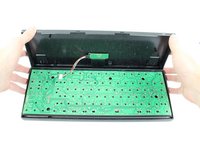
Pak het onderste paneel van het toetsenbord stevig vast en maak het voorzichtig los van de rest van het bord.
-
-
-
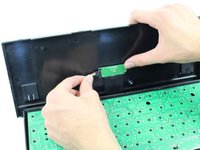
Desoldeer de verbindingen die de defecte led en schakelaar op de printplaat houden.
-
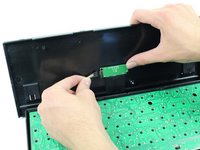
Schuif de defecte led eruit en vervang deze door de werkende led.
-
-







Volg deze instructies in omgekeerde volgorde om je apparaat weer in elkaar te zetten.
Annuleren: ik heb deze handleiding niet afgemaakt.
2 andere personen hebben deze handleiding voltooid.

Team

Cal Poly, Team 6-23, Maness Fall 2014 Lid van Cal Poly, Team 6-23, Maness Fall 2014
CPSU-MANESS-F14S6G23
4 Leden
72 handleidingen geschreven
4Gids Commentaar
What kind of leds is it? Where can I get them?
3 mm white leds. I don’t know what voltage or effect they should be at though. I’m guessing 10-20 mA at around 2V, but mind you I’m just guessing… :(
So I'm having an issue with the LED backlight -- not a single LED, I mean the entire backlight. The FN key and the windows lock key (f12) light up when they are supposed to, but the function keys that are supposed to toggle on and off the rest of the backlight no longer do so (f1-f4 keys). Yet the f1-f4 keys clearly work, for instance, pressing f1 brings up the Chrome help menu, as intended. Any idea whether this is fixable, or how? I assume there is some circuit that controls the toggling on/off of the backlight for most of the keys, so maybe an issue with that?
Thanks for any suggestions.
