Inleiding
This guide will show you how to replace the Asus ZenPad Z8 Tablet's back-camera. If you have followed all of the other steps on the troubleshooting guide and they've failed to solve the problem, replacing the camera may be your best bet.
Wat je nodig hebt
-
-
-
Turn off the power. The tablet has a hard power switch located on the right side.
 Vraag FixBot
-
-
-
Unscrew the screws located on the bottom and use the prying tool to open the tablet.
-
-
-
-
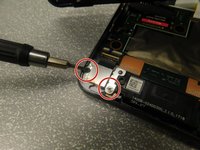
Unscrew the two screws that hold the camera onto the back cover. Each screw is located on either side of the camera.
-
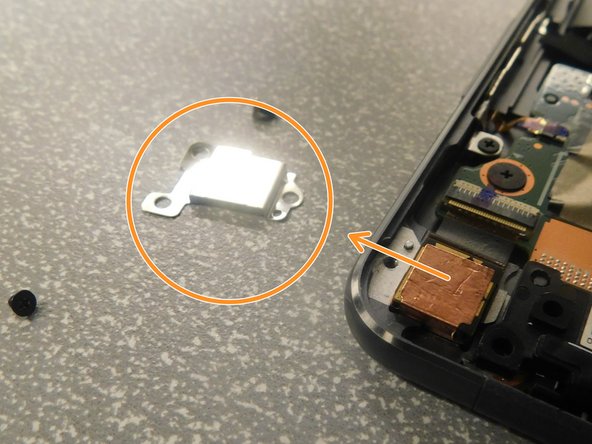
Remove the camera cover piece.
-
-
-
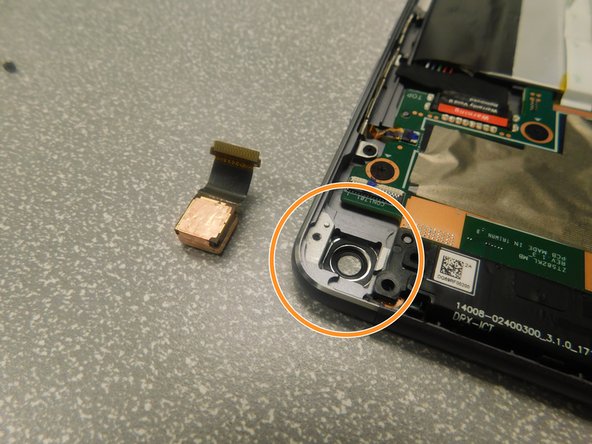
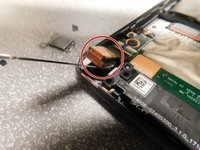
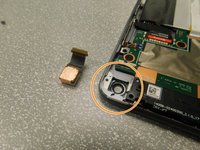
Use a prying tool to separate the camera, then pull to completely remove it.
-
Reinstall the new camera, camera cover, and screws.
-
-



To reassemble your device, follow these instructions in reverse order.
Annuleren: ik heb deze handleiding niet afgemaakt.
Één andere persoon heeft deze handleiding voltooid.

Team

Gateway, Team S1-G4, Saknee Spring 2019 Lid van Gateway, Team S1-G4, Saknee Spring 2019
GCC-SAKNEE-S19S1G4
4 Leden
1 handleiding geschreven
