Inleiding
This guide covers the process of replacing a worn-down or faulty battery in the Asus Q534U laptop computer.
Laptop batteries degrade with use, so if your laptop fails to hold a sufficient charge and has a high charge cycle count, you may be able to restore your computer by replacing the battery.
Wat je nodig hebt
-
-
Use a T5 screwdriver to remove all 10 screws that secure the bottom cover.
-
Pull off the back cover of the laptop.
 Vraag FixBot
-
-
-
Wedge an opening tool under the battery's bundled cable connector, and gently pry the connector up and to disconnect the battery.
-
-
-
-
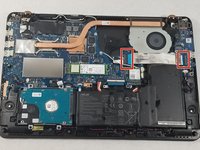
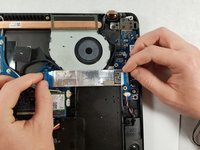
Lift up the black tab next to the silver ribbon cable.
-
Pull lightly on the blue tabs until the silver cable is free.
-
-
-
Use a Phillips #00 screwdriver to remove the 5 marked screws.
-
Gently remove the battery.
-



To reassemble your device, follow these instructions in reverse order.
Annuleren: ik heb deze handleiding niet afgemaakt.
18 andere personen hebben deze handleiding voltooid.

7Gids Commentaar
Is there a website link where I can get a replacement battery for ASUS Q534 UXK ? Model year 2016.
Can this laptop be used without a battery?
Thomas, yes. I found that out by mistake when I didn’t fully connect/lock the new cable and had to go back in and reconnect it. Worked as usual on AC power.
mmedina - thanks for the step by step. Worked like a champ for me.
Dear IFixIt,
Thank you for this straightforward approach to changing the battery on my ASUS Laptop Model Q534UX BHI7T19. The first attempt was 100% successful!! I can say that opening the laptop base was a little scary, but your step-by-step details removed enough fear of me screwing something up that I went for it!! Having the right tools on hand went a long way to getting fast results and great outcome. I highly advise viewers to purchase a tool set to remove the tiny screws and a plastic pry tool set (the one I purchased from Amazon was only $18 and included both) to make this task almost effortless. Without your guidance, I never would have attempted this project. Thanks again!!
Do you have similar guidance for changing out the hard drives on the above ASUS??
Hi Sheri, thanks for your message! We’re so happy this guide was helpful. We have a hard drive guide as well. Check out the Asus Q534U device page, there are several other guides in addition to the battery guide. Thanks again!
