Ga door naar hoofdinhoud
Word lid van de reparatiegemeenschap - Account aanmaken

Apple TV 3rd Generation Status LED Replacement

Wat je nodig hebt

    1. Apple TV 3rd Generation Status LED Replacement, Snap-on Base: stap 1, afbeelding 1 van 1
      • As the device base is firmly clipped, insert two metal spudgers to gently release the first clips.

      Vraag FixBot

      Voeg opmerking toe

    2. Apple TV 3rd Generation Status LED Replacement: stap 2, afbeelding 1 van 1
      • Continue releasing the last plastic clips with your hands taking care not to break any of the plastic elements attached to the base.

      Vraag FixBot

      Voeg opmerking toe

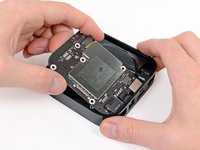
    1. Apple TV 3rd Generation Status LED Replacement, Logic Board: stap 3, afbeelding 1 van 1
      • Use a philips screwdriver to remove the 5 screws securing the metal heat sink. On Rev A (A1469) you need a T7 srewdriver

      Vraag FixBot

      Voeg opmerking toe

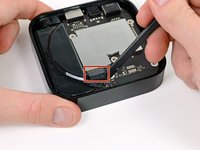
    2. Apple TV 3rd Generation Status LED Replacement: stap 4, afbeelding 1 van 2 Apple TV 3rd Generation Status LED Replacement: stap 4, afbeelding 2 van 2
      • Disconnect the power supply connector from the logic board with a spudger.

      Vraag FixBot

      Voeg opmerking toe

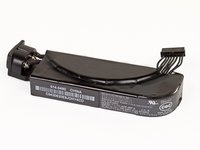
    1. Apple TV 3rd Generation Status LED Replacement, Power Supply: stap 5, afbeelding 1 van 2 Apple TV 3rd Generation Status LED Replacement, Power Supply: stap 5, afbeelding 2 van 2
      • Before you remove completely the power supply, unscrew the T6 screws on each side of the socket.

      • You may now be able to remove the power supply with a spudger.

      • Do not pull the wires to remove the power supply. The connector is fragile.

      • The rating of the power supply is 3.4V at 1.75A, which is identical to the 2nd Gen Apple TV's 5.95 watts.

      Vraag FixBot

      Voeg opmerking toe

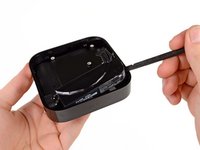
    1. Apple TV 3rd Generation Status LED Replacement, Status LED: stap 6, afbeelding 1 van 2 Apple TV 3rd Generation Status LED Replacement, Status LED: stap 6, afbeelding 2 van 2
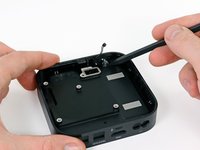
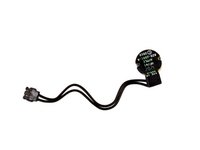
      • The last remaining part in the Apple TV is the status LED. You can remove this part with your plastic spudger.

      Vraag FixBot

      Voeg opmerking toe

Conclusie

To reassemble your device, follow these instructions in reverse order.

Annuleren: ik heb deze handleiding niet afgemaakt.

4 andere personen hebben deze handleiding voltooid.

Vincent Monteil

Lid sinds: 07/06/13

7.031 Reputatie

19 handleidingen geschreven

1Gids Commentaar

Step 2: “caring not to break….”. Thanks, great guide. David

David Apimerika - Antwoord Deel

Voeg opmerking toe

Weergavestatistieken:

Afgelopen 24 uren: 0

Afgelopen 7 dagen: 12

Afgelopen 30 dagen: 52

Altijd: 3,745