Ga door naar hoofdinhoud
Word lid van de reparatiegemeenschap - Account aanmaken

Anker 2.4G Wireless Mouse Sensor Replacement

Wat je nodig hebt

  1. Anker 2.4G Wireless Mouse Sensor Replacement, Sensor: stap 1, afbeelding 1 van 1
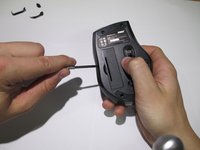
    • Using a spudger, carefully pry off the stickers to reveal the location of four screws.

    Vraag FixBot

    Voeg opmerking toe

  2. Anker 2.4G Wireless Mouse Sensor Replacement: stap 2, afbeelding 1 van 1
    • Using your Phillips screwdriver, remove the four screws.

    Vraag FixBot

    Voeg opmerking toe

  3. Anker 2.4G Wireless Mouse Sensor Replacement: stap 3, afbeelding 1 van 2 Anker 2.4G Wireless Mouse Sensor Replacement: stap 3, afbeelding 2 van 2
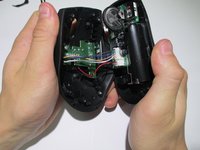
    • Using a spudger, carefully pry apart the upper and lower housing of the mouse.

    • Make sure you are not using too much pressure, as you could warp the plastic.

    Vraag FixBot

    Voeg opmerking toe

  4. Anker 2.4G Wireless Mouse Sensor Replacement: stap 4, afbeelding 1 van 1
    • Disconnect the wires from the white crimping headers.

    • Pull as far up on the wire as possible, but be careful to avoid ripping the wires.

    Vraag FixBot

    Voeg opmerking toe

  5. Anker 2.4G Wireless Mouse Sensor Replacement: stap 5, afbeelding 1 van 1
    • Remove the scroll wheel from the motherboard by pulling it to the left.

    • This may take some force to remove. Make sure to pull it parallel to the board, instead of perpendicularly.

    Vraag FixBot

    Voeg opmerking toe

  6. Anker 2.4G Wireless Mouse Sensor Replacement: stap 6, afbeelding 1 van 1
    Gereedschap gebruikt in deze stap:
    Anti-Static Wrist Strap
    $7.95
    • Gently lift the motherboard away from the plastic housing.

    • Use an iFixit grounding strap or another antistatic measure to prevent sensitive components from electrostatic discharge during this step.

    Vraag FixBot

    Voeg opmerking toe

  7. Anker 2.4G Wireless Mouse Sensor Replacement: stap 7, afbeelding 1 van 1
    • Desolder the six wires holding the I.C. in place to complete the sensor change.

    • Replace the broken sensor with the new sensor and solder back in place.

    • Make sure none of your solder connections are bridged as this can cause serious damage to your mouse.

    Vraag FixBot

    Voeg opmerking toe

Conclusie

To reassemble your device, follow these instructions in reverse order.

Annuleren: ik heb deze handleiding niet afgemaakt.

2 andere personen hebben deze handleiding voltooid.

Ryan

Lid sinds: 01/23/14

152 Reputatie

1 Handleiding geschreven

Team

Cal Poly, Team 1-39, Maness Winter 2014 Lid van Cal Poly, Team 1-39, Maness Winter 2014

CPSU-MANESS-W14S1G39

4 Leden

16 handleidingen geschreven

0Gids Commentaar

Voeg opmerking toe

Weergavestatistieken:

Afgelopen 24 uren: 2

Afgelopen 7 dagen: 17

Afgelopen 30 dagen: 72

Altijd: 8,428