Ga door naar hoofdinhoud
Word lid van de reparatiegemeenschap - Account aanmaken

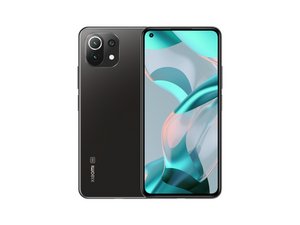
De Xiaomi Mi 11 Lite 5G NE is een mid-range smartphone van Xiaomi die in september 2021 werd uitgebracht. Het toestel heeft een 6,55" AMOLED-display, een 64 MP hoofdcamera, een vingerafdruksensor aan de zijkant, een 4250 mAh-batterij en draait op een Snapdragon 778G.

How to reconnect screen cable

My xiaomi 11 lite 5g ne sometimes the screen went black and showed green vertical lines. When I pressed near the front camera, the screen worked again normally with no issues in touch or colors.

But after the last time my phone fell, the screen turned off completely. I tried pressing the same spot (this time with more force), and the screen worked again for about 2 minutes, then went black permanently. Now it doesn’t respond no matter how much I press.

Could this mean the display cable got disconnected? If yes, how can I fix this problem?

Beantwoord! Bekijk het antwoord Dit probleem heb ik ook

Is dit een goede vraag?

Score 0
Voeg een opmerking toe

1 Antwoord

Gekozen oplossing

This sounds like a problem with the delicate connections between the glass that the display circuits are printed on and the flex cable leading to the motherboard. Unfortunately, those connections are not considered repairable (at least, not without equipment costing several thousand dollars), so the only real solution is to replace the screen.

This guide shows how to replace the screen+frame assembly on your phone.

Manuales / Xiaomi Mi 11 Lite 5G / Fullscreen - Nadie Me Llama Gallina

Was dit antwoord nuttig?

Score 2
Voeg een opmerking toe

Voeg je antwoord toe

unknown account zal eeuwig dankbaar zijn.
Weergavestatistieken:

Afgelopen 24 uren: 0

Afgelopen 7 dagen: 7

Afgelopen 30 dagen: 37

Altijd: 375