
How to replace ram
How to replace ram from on built 8 gbddr 4 to 2 16gb ddr 4 rams
Is dit een goede vraag?
Score
0

How to replace ram from on built 8 gbddr 4 to 2 16gb ddr 4 rams
Is dit een goede vraag?

Rep: 527,6k
 11
11
 400
400
 1,5k
1,5k
Here's a video that may help.
The ram module can be seen being removed at 1:20 minutes into the video. The other ram slot is above the one with the ram in it and is empty - see image below)
Always disconnect the battery cable from the motherboard as soon as the back cover has been removed, before doing anything else inside the laptop so as to prevent any electrical problems from occurring while you're working on the motherboard.
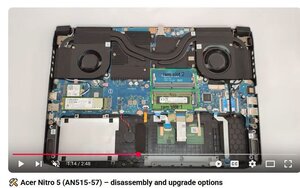
(click on image)
Was dit antwoord nuttig?
Afgelopen 24 uren: 1
Afgelopen 7 dagen: 1
Afgelopen 30 dagen: 16
Altijd: 89
