Hi Stuart,
Fortunately we're getting a certain amount of a handle on iPhone kernel panics, so we're in luck that we have information on what's going on with your phone.
We have a whole wiki article specifically about the particular kernel panic you're seeing, called "SMC Panic Assertion Failed".
iPhone SMC Panic Assertion Failed - iFixit
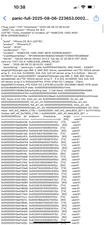
According to your panic log, the sensor array code you're seeing is 0x140000. The 0x prefix indicates the number is in hexadecimal (base 16) format. We know from experience that each sensor is represented by one binary digit, and in your case I see two digits set, the 0x100000 and the 0x040000 bits. So you have two errors, which we can decode from the wiki page.
iPhone Model
Phone 14 Pro and Pro Max
Sensor Array
0x40000
Likely Issue
Charge Port Assembly
Sensor Array
0x100000
Likely Issue
Power Button Flex Cable
Sorry to say we don't have schematic diagrams for the iPhone 14 phones, so we can't tell if there might be a common problem between the two errors. At this point your best bet would be to treat them as separate issues and go ahead and replace the charging port flex cable assembly along with the power/volume button flex cable.
It looks like iFixit hasn't had a chance to make guides for the fixes you're going to need to do, but the Spanish site Nadie Me Llama Gallina has just what you need.
Here's the guide for the charging port flex assembly.
Manuals / Apple iPhone 14 Pro Max / Charging Flex Cable - Nobody Calls Me Chicken
I checked all my usual sources but was unable to come up with a guide for the power/volume button assembly. I did find a YouTube video that seems to be well done and should get you through the procedure.
how to repair iPhone 14 pro max power volume mute switch flex - narrated walkthrough - YouTube
Obviously it's going to save you time and effort if you can figure out how to do both procedures at the same time; if you only do one, your phone is still going to be going through the three minute reboot loop since the other error is still going to be present.
I won't kid you, this is going to be one of the more difficult repairs on an iPhone since you're going to have to remove most of the internal components to get to those two flex cables. But it is indeed doable and if you've successfully replaced the screen you've got a good start on doing the rest of the jobs.
Good luck and let us know how it all turns out!
Unfortunately, the Nadie Me Llama Gallina site appears to have been taken over and taken down, so the previous link to their repair guide is no longer usable.


 157
157  87
87  154
154 
