Ga door naar hoofdinhoud

Reparatiehandleidingen voor moederborden en CPUs.

asrock a320m hdv r4.0 won't post and no beeps

one of my neighbors tossed out a gaming pc with an asrock a320m hdv r4.0 motherboard and ryzen 3 1200 cpu. they removed the graphics card, ram, cpu cooler and hard drive so i bought a cooler, a stick of ram, and an rx 550 gpu but the thing won't post but gets power and the fan on the gpu moves about an 8th of a turn. the ram was untested so i don't know if it could be bad ram or a bad cpu since the motherboard gets power and all the fans spin except the gpu fan. i'm stumped as to what's going on with it.

Beantwoord! Bekijk het antwoord Dit probleem heb ik ook

Is dit een goede vraag?

Score 0
Voeg een opmerking toe

2 Antwoorden

Gekozen oplossing

Hi @techlord

Since we don't know what you've tried, just verifying if you've done the following:

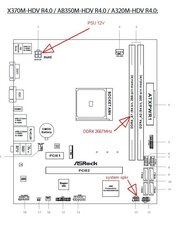
  • connected the PSU's 4 pin power cable to the 4 pin socket on the motherboard (see image below). If the PSU has an 8 pin cable you can break it in two and use just the one half.
  • connected a system speaker to the appropriate header pins on the Chassis Intrusion and speaker header pins (see image below) so that any beep codes can be heard.
  • installed the correct memory in the correct memory slot when using only one module (see image below)
  • performed a power refresh by disconnecting the power to the PSU, removing the cmos coin cell battery from the motherboard and then pressing and holding the power button operated for a full 30 seconds before releasing it. Reconnect the power to the PSU and check if the PC turns on. Doing this should reset the BIOS back to its default state in case it has become corrupted preventing a normal start. When the cmos battery is out, measure its voltage. If it is <2.5V DC replace it. Although at this stage it doesn't matter because all you want is for the PC to turn on.
Block Image

(click on image)

Was dit antwoord nuttig?

Score 1

25 opmerkingen:

i've done all that besides the speaker since there isn't one which gets me to believe my neighbor removed it or never had one in it. i'll test the coin cell battery and replace it if necessary. i'm starting to think the ram is bad since the 8 gb stick i bought was untested

door

no change and the battery is 3 volts. could it be bad ram cause the cpu seems fine since it gets pretty hot without the cooler on top of it.

door

i bought a speaker, it'll be here tomorrow and then i can check the beep code if it does beep

door

now that i have a speaker i get a 5 beep post code so i'm guessing the graphics card is dead

door

@techlord

Hopefully GPU card and not that it is a faulty PCIe slot.

If a different known working GPU card also doesn't work, check for 12V DC on pins B1, B2, B3, A2 & A3 and 3.3V on B8, B10, A9 & A10 of the PCIe slot to make sure that the slot is getting power

door

20 commentaren meer tonen

Voeg een opmerking toe

Start by removing all plug in items from the MB, except the CPU.

If you get POST beeps indicating something is missing, add that part back in and try again.

Proceed till you find something that stops the post.

If it doesn't run form the get go, then you have an issue with the MB or CPU.

Was dit antwoord nuttig?

Score 0

2 opmerkingen:

i get no beeps at all but would a dead cpu cause it or would the motherboard just not recognize the cpu causing no power

door

could it also be the ram that's bad? the ram i bought was untested so i have no idea if that is the cause of it not posting

door

Voeg een opmerking toe

Voeg je antwoord toe

Cheap gamer zal eeuwig dankbaar zijn.
Weergavestatistieken:

Afgelopen 24 uren: 0

Afgelopen 7 dagen: 5

Afgelopen 30 dagen: 61

Altijd: 535