Ga door naar hoofdinhoud

Repair and disassembly information for the Logitech MX Anywhere 3 portable wireless mouse. Released in 2020 and identified by model number 910-005986, 910-005833, 910-005987, or 910-005985.

phantom clicking in Anywhere MX 3

Same problem addressed for Anywhere MX mouse, but since this model is different, I wonder if there's another solution.

This happened after around 1.5 years of use.

My partner has the same mouse and the same problem, using a different OS, so it seems to me to be a hardware problem.

Beantwoord! Bekijk het antwoord Dit probleem heb ik ook

Is dit een goede vraag?

Score 3
4 opmerkingen

Hi @glicerico

What had you tried? had you tried replacing the micro switch?

door

No, I don't know what the micro switch is or how to replace it. Is there a guide? If you are referring to the article I linked, I planned to do it, but saw in the comments that some people tried with the Anywhere MX 3 and didn't work for them

door

Ah, I think the micro switch is the module containing the clickable part. No, I didn't replace that, I don't have the spare part.

door

After I reassembled my MX Anywhere 3 mouse, when I turn on the switch, the LED at the back of the mouse wheel only blinks red. I have already tried charging it, but the red LED keeps blinking whether it is charging (with the power switch turned on or off) or not charging (with the power switch turned on). Additionally, the LED on the Bluetooth switch, which has 3 options to connect up to 3 devices, no longer turns on. Does anyone can help me?

door

Voeg een opmerking toe

4 Antwoorden

Gekozen oplossing

Inspired in the guide for the Anywhere MX mouse, I opened the Anywhere MX 3, and although it's not built the same way, the solution was simple.

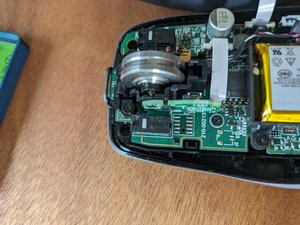
After carefully removing the 4 pads in the bottom of the mouse, then the 4 screws below them, I opened the mouse and saw the white elongated button responsible for the click.

Block Image

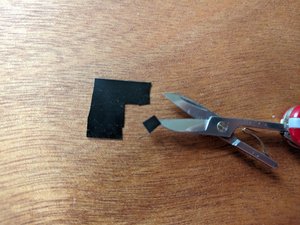
I cut 3 small squares of black electrical tape

Block Image

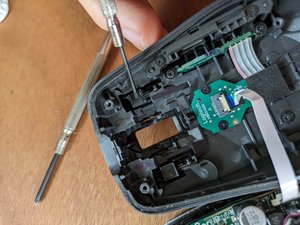
to fit the contact point with the click button on the other side, on the top of the mouse. I pasted the 3 squares one on top of the other in the place indicated by the screwdriver:

Block Image

then just reassembled the mouse cover, screws, and pads.

This fixed the problem and now my mouse works as good as new :)

Was dit antwoord nuttig?

Score 0
Voeg een opmerking toe

Yep. Same double click issue as all other Anywhere MX, appeared after 2 years of use after mandatory warranty ran out. Starting to believe this is deliberate design flaw. Has happened in 5/5 Anywhere MX mouses I have used.

Was dit antwoord nuttig?

Score 0

2 opmerkingen:

sad situation

door

After I reassembled my MX Anywhere 3 mouse, when I turn on the switch, the LED at the back of the mouse wheel only blinks red. I have already tried charging it, but the red LED keeps blinking whether it is charging (with the power switch turned on or off) or not charging (with the power switch turned on). Additionally, the LED on the Bluetooth switch, which has 3 options to connect up to 3 devices, no longer turns on. Does anyone can help me?

door

Voeg een opmerking toe

This is a problem, why this sites never advise people to replace the microswitch. Replace microswitch for left and right click and your mouse is like new again

Replace microswitch left click

Was dit antwoord nuttig?

Score 0

2 opmerkingen:

where do you get the microswitch replacements?

door

where do you get the microswitch replacements? i don't know where to look for it because I even know its name

door

Voeg een opmerking toe

After I reassembled my MX Anywhere 3 mouse, when I turn on the switch, the LED at the back of the mouse wheel only blinks red. I have already tried charging it, but the red LED keeps blinking whether it is charging (with the power switch turned on or off) or not charging (with the power switch turned on). Additionally, the LED on the Bluetooth switch, which has 3 options to connect up to 3 devices, no longer turns on. Does anyone can help me?

Was dit antwoord nuttig?

Score 0
Voeg een opmerking toe

Voeg je antwoord toe

glicerico zal eeuwig dankbaar zijn.
Weergavestatistieken:

Afgelopen 24 uren: 4

Afgelopen 7 dagen: 27

Afgelopen 30 dagen: 138

Altijd: 1,832