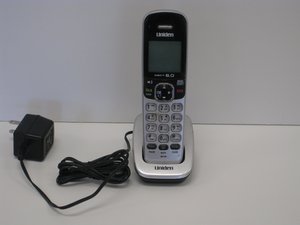

Flashing light on handset
The red light on all handsets is flashing and there is a rapid beep as dial tone. Can still ring out and receive calls . We dont have telstra message bank activated
Is dit een goede vraag?
Score
1
Rep: 23
 1
1
 1
1
The red light on all handsets is flashing and there is a rapid beep as dial tone. Can still ring out and receive calls . We dont have telstra message bank activated
Is dit een goede vraag?
Rep: 551,9k
11
425
 1,6k
1,6k
Hi @tina51 ,
What is the model number of your phone?
If it is a Uniden Dect 1760 to turn off the light:
With the phone in standby, open the menu and select Global Setup; select VMWI Reset, then select Yes.
Is the phone connected as a VOIP phone service on the NBN?
If it is then are you sure that Messagebank hasn’t been turned On? By default Telstra turns on Messagebank when on the NBN.
What do you get when you dial 101?
Was dit antwoord nuttig?
Thanks so much. Going to global set up fixed it . Yay. Thanks for thatt
dect 6,0 uniden
Unfortunately that's not the model number. It's the signalling protocol used by the phone.
The model number can be found on the bottom of the base station or sometimes under the battery in the phone
Rep: 690,6k
3,9k
1,1k
2,6k
Press and hold the FIND button about five to ten seconds until the beeping stops.
You can also try clearing all incoming calls.
Was dit antwoord nuttig?
there is no FIND button on the menu?????
How do I delete messages...and stop the explitive phone from continuously from flashing?????
Was dit antwoord nuttig?
Afgelopen 24 uren: 2
Afgelopen 7 dagen: 8
Afgelopen 30 dagen: 61
Altijd: 27,567




2 opmerkingen
where is the find button
door Rhonda Pollard
@rhondapollard
Please confirm the model number of your phone?
door jayeff