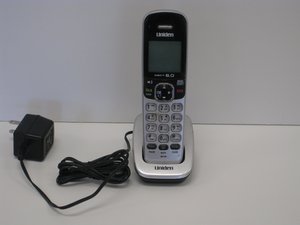

How to retrieve a message from handset
please advise how to retrieve a message from the handset
Is dit een goede vraag?
Score
2
Rep: 25
 1
1
 1
1
please advise how to retrieve a message from the handset
Is dit een goede vraag?
Rep: 553k
11
426
 1,6k
1,6k
Hi @exrae ,
Have you set up a Voicemail account with your phone service provider?
If you have then to retrieve any messages you will have to manually dial the access code so that you can access your Voicemail.
You can setup the phone so that you only have to press the Message / Mute key to retrieve any messages.
1. Press the Message / Mute key. If no voicemail mail access number has been setup the system prompts you to do that now.
2. Enter the phone service provider's voicemail access number. Press Menu / Select to set the number
3. The screen displays DONE
If you haven't set up a Voicemail account with your service provider, go to the service provider's website to find out how to set it up.
If the message light is blinking and there are no messages, you can reset it by the following action:
With the phone in standby mode, open the menu and select Global Setup, select VMWI Reset, then select Yes
Was dit antwoord nuttig?
My handset is not a cell phone. It is a base phone with 3 handsets. It uses the internet as do the computer & tv. I didn't have to go through the internet provider for my previous panasonic phone set. Is this different from that.
I have a mute/delete key.
Are you still with me?
Okay, I got it to work now. I just have to remember what I did. Thanks.
Hi... I have forgotten my Voicemail access code to retrieve Voicemail messages for my Uniden Hearing Impaired Cordless Telephone YT9040 System with Answering Machine.
Can you help?
Was dit antwoord nuttig?
How do I find the pin to listen to my messages
What is the model number of the phone?
What messages are you trying to listen to i.e. voicemail messages or messages left on the answer machine that may be in the base station of the phone?
Afgelopen 24 uren: 1
Afgelopen 7 dagen: 16
Afgelopen 30 dagen: 41
Altijd: 11,191



3 opmerkingen
There is a constant drilling sound on the line. Is this a message?
door Terri Ryan
Hi @ Terri Ryan,
Depending on your service provider, some providers use an interrupted dial tone signal (nearly like ordinary dial tone but not quite) to advise that there is a new message in your voice mailbox. You have to dial your message access code to retrieve the message.
If there are no new messages in your voicemail box, then it could also be that there is afault on the line which is causing the noise. If the noise is there all the time during a call, (both incoming and outgoing calls) and not just there when you first pick up the phone to make an outgoing call and then it stops for the rest of the call then the chances are that it is a line fault or faulty phone. To determine whether it is your particular phone that is the cause, if possible plug a corded handset into the phone socket where the cordless phone's base station is connected to and check if the "noise" is still there. If it is then there is most probably a fault on the line. If there isn't then there is a problem with your phone.
If you don't have a spare phone to test this out, ring your service provider about the problem. They should test the line. They may ask you to disconnect your phone while they test to prove whether it is the phone or the line.
door jayeff
please inform me here
door sandra naderi-nejad