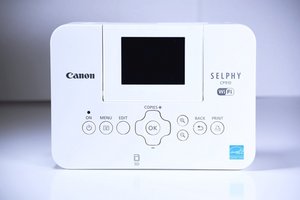

Printer still indicate low ink?
After replacing new ink cartridge, the printer still indicate low ink?
Is dit een goede vraag?
Score
20
Rep: 241
 2
2
 2
2
 1
1
After replacing new ink cartridge, the printer still indicate low ink?
Is dit een goede vraag?
Rep: 367
4
1
2
there is a little gear which can get out from it place in time. Check its position and if its moved - use a glue to hold it at place.
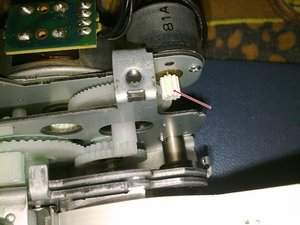
here is an example of wrong position of the gear:

If you can't figure out where is the gear in a printer - look at the bottom right corner of the picture:

If you need a replacement part:
Was dit antwoord nuttig?
You are a genius. Thanks a million!! Zach
Thanks! My wife now thinks I can fix anything. Made my day.
Thanks Alexander! That was it!
how do you get to the gear?
Thanks for that
Rep: 23
2
1
I solved this problem but printer stiil give the same message. Any ideea?
Many thanks!
Was dit antwoord nuttig?
Rep: 13
1
Just confirmed that this also applies to the Selphy CP1200 which Martin Merz previously confirmed...
The exact same gear in the exact same location..
When that little gear started to move over, pictures were starting to print out with some yellowing on the right side. This would slowly progress to the middle of the print.
Once that yellowing hit the middle of the print, then the printer would no longer detect a replacement print cartridge.
One little note to mention: When attempting this fix, slide that little gear only part way back, just a smidgen back. Use a very small dab of superglue on the very tip of a toothpick to just apply a miniscule amount of Super Glue to the shaft.. Then slide the gear back over the Super Glue all the way back to it's original position. This way you won't accidentally super glue gears to each other..
Was dit antwoord nuttig?
Rep: 13
2
Hey! I tried it on some older models (CP760 and 2x CP780). They also have this problem. Moving gear into place fixed it
Was dit antwoord nuttig?
Hi, quick question, what is the teeth count on CP760, because my was disintegrated. Thanks
I just checked it the gear has 10 teeth on the CP760. Now I'm going to check if this will fix my issue as well :-)
Rep: 13
1
Someone abandoned their CP910 because of the gear failure. I ended up getting it so I could try fixing it.
I initially slipped the gear back into place but didn't have super glue handy, so I just used it and it worked for about 8 prints before having problems again. I had superglue this time, and made sure the gear was very secure. Did 6 prints in a row and they all printed great.
There is a Youtube video that shows how to do this, but I've since realized that unlike the video, it's better to undo the three screws holding the main print engine assembly and remove it from the enclosure first after disconnecting the 2-pin fan cable. It's easier to work that way.
Was dit antwoord nuttig?
Rep: 1,4k
10
7
5
Done! The gear was still there but it was almost totally off the shaft. I applied a small dab of Gorilla glue in the gear and pressed it back on. And now I have a printer again!
Was dit antwoord nuttig?
Awesome! Stuck some gaffa tape to the metal on the far side - good for now!
Was dit antwoord nuttig?
Thanks so much. You are a genius. It’s working well now
Thank you! Worked for me as well for a newer model CP-1200 !
Was dit antwoord nuttig?
Amazing, and it works. To Canon's credit the opening and access to the printer's innards is easy and commendably simple. It is a shame that their engineers did not think to put the same thread lock paste they used for the screws securing the mechanism to the enclosure. Many thanks for giving a 12 year-old CP910 a new lease of life!
Was dit antwoord nuttig?
How do you get to the innards ??
Just one quick comment regarding CP-800 modells.
There are two different versions of gear existing !
One with 10 tooth, one with 11 tooth. Ensure to pick the right one :)
Don´t know if this is valid also for other versions...
Was dit antwoord nuttig?
Afgelopen 24 uren: 10
Afgelopen 7 dagen: 101
Afgelopen 30 dagen: 358
Altijd: 47,086












3 opmerkingen
I had the same issue with my CP1200. The solution was exactly like with the CP910 described here
door Martin Merz
Just confirmed that this also applies to the Selphy CP1200 which Martin Merz previously confirmed...
The exact same gear in the exact same location..
When that little gear started to move over, pictures were starting to print out with some yellowing on the right side. This would slowly progress to the middle of the print.
Once that yellowing hit the middle of the print, then the printer would no longer detect a replacement print cartridge.
One little note to mention: When attempting this fix, slide that little gear only part way back, just a smidgen back. Use a very small dab of superglue on the very tip of a toothpick to just apply a miniscule amount of Super Glue to the shaft.. Then slide the gear back over the Super Glue all the way back to it's original position. This way you won't accidentally super glue gears to each other..
door Andrew Jones
This worked for me for awhile, but then the low ink message started coming back. I opened it back up thinking the gear slipped again, but it was still secured in place with the glue. I ended up scraping the printer and getting a newer model. Hopefully won’t have this issue in the future.
door Alison Brauer