Wiki met studentenbijdrage
Een geweldig team van studenten van ons onderwijsprogramma heeft deze wiki gemaakt.
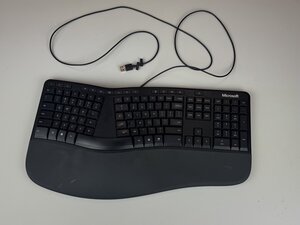
Als het indrukken van de toetsen op je Microsoft LXM-00001-toetsenbord geen reactie op het scherm oplevert, volg dan deze instructies om het probleem op te lossen.
Vuil onder de toetsen
Wanneer er vuil onder de toetsen vast komt te zitten, is de kans groot dat de toetsen blijven hangen, wat leidt tot niet-reagerende toetsen. Om dit probleem op te lossen, maak je de ruimtes tussen de toetsen schoon met een spuitbus met perslucht voor toetsenborden, microvezeldoekjes of een kleine borstel.
Vloeistof gemorst
Wanneer er vloeistof op een toetsenbord is gemorst, kunnen de toetsen niet meer reageren vanwege de incompatibiliteit van vloeistof met elektronica. Om dit te verhelpen, koppel je het toetsenbord los, droog je het overtollige vocht van het toetsenbord af en zet je het weer in elkaar.
Schade aan het toetsenbord
Als het toetsenbord is gevallen of op enige andere manier beschadigd is, kunnen de toetsen mogelijk niet meer reageren.

Team

Texas Tech, Team 2-1, Johansen Fall 2025 Lid van Texas Tech, Team 2-1, Johansen Fall 2025
TTU-JOHANSEN-F25S2G1
5 Leden
48 handleidingen geschreven

0 opmerkingen