Deze vertaling is door een computer gegenereerd en is nog niet door iemand nagekeken. Spreek je deze taal? Bekijk het hier.
Inleiding
Gaat de batterij niet lang mee? Vervang hem door een reservebatterij.
Wat je nodig hebt
-
-
-
Zorg ervoor dat de hold-schakelaar in de vergrendelde stand staat voordat je je iPod opent. De oranje balk moet zichtbaar zijn; dit geeft aan dat de hold-functie is ingeschakeld.
 Vraag FixBot
-
-
-
Steek een opening plectrum zo ver mogelijk in de naad tussen de plastic voorkant en het metalen achterpaneel, aan de rechterkant van de iPod.
-
Gebruik het opening plectrum om het plastic voorpaneel omhoog te wippen en vijf bevestigingslipjes los te maken (te zien op de derde foto).
-
Schuif het plectrum langs de rand van de iPod en ga door met wippen om de rest van de bevestigingslipjes los te maken.
-
Nadat alle vijf de lipjes aan de rechterkant los zijn, zou de behuizing gemakkelijk moeten openen.
-
-
-
Open de behuizing als een boek met de dock connector aan de bovenkant en leg het achterpaneel naast de voorkant van de iPod.
-
-
-
-
Gebruik een plastic gereedschap of je vingernagels om de oranje aansluiting koptelefoon voorzichtig los te koppelen. Zorg ervoor dat je recht omhoog trekt aan de (kabel)aansluiting, niet aan de kabel zelf.
-
-
-
-
-
Til de harde schijf met één hand op en ontkoppel voorzichtig de harde schijf-lintkabel van het logic board.
-
Til de harde schijf uit de iPod.
-
-
-
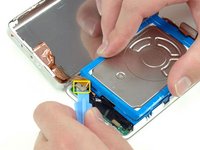
Koppel voorzichtig de witte (kabel)aansluiting van de accu los van het logic board. Zorg ervoor dat je alleen aan de (kabel)aansluiting zelf trekt en niet aan de kabels.
-
-
-
Verwijder de zwarte T6 Torx-schroef in de buurt van de kabelaansluiting van de batterij op het logic board.
-
-
-
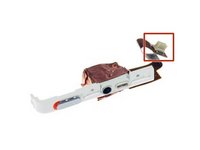
Voer de batterijkabel voorzichtig rond het uiteinde van het logic board. Wees voorzichtig dat u het logic board niet te ver omhoog trekt terwijl u de batterijkabel vrijmaakt.
-
-




Volg deze instructies in omgekeerde volgorde om uw apparaat weer in elkaar te zetten.
Annuleren: ik heb deze handleiding niet afgemaakt.
333 andere personen hebben deze handleiding voltooid.

20Gids Commentaar
If you are real careful you don't have to remove the Torx screw to get the battery out.
I found this quite easy. The tools worked great. I agree with Andy, if you push the tool into the groove, then lift or pry it up so the tip of the tool is down inside the back cover, you should be able to slide it across to pop the clips quite easily. Once you get the first two sides open, it goes quick.
I also did this without having to remove the Torx screw. It helped to lift the battery up a bit to give the wires a little slack, and then just feed them around the corner of the motherboard. Putting the new battery in, I just fed the wires around the corner, and used the opening tool to push them the final bit of the way around the corner.
My old iPod is like new now! Hours and hours of battery life, when it would previously die after 5 minutes.
Very simple and clear guide. I managed to replace the battery in the first try and it worked!
I was able to do it without disconnecting the headphone jack and without removing the Torx screw.
I found the replacement battery to be a little thicker than the original battery but there was no issue resealing the case.
