Ga door naar hoofdinhoud
Word lid van de reparatiegemeenschap - Account aanmaken

iMac Intel 27" EMC 2390 LED Driver Board Replacement

Wat je nodig hebt

  1. iMac Intel 27" EMC 2390 LED Driver Board Replacement, Glass Panel: stap 1, afbeelding 1 van 3 iMac Intel 27" EMC 2390 LED Driver Board Replacement, Glass Panel: stap 1, afbeelding 2 van 3 iMac Intel 27" EMC 2390 LED Driver Board Replacement, Glass Panel: stap 1, afbeelding 3 van 3
    Gereedschap gebruikt in deze stap:
    Heavy-Duty Suction Cups (Pair)
    $16.95
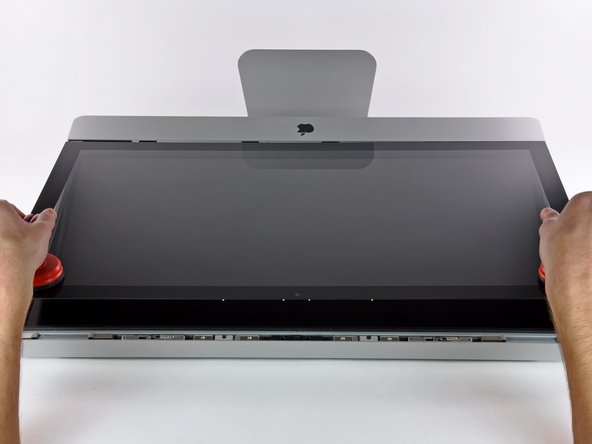
    • Stick a heavy-duty suction cup near each of the two top corners of the glass panel.

    • To attach the suction cups, first position the suction cup with the movable handle parallel to the face of the glass panel (as indicated in the second picture).

    • While lightly holding the suction cup against the glass, raise the movable handle until it is parallel with the other handle (as indicated by the third picture).

    • If your suction cups refuse to stick, try cleaning both the glass panel and the suction cup with a damp soft, lint-free cloth. (Dampen with distilled water, and if needed, an equal ratio of distilled water and white vinegar for best results.)

    • Do not use the suction cups to carry the display glass because if one of them fails to stick, you could drop the screen and break it.

    • The original iMac box makes a good place to store the glass panel. Otherwise, a padded horizontal surface, like a towel on a desk, will do nicely.

    Vraag FixBot

    Voeg opmerking toe

  2. iMac Intel 27" EMC 2390 LED Driver Board Replacement: stap 2, afbeelding 1 van 3 iMac Intel 27" EMC 2390 LED Driver Board Replacement: stap 2, afbeelding 2 van 3 iMac Intel 27" EMC 2390 LED Driver Board Replacement: stap 2, afbeelding 3 van 3
    • Gently lift the glass panel perpendicular to the face of the LCD, enough to clear the steel mounting pins attached along the underside of the top edge of the glass panel.

    • Pull the glass panel away from the lower edge of the iMac and carefully set it aside.

    • Don't use the suction cups to carry the glass panel—if either one loses its grip, the panel could fall and break.

    • After setting the glass panel down safely, be sure to release the suction cups, as the suction force over time can crack the glass.

    • During reinstallation, be sure to meticulously clean the inside of the glass panel and the face of the LCD as any dust or fingerprints trapped inside will be annoyingly visible when the machine is turned on.

    Vraag FixBot

    Voeg opmerking toe

  3. iMac Intel 27" EMC 2390 LED Driver Board Replacement, Display: stap 3, afbeelding 1 van 1
    • Remove the eight T10 Torx screws securing the LCD to the outer case.

    Vraag FixBot

    Voeg opmerking toe

  4. iMac Intel 27" EMC 2390 LED Driver Board Replacement: stap 4, afbeelding 1 van 3 iMac Intel 27" EMC 2390 LED Driver Board Replacement: stap 4, afbeelding 2 van 3 iMac Intel 27" EMC 2390 LED Driver Board Replacement: stap 4, afbeelding 3 van 3
    • Carefully lay the iMac stand-side down on a flat surface.

    • Due to tight tolerances, you will have to use a thin hooked tool to lift the display out of the outer case. As seen in the third picture, we made one out of a bent paperclip.

    • Use a thin hooked tool to lift one side of the top edge of the display by its steel outer frame.

    • After lifting the top edge of the display on one side, hold it out of the outer case while you use a hooked tool to lift the other side.

    • Do not lift the top edge of the display out of the outer case too far, as several short ribbon cables still connect the two components.

    Vraag FixBot

    Voeg opmerking toe

  5. iMac Intel 27" EMC 2390 LED Driver Board Replacement: stap 5, afbeelding 1 van 2 iMac Intel 27" EMC 2390 LED Driver Board Replacement: stap 5, afbeelding 2 van 2
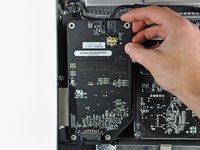
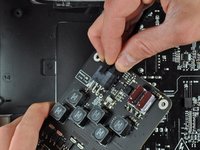
    • Using your fingers, carefully pull the vertical sync cable out of its socket on the LED driver board near the top left corner of your iMac.

    • Be sure to pull the connector parallel to the LED driver board, straight out of its socket.

    Vraag FixBot

    Voeg opmerking toe

  6. iMac Intel 27" EMC 2390 LED Driver Board Replacement: stap 6, afbeelding 1 van 1
    • Squeeze the two display data cable connector arms together to unlock it from its socket on the logic board.

    • Pull the display data cable connector away from its socket on the logic board.

    Vraag FixBot

    Voeg opmerking toe

  7. iMac Intel 27" EMC 2390 LED Driver Board Replacement: stap 7, afbeelding 1 van 1
    • Rotate the display out of the outer case enough to disconnect the LED backlight power cable from the LED driver board.

    Vraag FixBot

    Voeg opmerking toe

  8. iMac Intel 27" EMC 2390 LED Driver Board Replacement: stap 8, afbeelding 1 van 1
    • Lift the display for enough clearance to disconnect the LCD thermal sensor cable connector from its socket on the logic board.

    • If your fan is spinning full speed after completion, check this connection or the hard drive's thermal sensor cable.

    Vraag FixBot

    Voeg opmerking toe

  9. iMac Intel 27" EMC 2390 LED Driver Board Replacement: stap 9, afbeelding 1 van 1
    • Carefully pull the display toward the top edge of your iMac and lift it out of the outer case.

    Vraag FixBot

    Voeg opmerking toe

  10. iMac Intel 27" EMC 2390 LED Driver Board Replacement, LED Driver Board: stap 10, afbeelding 1 van 1
    • Remove the four T10 Torx screws securing the LED driver board to the outer case.

    Vraag FixBot

    Voeg opmerking toe

  11. iMac Intel 27" EMC 2390 LED Driver Board Replacement: stap 11, afbeelding 1 van 2 iMac Intel 27" EMC 2390 LED Driver Board Replacement: stap 11, afbeelding 2 van 2
    • Lift the LED driver board out of its recess in the outer case, minding the DC-In cable still attaching it to the power supply.

    • Disconnect the DC-In cable by depressing the locking mechanism while pulling the connector away from its socket on the LED driver board.

    Vraag FixBot

    Voeg opmerking toe

Conclusie

To reassemble your device, follow these instructions in reverse order.

Annuleren: ik heb deze handleiding niet afgemaakt.

11 andere personen hebben deze handleiding voltooid.

Brett Hartt

Lid sinds: 04/12/10

132.210 Reputatie

144 handleidingen geschreven

Team

iFixit Lid van iFixit

Staff

122 Leden

26.858 handleidingen geschreven

0Gids Commentaar

Voeg opmerking toe

Weergavestatistieken:

Afgelopen 24 uren: 4

Afgelopen 7 dagen: 18

Afgelopen 30 dagen: 97

Altijd: 21,085