Ga door naar hoofdinhoud
Word lid van de reparatiegemeenschap - Account aanmaken

iBook G3 12" Logic Board Replacement

Wat je nodig hebt

  1. iBook G3 12" Logic Board Replacement, Battery: stap 1, afbeelding 1 van 1
    • Use a coin to rotate the battery locking screw 90 degrees clockwise.

    • Lift the battery out of the computer.

    Vraag FixBot

    Voeg opmerking toe

  2. iBook G3 12" Logic Board Replacement, Keyboard: stap 2, afbeelding 1 van 1
    • Pull the keyboard release tabs toward you and lift up on the keyboard until it pops free.

    • If the keyboard does not come free, use a small flathead screwdriver to turn the keyboard locking screw 180 degrees in either direction and try again.

    • Flip the keyboard over, away from the screen, and rest it face-down on the trackpad area.

    Vraag FixBot

    Voeg opmerking toe

  3. iBook G3 12" Logic Board Replacement: stap 3, afbeelding 1 van 1
    • If the computer does not have an Airport card installed, skip the next two steps.

    • Push the wire clasp toward the Airport card and pull it up to free it from the RAM shield.

    Vraag FixBot

    Voeg opmerking toe

  4. iBook G3 12" Logic Board Replacement: stap 4, afbeelding 1 van 1
    • Grasp the clear plastic tab on the Airport card and pull toward the right.

    Vraag FixBot

    Voeg opmerking toe

  5. iBook G3 12" Logic Board Replacement: stap 5, afbeelding 1 van 1
    • Hold the Airport card in one hand and use your other hand to remove the antenna cable.

    Vraag FixBot

    Voeg opmerking toe

  6. iBook G3 12" Logic Board Replacement: stap 6, afbeelding 1 van 1
    • Remove the two 2.5 mm Phillips screws that secure the RAM shield.

    Vraag FixBot

    Voeg opmerking toe

  7. iBook G3 12" Logic Board Replacement: stap 7, afbeelding 1 van 1
    • Grasp the metal bracket on top of the RAM shield and pull upward to remove the shield.

    Vraag FixBot

    Voeg opmerking toe

  8. iBook G3 12" Logic Board Replacement: stap 8, afbeelding 1 van 1
    • Pull the keyboard cable up from the logic board, holding the cable as close to the connector as possible.

    Vraag FixBot

    Voeg opmerking toe

  9. iBook G3 12" Logic Board Replacement, Lower Case: stap 9, afbeelding 1 van 1
    • Your laptop should look approximately like this.

    Vraag FixBot

    Voeg opmerking toe

  10. iBook G3 12" Logic Board Replacement: stap 10, afbeelding 1 van 1
    • Use a pin (or anything you like) to remove the three rubber feet from the lower case.

    Vraag FixBot

    Voeg opmerking toe

  11. iBook G3 12" Logic Board Replacement: stap 11, afbeelding 1 van 1
    • Remove the three 5.2 mm newly-revealed Phillips screws.

    Vraag FixBot

    Voeg opmerking toe

  12. iBook G3 12" Logic Board Replacement: stap 12, afbeelding 1 van 1
    • Use a spudger or small flathead screwdriver to pry up the three metal rings that housed the rubber bumpers.

    Vraag FixBot

    Voeg opmerking toe

  13. iBook G3 12" Logic Board Replacement: stap 13, afbeelding 1 van 1
    • Remove the one 10 mm and two 20 mm hex screws using a 2mm hex. Alternatively, a T8 Torx screwdriver key will do.

    Vraag FixBot

    Voeg opmerking toe

  14. iBook G3 12" Logic Board Replacement: stap 14, afbeelding 1 van 1
    • Remove the two 4.2 mm Phillips screws on either side of the battery contacts.

    Vraag FixBot

    Voeg opmerking toe

  15. iBook G3 12" Logic Board Replacement: stap 15, afbeelding 1 van 1
    • Breathe deeply. Trying times are ahead, but we promise the lower case does come off.

    • Push the thin rims of the lower case surrounding the battery compartment in, bending them past the tabs, and then lift up to free that corner of the lower case.

    Vraag FixBot

    Voeg opmerking toe

  16. iBook G3 12" Logic Board Replacement: stap 16, afbeelding 1 van 1
    • There is a slot on the wall of the battery compartment that locks the lower case in place. Use a small flathead screwdriver to pry out the slot's lower rim and pull up on the lower case to free the slot from the tabs holding it.

    Vraag FixBot

    Voeg opmerking toe

  17. iBook G3 12" Logic Board Replacement: stap 17, afbeelding 1 van 1
    • Run a spudger along the seam between the lower case and upper case on the front of the computer to free the tabs locking the lower case. Pull up on the lower case and continue to use the spudger as necessary until you hear three distinct clicks.

    Vraag FixBot

    Voeg opmerking toe

  18. iBook G3 12" Logic Board Replacement: stap 18, afbeelding 1 van 1
    • Continue to run the spudger around the front, right corner. There are two tabs on the port side of the computer, one near the front corner and one near the sound out port.

    Vraag FixBot

    Voeg opmerking toe

  19. iBook G3 12" Logic Board Replacement: stap 19, afbeelding 1 van 1
    • Once the front and sides of the lower case are free, turn the computer so that the back is facing you and pull the lower case up and toward you until the back tabs pop free (it may be helpful to jiggle the case up and down).

    Vraag FixBot

    Voeg opmerking toe

  20. iBook G3 12" Logic Board Replacement: stap 20, afbeelding 1 van 1
    • Remove the small greasy springs with white plastic caps from either side of the battery contacts.

    Vraag FixBot

    Voeg opmerking toe

  21. iBook G3 12" Logic Board Replacement, Bottom Shield: stap 21, afbeelding 1 van 1
    • Your laptop should look approximately like this.

    Vraag FixBot

    Voeg opmerking toe

  22. iBook G3 12" Logic Board Replacement: stap 22, afbeelding 1 van 1
    • Remove the five 5.8 mm Phillips screws from the bottom shield.

    • Peel back the yellow tape and foil shielding outlined in the image.

    Vraag FixBot

    Voeg opmerking toe

  23. iBook G3 12" Logic Board Replacement: stap 23, afbeelding 1 van 1
    • Lift the bottom shield off.

    Vraag FixBot

    Voeg opmerking toe

  24. iBook G3 12" Logic Board Replacement, Upper Case: stap 24, afbeelding 1 van 1
    • Remove the following 4 screws on the bottom of the computer:

    • Two 3 mm Phillips from the left side of the computer.

    • One 4.5 mm Phillips near the latch mechanism (this screw may be missing in 800 MHz iBooks)

    • One 14.2 mm Phillips near the front, right corner.

    Vraag FixBot

    Voeg opmerking toe

  25. iBook G3 12" Logic Board Replacement: stap 25, afbeelding 1 van 1
    • Use a straightened paperclip to open the optical drive tray.

    Vraag FixBot

    Voeg opmerking toe

  26. iBook G3 12" Logic Board Replacement: stap 26, afbeelding 1 van 1
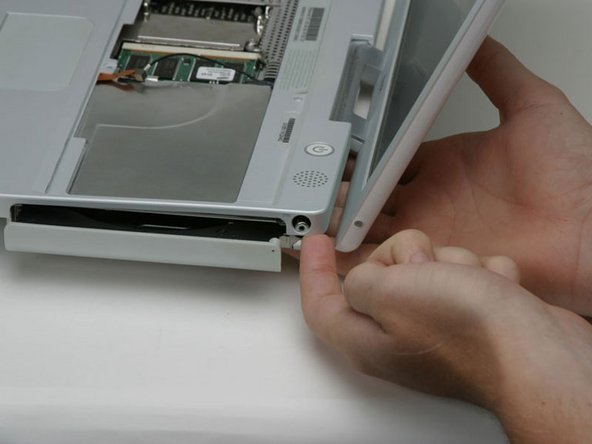
    • Pull the optical drive out just enough so that you can access and remove a Phillips screw near the battery compartment.

    Vraag FixBot

    Voeg opmerking toe

  27. iBook G3 12" Logic Board Replacement: stap 27, afbeelding 1 van 1
    • Pull the optical drive a bit more so that you can access and remove a second Phillips screw near the power receptacle.

    Vraag FixBot

    Voeg opmerking toe

  28. iBook G3 12" Logic Board Replacement: stap 28, afbeelding 1 van 1
    Gereedschap gebruikt in deze stap:
    Tweezers
    $4.99
    • Turn over the computer and open it.

    • Use tweezers (or a refrigerator magnet) to remove the magnet covering a Phillips screw near the middle of the computer.

    Vraag FixBot

    Voeg opmerking toe

  29. iBook G3 12" Logic Board Replacement: stap 29, afbeelding 1 van 1
    • Remove the following 4 screws on the edges of the keyboard area.

    • One 4.5 mm Phillips underneath where the magnet was.

    • Three 6 mm Phillips in plastic depressions.

    Vraag FixBot

    Voeg opmerking toe

  30. iBook G3 12" Logic Board Replacement: stap 30, afbeelding 1 van 1
    • Peel up the foil tape covering the speaker cable near the ports.

    Vraag FixBot

    Voeg opmerking toe

  31. iBook G3 12" Logic Board Replacement: stap 31, afbeelding 1 van 1
    • This is a diagram of the trackpad ribbon clamp connector you will disconnect in the next step.

    • 1) With your fingernails, grasp the locking bar on either side and pull up a small amount (about 1/16" or 2 mm).

    • 2) After disengaging the locking bar, slide the cable out of the connector.

    Vraag FixBot

    Voeg opmerking toe

  32. iBook G3 12" Logic Board Replacement: stap 32, afbeelding 1 van 1
    • Loosen the trackpad connector by pulling the top piece up slightly, freeing the trackpad ribbon.

    • Slide the orange trackpad ribbon out of the connector.

    Vraag FixBot

    Voeg opmerking toe

  33. iBook G3 12" Logic Board Replacement: stap 33, afbeelding 1 van 1
    • Before you can jerk the upper case off with joy, you must disconnect both the blue and white power cable and red and black speaker cable as described in the next steps.

    • Lift the upper case from the left side and use your other hand to pull out the right side in order to clear the power receptacle.

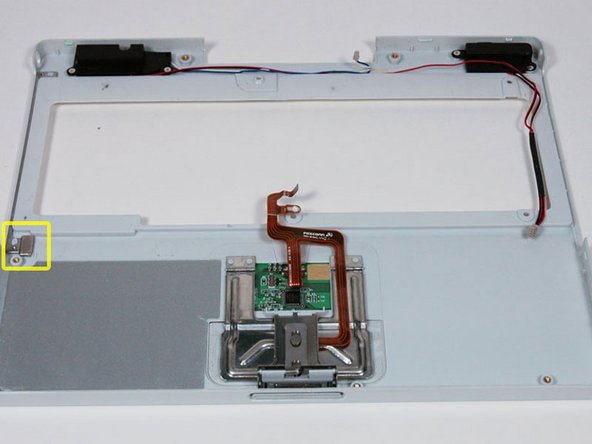
    • There may be a thin metal bar fastened to the upper case by the two screws on either side of the optical drive. This bar provides rigidity around the optical drive; don't forget it when reassembling.

    Vraag FixBot

    Voeg opmerking toe

  34. iBook G3 12" Logic Board Replacement: stap 34, afbeelding 1 van 1
    • The connectors at the ends of the cables are attached very firmly to the sockets on the logic board. Pulling directly on the cable will either separate the cable from its connector or the socket from the logic board.

    • Lift the upper case enough to disconnect the blue and white power cable from the logic board. Using your fingernails or a dental pick, carefully pry the connector from its socket. Make sure you're pulling only on the connector and not on the socket.

    Vraag FixBot

    Voeg opmerking toe

  35. iBook G3 12" Logic Board Replacement: stap 35, afbeelding 1 van 1
    • Lift the upper case off completely and disconnect the red and black speaker cable from the logic board. As before, make sure you're pulling only on the connector and not on the socket.

    Vraag FixBot

    Voeg opmerking toe

  36. iBook G3 12" Logic Board Replacement: stap 36, afbeelding 1 van 1
    • There is a magnet that allows the computer to detect when the laptop is closed. If this magnet is not present your computer will not automatically go to sleep. Be sure the magnet is in the position indicated.

    Vraag FixBot

    Voeg opmerking toe

  37. iBook G3 12" Logic Board Replacement, Top Shield: stap 37, afbeelding 1 van 1
    • Your laptop should look approximately like this.

    Vraag FixBot

    Voeg opmerking toe

  38. iBook G3 12" Logic Board Replacement: stap 38, afbeelding 1 van 1
    • Remove the following 14 screws (some models may be missing a couple of screws):

    • One 2.5 mm Phillips.

    • Six 3.5 mm Phillips.

    • One 4.5 mm Phillips near the sleep light with a small shaft.

    • Two 4.5 mm Phillips with larger shafts.

    • Four 5 mm Phillips

    • If a screw is inserted in the left hole, the 14.2 mm screw in step 24 can not be inserted to hold the top case down.

    Vraag FixBot

    Voeg opmerking toe

  39. iBook G3 12" Logic Board Replacement: stap 39, afbeelding 1 van 1
    • Peel back three strips of yellow tape in the bottom left corner.

    • Peel back one strip of foil tape in the upper left corner and another near where the trackpad connects to the logic board.

    Vraag FixBot

    Voeg opmerking toe

  40. iBook G3 12" Logic Board Replacement: stap 40, afbeelding 1 van 1
    • Lift the top shield up from the right side, minding the upper left corner, which may catch on the metal framework.

    Vraag FixBot

    Voeg opmerking toe

  41. iBook G3 12" Logic Board Replacement, Modem: stap 41, afbeelding 1 van 1
    • Your laptop should look approximately like this.

    Vraag FixBot

    Voeg opmerking toe

  42. iBook G3 12" Logic Board Replacement: stap 42, afbeelding 1 van 1
    • Remove the single strip of tape running across the modem.

    • Remove the single Phillips securing the display data cable to the metal framework.

    Vraag FixBot

    Voeg opmerking toe

  43. iBook G3 12" Logic Board Replacement: stap 43, afbeelding 1 van 1
    • Move the display data cable to the right in order to access and remove a single Phillips screw.

    • Remove the single Phillips screw remaining at the upper, right corner of the modem.

    Vraag FixBot

    Voeg opmerking toe

  44. iBook G3 12" Logic Board Replacement: stap 44, afbeelding 1 van 1
    • Lift the modem from the logic board on the right side, being careful not to strain the display data cable.

    • Disconnect the modem cable from the left side of the modem.

    • Slide the modem out of the computer, being careful to avoid catching the black plastic shielding on the surrounding cables.

    Vraag FixBot

    Voeg opmerking toe

  45. iBook G3 12" Logic Board Replacement: stap 45, afbeelding 1 van 1
    • Your laptop should look approximately like this.

    Vraag FixBot

    Voeg opmerking toe

  46. iBook G3 12" Logic Board Replacement, Hard Drive: stap 46, afbeelding 1 van 1
    • Your laptop should look approximately like this.

    Vraag FixBot

    Voeg opmerking toe

  47. iBook G3 12" Logic Board Replacement: stap 47, afbeelding 1 van 1
    • Use the transparent orange loop to disconnect the large orange ribbon cable from the logic board.

    Vraag FixBot

    Voeg opmerking toe

  48. iBook G3 12" Logic Board Replacement: stap 48, afbeelding 1 van 1
    • Lift up the front edge of the hard drive.

    • Peel back the black tape to free the microphone cable from the hard drive.

    Vraag FixBot

    Voeg opmerking toe

  49. iBook G3 12" Logic Board Replacement: stap 49, afbeelding 1 van 1
    • Use the transparent orange loop to disconnect the hard drive ribbon cable from the hard drive.

    • This is a bit tricky. Try rocking the cable gently from side to side while applying even pressure. If you bend the pins, do your best to straighten them, using the hard drive cable as a guide.

    Vraag FixBot

    Voeg opmerking toe

  50. iBook G3 12" Logic Board Replacement: stap 50, afbeelding 1 van 1
    • Your laptop should look approximately like this.

    Vraag FixBot

    Voeg opmerking toe

  51. iBook G3 12" Logic Board Replacement, Display: stap 51, afbeelding 1 van 1
    • Your laptop should look approximately like this.

    Vraag FixBot

    Voeg opmerking toe

  52. iBook G3 12" Logic Board Replacement: stap 52, afbeelding 1 van 1
    • If you have already removed the hard drive in a previous step, your iBook may differ slightly from the picture.

    • Disconnect the microphone cable from the front, left corner of the logic board.

    • Peel back the black tape and free the microphone cable from the hard drive.

    Vraag FixBot

    Voeg opmerking toe

  53. iBook G3 12" Logic Board Replacement: stap 53, afbeelding 1 van 1
    • Use the black plastic handle to disconnect the display data cable from the logic board.

    Vraag FixBot

    Voeg opmerking toe

  54. iBook G3 12" Logic Board Replacement: stap 54, afbeelding 1 van 1
    • If you have already removed the modem in a previous step, you can skip this step.

    • Remove the single Phillips securing the display data cable to the metal framework.

    Vraag FixBot

    Voeg opmerking toe

  55. iBook G3 12" Logic Board Replacement: stap 55, afbeelding 1 van 1
    • Deroute the display data and microphone cables.

    Vraag FixBot

    Voeg opmerking toe

  56. iBook G3 12" Logic Board Replacement: stap 56, afbeelding 1 van 1
    • Peel back the yellow tape securing the inverter cable to the optical drive.

    Vraag FixBot

    Voeg opmerking toe

  57. iBook G3 12" Logic Board Replacement: stap 57, afbeelding 1 van 1
    • Disconnect the inverter cable from the logic board.

    Vraag FixBot

    Voeg opmerking toe

  58. iBook G3 12" Logic Board Replacement: stap 58, afbeelding 1 van 1
    • Carefully deroute the inverter cable from beneath the optical drive.

    • Deroute the Airport antenna cable from beneath the optical drive.

    Vraag FixBot

    Voeg opmerking toe

  59. iBook G3 12" Logic Board Replacement: stap 59, afbeelding 1 van 1
    • Support the display with your free hand while removing the following screws.

    • Remove the single Phillips screw on the outer edge of either hinge (two screws total).

    • Tilt the display back to get over two small nubbins, and then slide it directly from the case and away.

    Vraag FixBot

    Voeg opmerking toe

  60. iBook G3 12" Logic Board Replacement, Optical Drive: stap 60, afbeelding 1 van 1
    • If you have already removed the hard drive or display in a previous step, your iBook may differ slightly from the picture.

    • On the bottom of the computer, disconnect the DC-In cable from the logic board.

    Vraag FixBot

    Voeg opmerking toe

  61. iBook G3 12" Logic Board Replacement: stap 61, afbeelding 1 van 1
    • Flip the computer over and open the display.

    • Open the optical drive using a straightened paperclip (if it's not already opened).

    • Peel up the yellow tape from the optical drive.

    Vraag FixBot

    Voeg opmerking toe

  62. iBook G3 12" Logic Board Replacement: stap 62, afbeelding 1 van 1
    • This step may vary on some iBook models. If the screws shown are not on your iBook, you may need to flip the computer over and remove two screws attaching the bottom of the optical drive to the metal framework.

    • Remove the two Phillips screws securing the optical drive to the metal framework.

    Vraag FixBot

    Voeg opmerking toe

  63. iBook G3 12" Logic Board Replacement: stap 63, afbeelding 1 van 1
    • Peel back the orange ribbon cable to reveal a single Phillips screw. Remove this screw to free the optical drive from the metal framework.

    Vraag FixBot

    Voeg opmerking toe

  64. iBook G3 12" Logic Board Replacement: stap 64, afbeelding 1 van 1
    • Lift the optical drive by the edge closest to the screen, minding that the metal bracket at the top left corner doesn't catch on the Airport or inverter cables.

    Vraag FixBot

    Voeg opmerking toe

  65. iBook G3 12" Logic Board Replacement: stap 65, afbeelding 1 van 1
    • Remove the two 2.5 mm Phillips screws securing the large orange ribbon cable and thin metal bracket to the drive.

    Vraag FixBot

    Voeg opmerking toe

  66. iBook G3 12" Logic Board Replacement: stap 66, afbeelding 1 van 1
    • Disconnect the ribbon cable from the optical drive.

    • If you have a CD or any other object jammed in your optical drive, we have an optical drive repair guide.

    Vraag FixBot

    Voeg opmerking toe

  67. iBook G3 12" Logic Board Replacement, Logic Board: stap 67, afbeelding 1 van 1
    • Your laptop should look approximately like this.

    Vraag FixBot

    Voeg opmerking toe

  68. iBook G3 12" Logic Board Replacement: stap 68, afbeelding 1 van 1
    • Remove the three Phillips securing the heat sink to the metal framework.

    • Remove the rear plastic grill and IO Bezel.

    Vraag FixBot

    Voeg opmerking toe

  69. iBook G3 12" Logic Board Replacement: stap 69, afbeelding 1 van 1
    • Turn the remains of the computer over.

    • Remove the following 6 screws:

    • One 4 mm Phillips at the upper right corner of the logic board.

    • One 6 mm Phillips at the front of the computer, near the sleep light.

    • Two 6 mm small-head Philips from the middle of the logic board

    • Two 7.5 mm small-head Phillips, one on either side of the battery contacts.

    Vraag FixBot

    Voeg opmerking toe

  70. iBook G3 12" Logic Board Replacement: stap 70, afbeelding 1 van 1
    • Turn the remains of the computer over again.

    • Lift the heat sink out of the computer.

    • If you need to mount the heat sink back into the laptop, we have a thermal paste guide that makes replacing the thermal compound easy.

    Vraag FixBot

    Voeg opmerking toe

  71. iBook G3 12" Logic Board Replacement: stap 71, afbeelding 1 van 1
    • Disconnect the sleep light from the logic board.

    Vraag FixBot

    Voeg opmerking toe

  72. iBook G3 12" Logic Board Replacement: stap 72, afbeelding 1 van 1
    • Turn the remains of the computer over (for the last time).

    Vraag FixBot

    Voeg opmerking toe

  73. iBook G3 12" Logic Board Replacement: stap 73, afbeelding 1 van 1
    • Disconnect the fan cable from the logic board.

    Vraag FixBot

    Voeg opmerking toe

  74. iBook G3 12" Logic Board Replacement: stap 74, afbeelding 1 van 1
    • Press the metal framework out as shown and lift the logic board out of the computer, holding it near the battery contacts.

    Vraag FixBot

    Voeg opmerking toe

Conclusie

To reassemble your device, follow these instructions in reverse order.

Annuleren: ik heb deze handleiding niet afgemaakt.

27 andere personen hebben deze handleiding voltooid.

Bijgevoegde documenten

iRobot

Lid sinds: 09/24/09

1 Reputatie

636 handleidingen geschreven

1Gids Commentaar

Great instructions. I never took apart a computer before and I was able to complete the task and my ibook works great! Thank you! BTW- I am a woman and if I can do this so can others:-)

Patricia

Pat Roch - Antwoord Deel

Voeg opmerking toe

Weergavestatistieken:

Afgelopen 24 uren: 5

Afgelopen 7 dagen: 25

Afgelopen 30 dagen: 126

Altijd: 46,944