Deze vertaling is door een computer gegenereerd en is nog niet door iemand nagekeken. Spreek je deze taal? Bekijk het hier.
Inleiding
Deze handleiding laat zien hoe je de oplaadpoort vervangt. Je hebt hiervoor een openingsgereedschap, een pincet en een Phillips #00-kruiskopschroevendraaier nodig.
Wat je nodig hebt
-
-
-
Draai de telefoon om, zodat het achterpaneel naar boven gericht is.
-
Wrik het plastic Openingsgereedschap tussen het zwarte buitenpaneel en het zilveren zijpaneel.
-
Duw het plastic Openingsgereedschap omlaag om het achterpaneel van de rest van de telefoon te scheiden.
-
Ga hiermee door langs alle zijden van de telefoon totdat het achterpaneel volledig losgekomen is.
 Vraag FixBot
-
-
Gereedschap gebruikt in deze stap:Tweezers$4.99
-
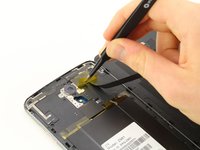
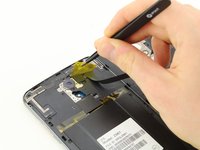
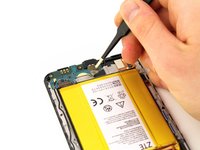
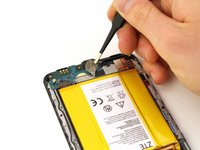
Verwijder de gele Kapton-tape door het pincet te gebruiken om deze los te pellen en van het apparaat af te trekken.
-
-
-
Gebruik de #00 kruiskopschroevendraaier om de twee 3,0 mm schroeven bij de bovenkant van de telefoon, naast de camera achteraan, te verwijderen.
-
-
-
-
Verwijder de flexkabel van de vingerafdruksensor en gebruik het Openingsgereedschap om deze eruit te wippen.
-
-
-
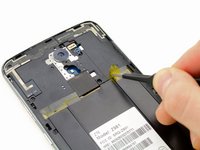
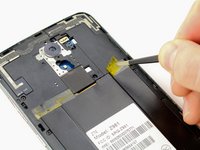
Gebruik de pincet om de gele Kapton-tape aan de rechterkant van de telefoon los te trekken.
-
-
-
Verwijder met de Phillips #00-kruiskopschroevendraaier de 15 schroeven van 3,0 mm van het achterpaneel die zich rond de rand van de telefoon bevinden.
-
-
-
Draai de telefoon om zodat het scherm naar boven is gericht.
-
Steek het plastic Openingsgereedschap tussen het scherm en het achterpaneel.
-
Duw het Openingsgereedschap omhoog om het paneel van de telefoon te scheiden.
-
Ga hiermee door rondom de hele telefoon totdat het achterpaneel niet meer verbonden is met het apparaat.
-
-
-
-
Gereedschap gebruikt in deze stap:Tweezers$4.99
-
Gebruik een pincet om de antenne te verwijderen.
-
-
-
Gebruik een pincet om de tape aan de onderkant van de telefoon los te trekken.
-
-
-
Wrik het Openingsgereedschap onder de oplaadplaat aan de onderkant van de telefoon.
-
Duw het Openingsgereedschap naar beneden zodat de oplaadplaat loskomt van de telefoon.
-
Ga hiermee door rondom de oplaadplaat totdat deze volledig loskomt van de telefoon.
-
-







Volg deze instructies in omgekeerde volgorde om je apparaat weer in elkaar te zetten.
Annuleren: ik heb deze handleiding niet afgemaakt.
11 andere personen hebben deze handleiding voltooid.

Team

Cal Poly, Team S17-G3, Livingston Spring 2018 Lid van Cal Poly, Team S17-G3, Livingston Spring 2018
CPSU-LIVINGSTON-S18S17G3
4 Leden
86 handleidingen geschreven
11Gids Commentaar
Very nice BUT where do you get the replacement charging port?
Where can I bye the parts
“Buy” as in purchase not “Bye” as in see you later.
