Ga door naar hoofdinhoud
Word lid van de reparatiegemeenschap - Account aanmaken

Xiaomi Redmi Note Rear Camera Replacement

Wat je nodig hebt

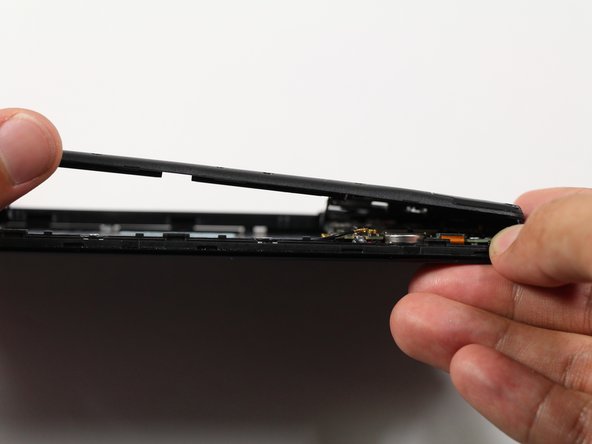
  1. Xiaomi Redmi Note Rear Camera Replacement, Battery: stap 1, afbeelding 1 van 1
    • Make sure the Xiaomi Redmi Note is powered off before removing the battery.

    • Insert the plastic opening tool between the charging port and the rear case.

    • Pry the end of the rear case up from the charging port.

    Vraag FixBot

    Voeg opmerking toe

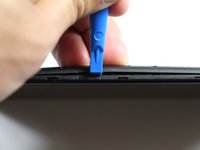
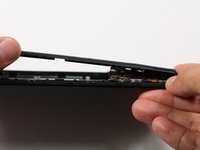
  2. Xiaomi Redmi Note Rear Camera Replacement: stap 2, afbeelding 1 van 2 Xiaomi Redmi Note Rear Camera Replacement: stap 2, afbeelding 2 van 2
    • Run the plastic opening tool along the seam on the side of the phone to remove the rear casing.

    Vraag FixBot

    Voeg opmerking toe

  3. Xiaomi Redmi Note Rear Camera Replacement: stap 3, afbeelding 1 van 2 Xiaomi Redmi Note Rear Camera Replacement: stap 3, afbeelding 2 van 2
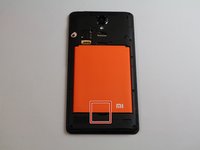
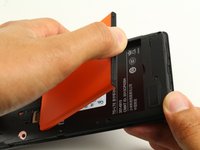
    • Locate the indentation at the bottom of the battery.

    • Place a finger in the indentation and lift up to remove the battery.

    Vraag FixBot

    Voeg opmerking toe

  4. Xiaomi Redmi Note Rear Camera Replacement, Midframe: stap 4, afbeelding 1 van 2 Xiaomi Redmi Note Rear Camera Replacement, Midframe: stap 4, afbeelding 2 van 2
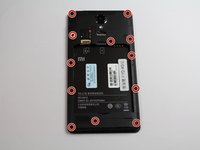
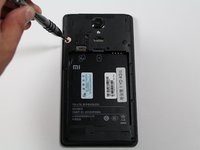
    • Remove twelve 3.5mm Phillips #00 screws from the midframe.

    Vraag FixBot

    Voeg opmerking toe

  5. Xiaomi Redmi Note Rear Camera Replacement: stap 5, afbeelding 1 van 2 Xiaomi Redmi Note Rear Camera Replacement: stap 5, afbeelding 2 van 2
    • Insert a plastic opening into the seam between the midframe and the bottom frame of the phone.

    • Run the plastic opening tool along the seam.

    • Pry up the midframe with the plastic opening tool.

    • Once the midframe has been sufficiently lifted with the tool, place a hand underneath the edge to lift the entire component out of the frame.

    • There will be snapping sounds as the clips on the midframe disconnect from the phone.

    Vraag FixBot

    Voeg opmerking toe

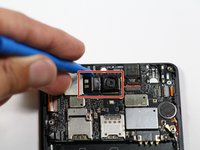
  6. Xiaomi Redmi Note Rear Camera Replacement, Rear Camera: stap 6, afbeelding 1 van 2 Xiaomi Redmi Note Rear Camera Replacement, Rear Camera: stap 6, afbeelding 2 van 2
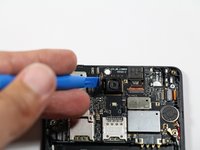
    • Disconnect the rear-facing camera from the motherboard by pulling out the press-fit connector to its left.

    Vraag FixBot

    Voeg opmerking toe

Conclusie

To reassemble your device, follow these instructions in reverse order.

Annuleren: ik heb deze handleiding niet afgemaakt.

4 andere personen hebben deze handleiding voltooid.

AJ Beers

Lid sinds: 04/26/17

213 Reputatie

2 handleidingen geschreven

Team

Cal Poly, Team S22-G4, Livingston Spring 2017 Lid van Cal Poly, Team S22-G4, Livingston Spring 2017

CPSU-LIVINGSTON-S17S22G4

4 Leden

16 handleidingen geschreven

0Gids Commentaar

Voeg opmerking toe

Weergavestatistieken:

Afgelopen 24 uren: 2

Afgelopen 7 dagen: 11

Afgelopen 30 dagen: 48

Altijd: 4,262