Inleiding
Use this guide to replace the left handle cover on your Xbox Series X|S Controller (model 1914).
Wat je nodig hebt
-
-
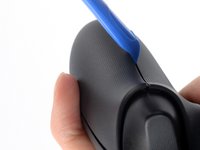
Insert an opening tool between the left handle cover and the bottom inner edge of the back housing.
-
-
-
-
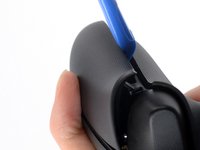
Slide the opening tool along the inner edge of the left handle cover and pry intermittently to release the plastic clips.
-
-
-
Pry up the middle inner edge of the handle cover with the opening tool to release the remaining clips.
-
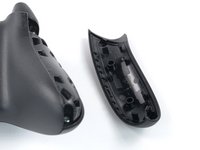
Remove the left handle cover.
-


To reassemble your device, follow these instructions in reverse order.
Repair didn’t go as planned? Try some basic troubleshooting, or ask our Answers community for help.
Annuleren: ik heb deze handleiding niet afgemaakt.
2 andere personen hebben deze handleiding voltooid.



